Police Car Chase Simulator

Police Car Chase Simulator

Racing

| NexusPlay

Play on PC with BlueStacks or from our cloud

  • Overview
  • Game Features
  • How to Play

Page Modified On: April 13, 2026

Play Police Car Chase Simulator on PC or Mac

From the innovators and creators at NexusPlay, Police Car Chase Simulator is another fun addition to the World of Racing games. Go beyond your mobile screen and play it bigger and better on your PC or Mac. An immersive experience awaits you.

About the Game

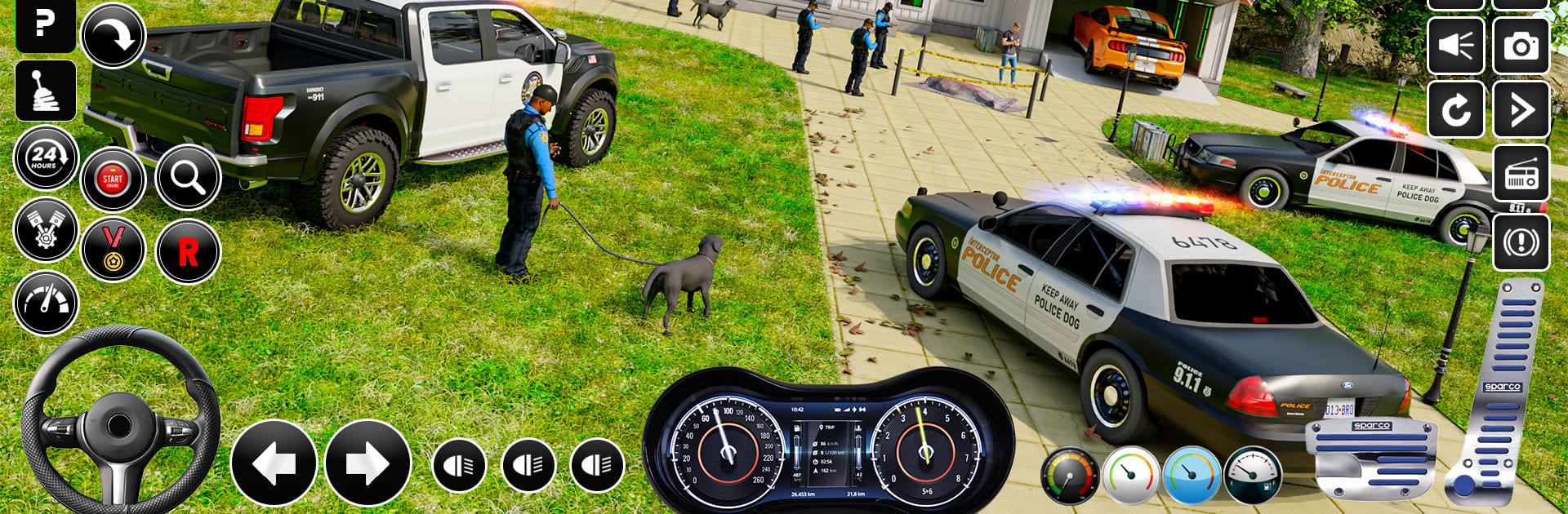
Police Car Chase Simulator puts you in the driver’s seat of real patrol vehicles and throws you straight into the action. Built by NexusPlay, this Racing game blends high-speed pursuits with the everyday rush of city patrol duty. Expect quick decisions, tight turns, and that satisfying moment when the sirens flip on and the chase begins.

Game Features

  • High-speed pursuits — Respond to urgent calls, lock on to suspects, and weave through traffic to make the arrest without wrecking your cruiser.
  • Varied mission types — From breakneck chases to careful parking and crowd-control tasks, every assignment challenges a different part of your driving skill set.
  • Big, explorable maps — Patrol busy downtown streets, cruise wide-open highways, and cut across offroad routes when suspects go off the grid.
  • Authentic driving feel — Weighty handling and believable police car physics make every drift, brake check, and pit maneuver feel earned.
  • Multiple control options — Choose tilt, on-screen buttons, or a virtual steering wheel so the car responds exactly how you like.
  • Garage full of cop vehicles — Unlock modern patrol sedans, tough SUVs, and specialized pursuit cars tuned for speed and grip.
  • Day and night patrols — Navigate traffic by daylight or light up the streets after dark with flashing red-and-blue bars.
  • Lively traffic and environments — Dynamic vehicles and detailed city scenes keep every pursuit fresh and unpredictable.
  • Offline play — No connection? No problem. Run patrols and missions anytime.
  • BlueStacks support — Prefer a bigger view and steady performance? Play Police Car Chase Simulator on PC with BlueStacks for crisp control and visibility.

Make your gaming sessions memorable with precise controls that give you an edge in close combats and visuals that pop up, bringing every character to life.


Game Features

Enhancements

  • Macros
  • Multi Instance
  • Multi Instance Sync
  • Script
  • Enhancements
Macros

Macros

Automate the predictable in Police Car Chase Simulator and transform your gameplay with Macros. Get access to inventive Macros in the BlueStacks Macro Community
Multi Instance

Multi Instance

Play Police Car Chase Simulator on one window. And chat with your friend on the other. Press CTRL + Shift + 8 to open the Multi-Instance Manager. And start creating fresh instances or clone an existing one.
Multi Instance Sync

Multi Instance Sync

Play Police Car Chase Simulator with the power of Multi-Instance Sync. Replicate what you are doing on the main instance on all other instances. Level up faster, play more.
Script

Script

Script your way to gaming glory in Police Car Chase Simulator with BlueStacks Script. Write and run a set of commands to automate repeated tasks. Trigger the command by assigning it to any key.
Read More

How to Download and Play Police Car Chase Simulator on PC or Mac

  • Download and install BlueStacks on your PC or Mac

  • Complete Google sign-in to access the Play Store, or do it later

  • Look for Police Car Chase Simulator in the search bar at the top right corner

  • Click to install Police Car Chase Simulator from the search results

  • Complete Google sign-in (if you skipped step 2) to install Police Car Chase Simulator

  • Click the Police Car Chase Simulator icon on the home screen to start playing

video
Watch Video

Minimum System Requirements

With BlueStacks 5, you can get started on a PC that fulfills the following requirements.

  • Operating System

    Microsoft Windows 7 or above, macOS 11 (Big Sur) or above

  • Processor

    Intel, AMD or Apple Silicon Processor

  • RAM

    at least 4GB

  • HDD

    10GB Free Disk Space

Note:

* You must be an Administrator on your PC. Up to date graphics drivers from Microsoft or the chipset vendor.

Police Car Chase Simulator - FAQs

  • How to play Police Car Chase Simulator on Windows PC & Mac?

    Play Police Car Chase Simulator on your PC or Mac by following these simple steps.

    • Click on 'Play Police Car Chase Simulator on PC’ to download BlueStacks
    • Install it and log-in to Google Play Store
    • Launch and play the game.
  • Why is BlueStacks the fastest and safest platform to play games on PC?

    BlueStacks respects your privacy and is always safe and secure to use. It does not carry any malware, spyware, or any sort of additional software that could harm your PC.

    It is engineered to optimize speed and performance for a seamless gaming experience.

  • What are Police Car Chase Simulator PC requirements?

    Minimum requirement to run Police Car Chase Simulator on your PC

    • OS: Microsoft Windows 7 or above MacOS 11 (Big Sur) or above
    • Processor: Intel, AMD or Apple Silicon Processor
    • RAM: Your PC must have at least 4GB of RAM. (Note that having 4GB or more disk space is not a substitute for RAM)
    • HDD: 10GB Free Disk Space.
    • You must be an Administrator on your PC.