Animal Game: Family Simulator

Animal Game: Family Simulator

Role Playing

| Rage Quit Games Group

Play on PC with BlueStacks or from our cloud

  • Overview
  • Game Features
  • How to Play

Page Modified On: August 31, 2026

Play Animal Game: Family Simulator on PC or Mac

Play Animal Game: Family Simulator by Rage Quit Games Group on PC or Mac with BlueStacks. Use a bigger screen, mouse and keyboard controls, and smoother performance while you play.

About the Game

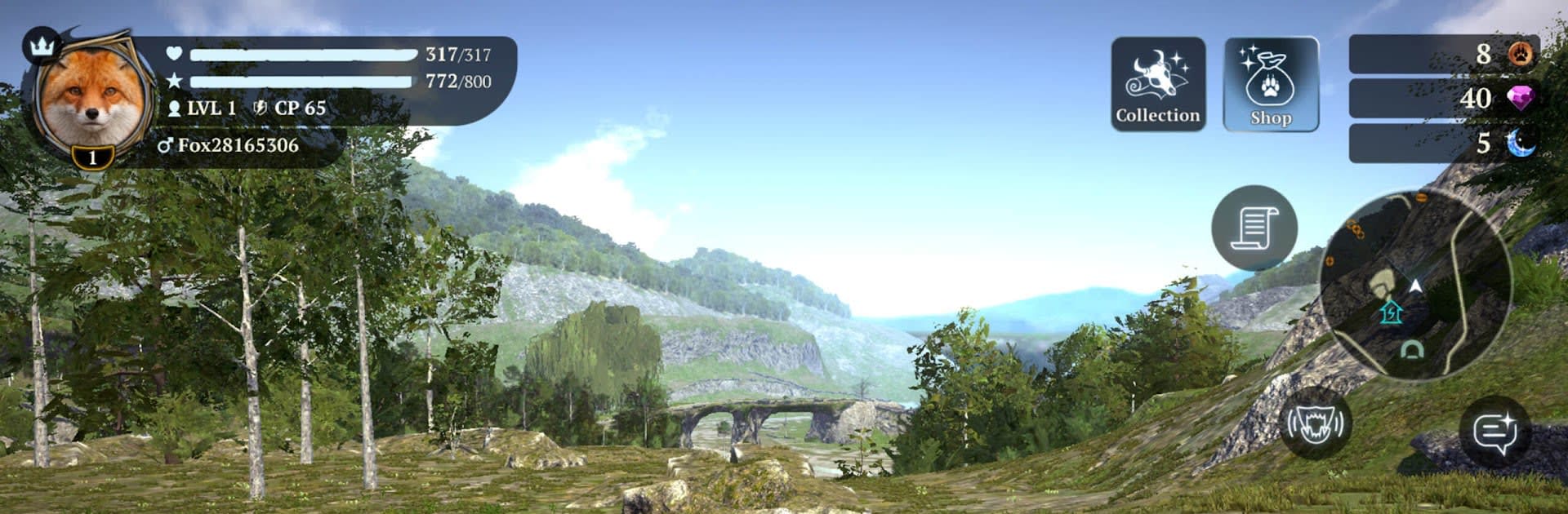
Animal Game: Family Simulator is all about living the wild life from the inside out. You start as a lone predator, then grow a tight-knit family and lead them through a world that doesn’t forgive bad calls. It blends survival choices, exploration, and head-to-head encounters with other players into a gritty Role Playing experience. Prefer a bigger screen? It plays smoothly on BlueStacks.

Game Features

  • Choose Your Predator: Pick a bear, fox, panther, or lynx, each with a distinct feel—heavy hits, crafty maneuvers, shadowy ambushes, or quiet control of the terrain.
  • Build a Wild Family: Raise cubs, keep everyone fed, and protect the young; your decisions shape who survives the night and who leads tomorrow.
  • Survival With Real Stakes: Hunger, injuries, and scarce resources force tough calls—fight for territory or fall back before things go sideways.
  • Quests and Abilities: Tackle quests to unlock new moves, sharpen instincts, and tune your squad’s strengths to match your playstyle.
  • Biomes That Change the Hunt: Stalk through forests, swamps, jungles, icy paths, tundra, and dusty flats—terrain affects tracking, stealth, and escape routes.
  • Multiplayer That Actually Matters: Run with friends or clash with rival packs, claim hot spots, and battle over resources in a world where every encounter counts.
  • Roles and Tactics: Assign guardians, scouts, and strikers, rotate leadership when danger spikes, and switch plans on the fly.
  • 3D Combat That Feels Physical: Weighty attacks, quick sidesteps, and creature-specific animations make chases and brawls feel grounded.
  • Raids and Territory Defense: Push into riskier zones for rewards, guard your den, and outsmart predators eyeing your ground.

Start your journey now. Download the game on BlueStacks, invite your friends, and march on a new adventure.


Game Features

Enhancements

  • Macros
  • Rerolling
  • Eco Mode
  • Multi Instance Sync
  • Enhancements
Macros

Macros

Focus more on the fun part of the game, skip the tedious aspects. Master Animal Game: Family Simulator with Macros. Record yourself completing the monotonous tasks you wish to automate and replay them later with just one keypress.
Rerolling

Rerolling

Speed up the rerolling process in Animal Game: Family Simulator. Perform multiple summons and keep looking for the best Heroes. Use Multi-Instance sync to replicate the rerolling mechanism in all instances.
Eco Mode

Eco Mode

Farm in-game resources with ease in Animal Game: Family Simulator. Enable the Eco Mode when running the game in multiple instances. And lower your PC's resource consumption.
Multi Instance Sync

Multi Instance Sync

With the Multi-instance Sync, you can do even more in Animal Game: Family Simulator. Sync the action of the main instance and repeat them in real time for all other instances. Sync and sit back, let the game progress unfold.
Read More

How to Download and Play Animal Game: Family Simulator on PC or Mac

  • Download and install BlueStacks on your PC or Mac

  • Complete Google sign-in to access the Play Store, or do it later

  • Look for Animal Game: Family Simulator in the search bar at the top right corner

  • Click to install Animal Game: Family Simulator from the search results

  • Complete Google sign-in (if you skipped step 2) to install Animal Game: Family Simulator

  • Click the Animal Game: Family Simulator icon on the home screen to start playing

video
Watch Video

Minimum System Requirements

With BlueStacks 5, you can get started on a PC that fulfills the following requirements.

  • Operating System

    Microsoft Windows 7 or above, macOS 11 (Big Sur) or above

  • Processor

    Intel, AMD or Apple Silicon Processor

  • RAM

    at least 4GB

  • HDD

    10GB Free Disk Space

Note:

* You must be an Administrator on your PC. Up to date graphics drivers from Microsoft or the chipset vendor.

Animal Game: Family Simulator - FAQs

  • How to play Animal Game: Family Simulator on Windows PC & Mac?

    Play Animal Game: Family Simulator on your PC or Mac by following these simple steps.

    • Click on 'Play Animal Game: Family Simulator on PC’ to download BlueStacks
    • Install it and log-in to Google Play Store
    • Launch and play the game.
  • Why is BlueStacks the fastest and safest platform to play games on PC?

    BlueStacks respects your privacy and is always safe and secure to use. It does not carry any malware, spyware, or any sort of additional software that could harm your PC.

    It is engineered to optimize speed and performance for a seamless gaming experience.

  • What are Animal Game: Family Simulator PC requirements?

    Minimum requirement to run Animal Game: Family Simulator on your PC

    • OS: Microsoft Windows 7 or above MacOS 11 (Big Sur) or above
    • Processor: Intel, AMD or Apple Silicon Processor
    • RAM: Your PC must have at least 4GB of RAM. (Note that having 4GB or more disk space is not a substitute for RAM)
    • HDD: 10GB Free Disk Space.
    • You must be an Administrator on your PC.