CELLAR: indie pixel roguelike

CELLAR: indie pixel roguelike

Role Playing

| Quiet Town Studio

Play on PC with BlueStacks or from our cloud

  • Overview
  • Game Features
  • How to Play

Page Modified On: November 03, 2025

Play CELLAR: indie pixel roguelike on PC or Mac

Bring your A-game to CELLAR: indie pixel roguelike, the Role Playing game sensation from Quiet Town Studio. Give your gameplay the much-needed boost with precise game controls, high FPS graphics, and top-tier features on your PC or Mac with BlueStacks.

About the Game

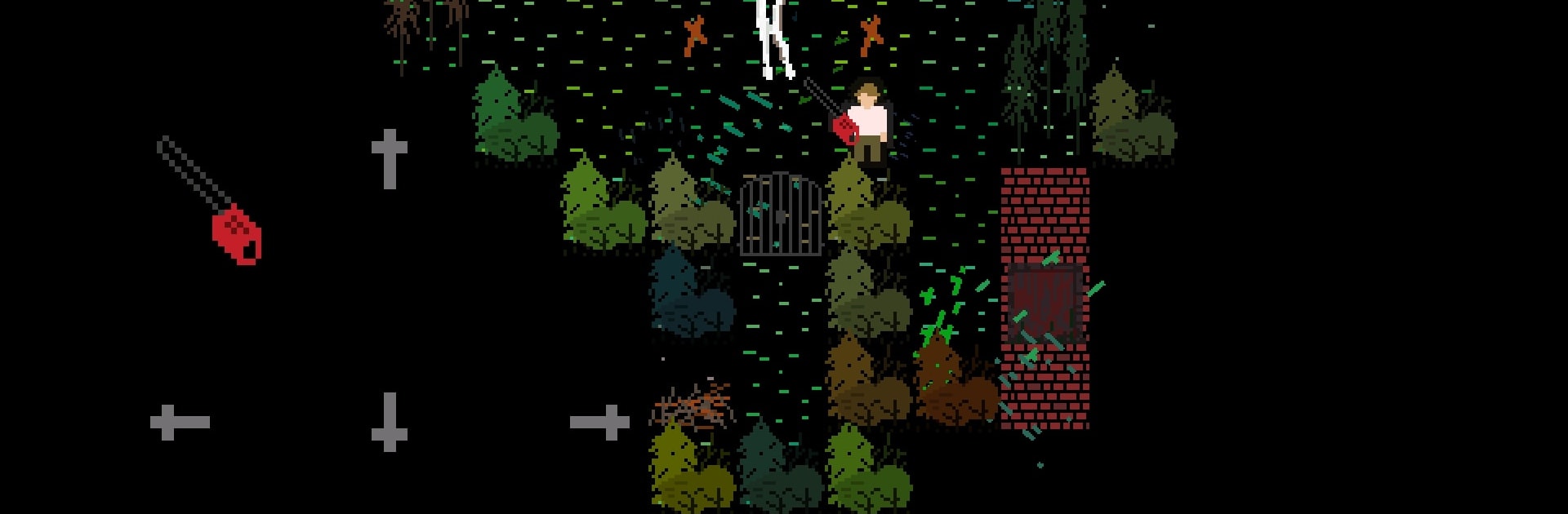
CELLAR: indie pixel roguelike is a scrappy, turn-based crawl where everything feels a little too close to real life. It’s part gritty urban tale, part chaotic roguelike, wrapped in chunky pixel art and short, high-stakes runs. From Quiet Town Studio, this Role Playing adventure leans on tough choices, messy encounters, and the thrill of squeezing out a win.

Game Features

  • Basement-Born Story: Loosely inspired by real events, with moments that swing from darkly funny to uncomfortably honest.
  • Turn-Based Brawls: Move a square, line up a throw, and make every action count—knife tosses, improvised gear, and, when things get loud, a certain buzzing power tool.
  • Quick Runs, Real Wins: No endless grind here. A smart, focused run can be wrapped up in under half an hour.
  • Procedural + Handcrafted: Randomized roguelike layouts meet hand-built story scenes—maybe a cheap beer, maybe a breakup, definitely choices.
  • Oddball Enemies: Not your usual fantasy cast—expect street toughs, unhinged martial artists, maniacs, and the occasional zombie.
  • Simple, Snappy Controls: Arrow-style movement and clean inputs make it easy to learn and hard to put down.
  • Controller Friendly: Fully adapted for gamepads if that’s how you like to play.
  • Retro Pixel Vibe: A sharp 2D, 8‑bit‑style look that feels classic without being dusty.
  • Analog + Guitar OST: Analog synths and electric guitar set a tense, moody atmosphere that sticks with you.
  • Tactics Over Flash: It looks minimal, but positioning, timing, and smart item use carry the run.
  • Offline, No Ads: Play anywhere without interruptions. There’s a small premium option if you want more out of it.
  • PC-Friendly via BlueStacks: Prefer a bigger screen and custom keys? It plays smoothly on BlueStacks.

Ready to top the leaderboard? We bet you do. Let precise controls and sharp visuals optimized on BlueStacks lead you to victory.


Game Features

Enhancements

  • Macros
  • Rerolling
  • Eco Mode
  • Multi Instance Sync
  • Enhancements
Macros

Macros

Focus more on the fun part of the game, skip the tedious aspects. Master CELLAR: indie pixel roguelike with Macros. Record yourself completing the monotonous tasks you wish to automate and replay them later with just one keypress.
Rerolling

Rerolling

Speed up the rerolling process in CELLAR: indie pixel roguelike. Perform multiple summons and keep looking for the best Heroes. Use Multi-Instance sync to replicate the rerolling mechanism in all instances.
Eco Mode

Eco Mode

Farm in-game resources with ease in CELLAR: indie pixel roguelike. Enable the Eco Mode when running the game in multiple instances. And lower your PC's resource consumption.
Multi Instance Sync

Multi Instance Sync

With the Multi-instance Sync, you can do even more in CELLAR: indie pixel roguelike. Sync the action of the main instance and repeat them in real time for all other instances. Sync and sit back, let the game progress unfold.
Read More

How to Download and Play CELLAR: indie pixel roguelike on PC or Mac

  • Download and install BlueStacks on your PC or Mac

  • Complete Google sign-in to access the Play Store, or do it later

  • Look for CELLAR: indie pixel roguelike in the search bar at the top right corner

  • Click to install CELLAR: indie pixel roguelike from the search results

  • Complete Google sign-in (if you skipped step 2) to install CELLAR: indie pixel roguelike

  • Click the CELLAR: indie pixel roguelike icon on the home screen to start playing

video
Watch Video

Minimum System Requirements

With BlueStacks 5, you can get started on a PC that fulfills the following requirements.

  • Operating System

    Microsoft Windows 7 or above, macOS 11 (Big Sur) or above

  • Processor

    Intel, AMD or Apple Silicon Processor

  • RAM

    at least 4GB

  • HDD

    10GB Free Disk Space

Note:

* You must be an Administrator on your PC. Up to date graphics drivers from Microsoft or the chipset vendor.

CELLAR: indie pixel roguelike - FAQs

  • How to play CELLAR: indie pixel roguelike on Windows PC & Mac?

    Play CELLAR: indie pixel roguelike on your PC or Mac by following these simple steps.

    • Click on 'Play CELLAR: indie pixel roguelike on PC’ to download BlueStacks
    • Install it and log-in to Google Play Store
    • Launch and play the game.
  • Why is BlueStacks the fastest and safest platform to play games on PC?

    BlueStacks respects your privacy and is always safe and secure to use. It does not carry any malware, spyware, or any sort of additional software that could harm your PC.

    It is engineered to optimize speed and performance for a seamless gaming experience.

  • What are CELLAR: indie pixel roguelike PC requirements?

    Minimum requirement to run CELLAR: indie pixel roguelike on your PC

    • OS: Microsoft Windows 7 or above MacOS 11 (Big Sur) or above
    • Processor: Intel, AMD or Apple Silicon Processor
    • RAM: Your PC must have at least 4GB of RAM. (Note that having 4GB or more disk space is not a substitute for RAM)
    • HDD: 10GB Free Disk Space.
    • You must be an Administrator on your PC.