FPS Gun Shooting Game Offline

FPS Gun Shooting Game Offline

Role Playing

| legend games studio

Play on PC with BlueStacks or from our cloud

  • Overview
  • Game Features
  • How to Play

Page Modified On: August 11, 2026

Play FPS Gun Shooting Game Offline on PC or Mac

FPS Gun Shooting Game Offline by legend games studio has plenty to keep you busy. BlueStacks lets you play it on PC or Mac with more screen space, better control, and fewer mobile limits.

About the Game

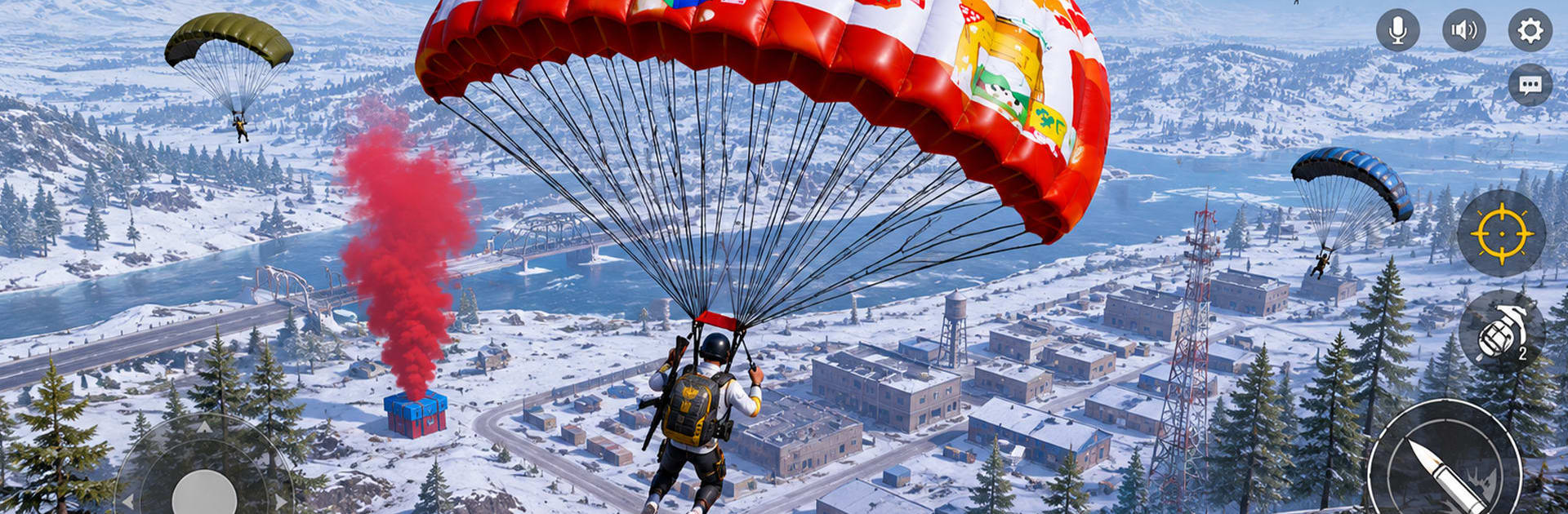
FPS Gun Shooting Game Offline is a first-person shooter that lets you jump straight into gritty missions without needing Wi-Fi. You get the rush of close-quarters combat, long-range sniping, and squad skirmishes that feel fast and punchy. It’s built for quick sessions or long runs—pick your loadout, hit the field, and handle business.

Game Features

  • Story Missions: Work through bite-sized, objective-driven encounters across varied battle zones, from urban streets to rugged outposts.
  • Team Battles: Hop into team deathmatch-style clashes against tough AI squads and push for control with smart positioning and timing.
  • Precision Sniping: Line up clean headshots with adjustable zoom, steady aim, and maps that reward patience and good angles.
  • Modern Arsenal: Swap between assault rifles, snipers, and heavy hitters; find the right tool for close fights or long lanes.
  • Commando Ops: Tackle high-stakes raids, clear hostile strongholds, and respond to sudden counterattacks that test your reflexes.
  • Zombie Survival: Hold the line against relentless waves, manage your ammo, and see how long you can keep the horde at bay.
  • Vehicle Combat: Roll out with armored vehicles and tank showdowns for a change of pace and some serious firepower.
  • Smooth Controls: Responsive aiming, snappy reloads, and sensible layouts make every gunfight feel tight and readable.
  • Fully Offline: No signal? No problem. Play anytime with all major modes available offline.
  • Optimized 3D: Crisp visuals and steady performance on a wide range of devices, with a lightweight install.
  • Plays Great on BlueStacks: Prefer a bigger screen and precise aim with a mouse and keyboard? It runs nicely there too.

Genre: Role Playing

Get ready for a buttery smooth, high-performance gaming action only on BlueStacks.

Game Features

Enhancements

  • Macros
  • Rerolling
  • Eco Mode
  • Multi Instance Sync
  • Enhancements
Macros

Macros

Focus more on the fun part of the game, skip the tedious aspects. Master FPS Gun Shooting Game Offline with Macros. Record yourself completing the monotonous tasks you wish to automate and replay them later with just one keypress.
Rerolling

Rerolling

Speed up the rerolling process in FPS Gun Shooting Game Offline. Perform multiple summons and keep looking for the best Heroes. Use Multi-Instance sync to replicate the rerolling mechanism in all instances.
Eco Mode

Eco Mode

Farm in-game resources with ease in FPS Gun Shooting Game Offline. Enable the Eco Mode when running the game in multiple instances. And lower your PC's resource consumption.
Multi Instance Sync

Multi Instance Sync

With the Multi-instance Sync, you can do even more in FPS Gun Shooting Game Offline. Sync the action of the main instance and repeat them in real time for all other instances. Sync and sit back, let the game progress unfold.
Read More

How to Download and Play FPS Gun Shooting Game Offline on PC or Mac

  • Download and install BlueStacks on your PC or Mac

  • Complete Google sign-in to access the Play Store, or do it later

  • Look for FPS Gun Shooting Game Offline in the search bar at the top right corner

  • Click to install FPS Gun Shooting Game Offline from the search results

  • Complete Google sign-in (if you skipped step 2) to install FPS Gun Shooting Game Offline

  • Click the FPS Gun Shooting Game Offline icon on the home screen to start playing

video
Watch Video

Minimum System Requirements

With BlueStacks 5, you can get started on a PC that fulfills the following requirements.

  • Operating System

    Microsoft Windows 7 or above, macOS 11 (Big Sur) or above

  • Processor

    Intel, AMD or Apple Silicon Processor

  • RAM

    at least 4GB

  • HDD

    10GB Free Disk Space

Note:

* You must be an Administrator on your PC. Up to date graphics drivers from Microsoft or the chipset vendor.

FPS Gun Shooting Game Offline - FAQs

  • How to play FPS Gun Shooting Game Offline on Windows PC & Mac?

    Play FPS Gun Shooting Game Offline on your PC or Mac by following these simple steps.

    • Click on 'Play FPS Gun Shooting Game Offline on PC’ to download BlueStacks
    • Install it and log-in to Google Play Store
    • Launch and play the game.
  • Why is BlueStacks the fastest and safest platform to play games on PC?

    BlueStacks respects your privacy and is always safe and secure to use. It does not carry any malware, spyware, or any sort of additional software that could harm your PC.

    It is engineered to optimize speed and performance for a seamless gaming experience.

  • What are FPS Gun Shooting Game Offline PC requirements?

    Minimum requirement to run FPS Gun Shooting Game Offline on your PC

    • OS: Microsoft Windows 7 or above MacOS 11 (Big Sur) or above
    • Processor: Intel, AMD or Apple Silicon Processor
    • RAM: Your PC must have at least 4GB of RAM. (Note that having 4GB or more disk space is not a substitute for RAM)
    • HDD: 10GB Free Disk Space.
    • You must be an Administrator on your PC.