Idle Arena - Clicker Battle

Idle Arena - Clicker Battle

Role Playing

| Wiggle Woggle

Play on PC with BlueStacks or from our cloud

  • Overview
  • Game Features
  • How to Play

Page Modified On: December 22, 2025

Play Idle Arena - Clicker Battle on PC or Mac

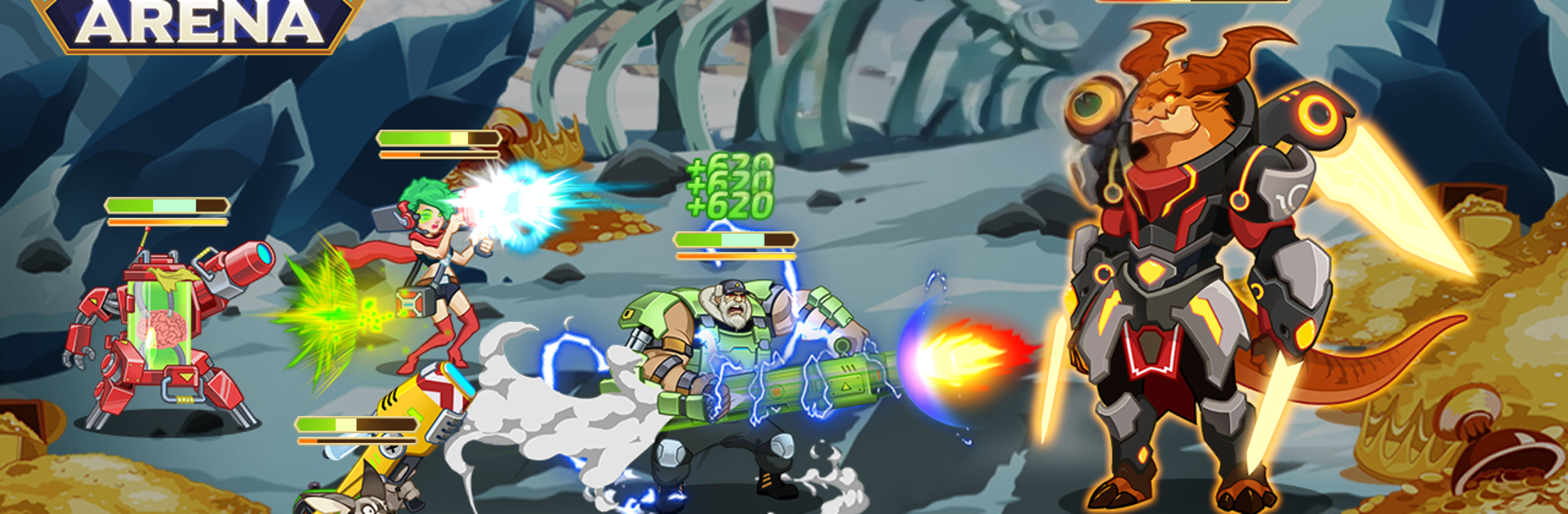
Join millions to experience Idle Arena – Clicker Battle, an exciting Role Playing game from Wiggle Woggle. With BlueStacks App Player, you are always a step ahead of your opponent, ready to outplay them with faster gameplay and better control with the mouse and keyboard on your PC or Mac.

Idle Arena – Clicker Battle is a chill sci fi idle battler where most of the heavy lifting happens while you do other things. You recruit a bunch of heroes from a shady space bar, mix factions for bonuses, raise their levels, and evolve them into tougher versions of themselves. Battles run on their own, but there is a nice bit of timing with when you fire off big skills, and team placement matters more than you would expect. The fun loop is simple. set a squad, close the game, come back to a chest full of gear and resources. On PC with BlueStacks it feels clean to click through menus and manage squads between tabs, and leaving it running while grinding is painless.

There are a lot of modes to bounce between, not just a straight campaign. Tower trials, world bosses, and big alliance clashes keep things moving, and guilds give you people to team with during wars. Loot is everywhere, with over a hundred items and equipments to chase, plus crafting and ascending gear to unlock stronger versions. Some of the best stuff is hidden behind that ascension path, so tinkering with builds never really stops. Regular events like The Wild Chase and Treasure Hunts throw extra rewards into the mix. It is not a super intense strategy game, more a steady drip of progress with enough planning to feel smart, and it supports multiple languages if that helps. Internet is required, and there are optional purchases, but the idle gains keep it moving without pressure.

Get ready for a buttery smooth, high-performance gaming action only on BlueStacks.

Game Features

Enhancements

  • Macros
  • Rerolling
  • Eco Mode
  • Multi Instance Sync
  • Enhancements
Macros

Macros

Focus more on the fun part of the game, skip the tedious aspects. Master Idle Arena - Clicker Battle with Macros. Record yourself completing the monotonous tasks you wish to automate and replay them later with just one keypress.
Rerolling

Rerolling

Speed up the rerolling process in Idle Arena - Clicker Battle. Perform multiple summons and keep looking for the best Heroes. Use Multi-Instance sync to replicate the rerolling mechanism in all instances.
Eco Mode

Eco Mode

Farm in-game resources with ease in Idle Arena - Clicker Battle. Enable the Eco Mode when running the game in multiple instances. And lower your PC's resource consumption.
Multi Instance Sync

Multi Instance Sync

With the Multi-instance Sync, you can do even more in Idle Arena - Clicker Battle. Sync the action of the main instance and repeat them in real time for all other instances. Sync and sit back, let the game progress unfold.
Read More

How to Download and Play Idle Arena - Clicker Battle on PC or Mac

  • Download and install BlueStacks on your PC or Mac

  • Complete Google sign-in to access the Play Store, or do it later

  • Look for Idle Arena - Clicker Battle in the search bar at the top right corner

  • Click to install Idle Arena - Clicker Battle from the search results

  • Complete Google sign-in (if you skipped step 2) to install Idle Arena - Clicker Battle

  • Click the Idle Arena - Clicker Battle icon on the home screen to start playing

video
Watch Video

Minimum System Requirements

With BlueStacks 5, you can get started on a PC that fulfills the following requirements.

  • Operating System

    Microsoft Windows 7 or above, macOS 11 (Big Sur) or above

  • Processor

    Intel, AMD or Apple Silicon Processor

  • RAM

    at least 4GB

  • HDD

    10GB Free Disk Space

Note:

* You must be an Administrator on your PC. Up to date graphics drivers from Microsoft or the chipset vendor.

Idle Arena - Clicker Battle - FAQs

  • How to play Idle Arena - Clicker Battle on Windows PC & Mac?

    Play Idle Arena - Clicker Battle on your PC or Mac by following these simple steps.

    • Click on 'Play Idle Arena - Clicker Battle on PC’ to download BlueStacks
    • Install it and log-in to Google Play Store
    • Launch and play the game.
  • Why is BlueStacks the fastest and safest platform to play games on PC?

    BlueStacks respects your privacy and is always safe and secure to use. It does not carry any malware, spyware, or any sort of additional software that could harm your PC.

    It is engineered to optimize speed and performance for a seamless gaming experience.

  • What are Idle Arena - Clicker Battle PC requirements?

    Minimum requirement to run Idle Arena - Clicker Battle on your PC

    • OS: Microsoft Windows 7 or above MacOS 11 (Big Sur) or above
    • Processor: Intel, AMD or Apple Silicon Processor
    • RAM: Your PC must have at least 4GB of RAM. (Note that having 4GB or more disk space is not a substitute for RAM)
    • HDD: 10GB Free Disk Space.
    • You must be an Administrator on your PC.