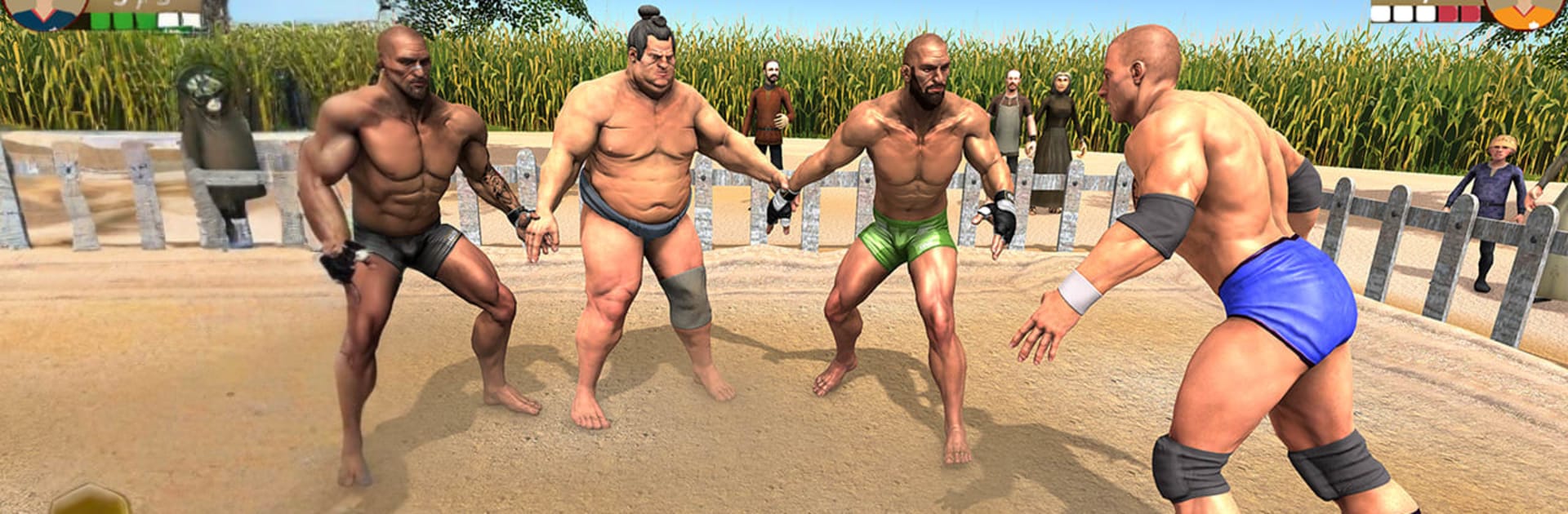
Kabaddi Games Fighting League

Kabaddi Games Fighting League

Role Playing

| Vigorous Glory

Play on PC with BlueStacks or from our cloud

  • Overview
  • Game Features
  • How to Play

Page Modified On: June 17, 2026

Play Kabaddi Games Fighting League on PC or Mac

Play Kabaddi Games Fighting League by Vigorous Glory on PC or Mac with BlueStacks. Use a bigger screen, mouse and keyboard controls, and smoother performance while you play.

About the Game

Kabaddi Games Fighting League brings the raw rush of South Asian kabaddi to your screen with a bold, brawler-style twist. It blends classic raider-vs-defender strategy with hard-hitting wrestling flair, so every round feels tense, fast, and just a little unpredictable. If you’re into quick reads, smart counters, and clutch escapes, this Role Playing take on kabaddi is right up your alley.

Game Features

  • Authentic Kabaddi Flow: Switch between raiding and defending, read the court, and time your breath control and tackles to flip momentum in a heartbeat.
  • Tag-Team Tournaments: Work through tag and knockout brackets where one slip can send you packing—or set up a comeback for the ages.
  • Clubs, Championships, Leaderboards: Jump into club play, climb through championship brackets, and check your standings on leaderboards to see how your grind is paying off.
  • Heavyweight Showdowns: Face powerhouse opponents who hit hard and react fast. Master feints, smart footwork, and gutsy lunges to outplay bigger rivals.
  • Wrestling Meets Kabaddi: Mix grapples, slams, and martial-arts-inspired strikes with traditional kabaddi moves for satisfying, high-impact exchanges.
  • Raider’s Mindset: Lead your side as the raiding specialist—edge along the boundary, bait defenders, and snag those precious touch points before sprinting home.
  • Dynamic Arenas: Compete in lively arenas inspired by regional kabaddi culture, complete with energetic crowds and a championship vibe.
  • Smooth, Pick-Up-and-Play Controls: Simple to learn, with timing-based mechanics that reward skill as you sharpen your reactions.
  • PC-Friendly Option: Prefer a bigger view and keyboard controls? You can run it on BlueStacks without changing the feel of the action.

BlueStacks gives you more room to focus on the game and less time adjusting around mobile limitations.


Game Features

Enhancements

  • Macros
  • Rerolling
  • Eco Mode
  • Multi Instance Sync
  • Enhancements
Macros

Macros

Focus more on the fun part of the game, skip the tedious aspects. Master Kabaddi Games Fighting League with Macros. Record yourself completing the monotonous tasks you wish to automate and replay them later with just one keypress.
Rerolling

Rerolling

Speed up the rerolling process in Kabaddi Games Fighting League. Perform multiple summons and keep looking for the best Heroes. Use Multi-Instance sync to replicate the rerolling mechanism in all instances.
Eco Mode

Eco Mode

Farm in-game resources with ease in Kabaddi Games Fighting League. Enable the Eco Mode when running the game in multiple instances. And lower your PC's resource consumption.
Multi Instance Sync

Multi Instance Sync

With the Multi-instance Sync, you can do even more in Kabaddi Games Fighting League. Sync the action of the main instance and repeat them in real time for all other instances. Sync and sit back, let the game progress unfold.
Read More

How to Download and Play Kabaddi Games Fighting League on PC or Mac

  • Download and install BlueStacks on your PC or Mac

  • Complete Google sign-in to access the Play Store, or do it later

  • Look for Kabaddi Games Fighting League in the search bar at the top right corner

  • Click to install Kabaddi Games Fighting League from the search results

  • Complete Google sign-in (if you skipped step 2) to install Kabaddi Games Fighting League

  • Click the Kabaddi Games Fighting League icon on the home screen to start playing

video
Watch Video

Minimum System Requirements

With BlueStacks 5, you can get started on a PC that fulfills the following requirements.

  • Operating System

    Microsoft Windows 7 or above, macOS 11 (Big Sur) or above

  • Processor

    Intel, AMD or Apple Silicon Processor

  • RAM

    at least 4GB

  • HDD

    10GB Free Disk Space

Note:

* You must be an Administrator on your PC. Up to date graphics drivers from Microsoft or the chipset vendor.

Kabaddi Games Fighting League - FAQs

  • How to play Kabaddi Games Fighting League on Windows PC & Mac?

    Play Kabaddi Games Fighting League on your PC or Mac by following these simple steps.

    • Click on 'Play Kabaddi Games Fighting League on PC’ to download BlueStacks
    • Install it and log-in to Google Play Store
    • Launch and play the game.
  • Why is BlueStacks the fastest and safest platform to play games on PC?

    BlueStacks respects your privacy and is always safe and secure to use. It does not carry any malware, spyware, or any sort of additional software that could harm your PC.

    It is engineered to optimize speed and performance for a seamless gaming experience.

  • What are Kabaddi Games Fighting League PC requirements?

    Minimum requirement to run Kabaddi Games Fighting League on your PC

    • OS: Microsoft Windows 7 or above MacOS 11 (Big Sur) or above
    • Processor: Intel, AMD or Apple Silicon Processor
    • RAM: Your PC must have at least 4GB of RAM. (Note that having 4GB or more disk space is not a substitute for RAM)
    • HDD: 10GB Free Disk Space.
    • You must be an Administrator on your PC.