Mud Jeep 3D
Mud Jeep 3D

Mud Jeep 3D

Role Playing

| Simulator Hub 2022

Play on PC with BlueStacks or from our cloud

  • Overview
  • Game Features
  • How to Play

Page Modified On: November 10, 2025

Play Mud Jeep 3D on PC or Mac

Step into the World of Mud Jeep 3D, a thrilling Role Playing game from the house of Simulator Hub 2022. Play this Android game on BlueStacks App Player and experience immersive gaming on PC or Mac.

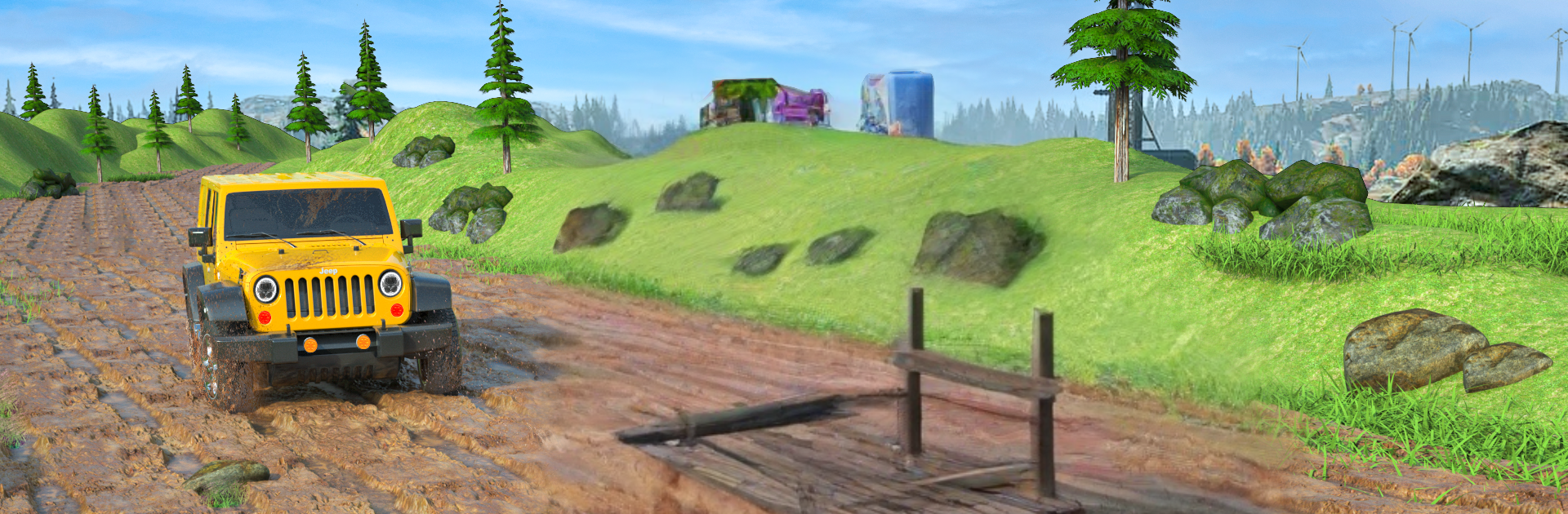
Mud Jeep 3D is all about wrestling a chunky 4×4 through messy, uneven trails, with the game leaning into mud, ruts, and that slow grind of trying not to sink. It is not a racer. Missions ask the player to get a jeep from one muddy checkpoint to another, sometimes hauling cargo, without tipping or getting stuck in a puddle that looked harmless a second ago. Four different jeeps are available, and they do not feel identical. One might dig in harder but pull better on climbs, another turns sharper but loses traction faster. The whole thing lives or dies on throttle control and keeping momentum, so small choices matter, like taking a wider line around a deep rut or easing off right before a hill so the tires can bite.

What stands out is the weight of the vehicles and the way the mud slows everything down, which makes every little slope feel like a mini puzzle. Players watch the wheels spin, nudge the steering to find grip, and try to keep the cargo steady so it does not bounce out on a rock. The visuals are simple but the splashes, the sloshy sounds, and the wheel tracks sell the idea enough. On PC with BlueStacks, it runs smooth and the keyboard mapping makes steering and throttle feel steady, which helps a lot on narrow bridges and tight turns. The pace is relaxed but tense in a good way. The missions are straight to the point, jump in, pick a jeep, and grind through the mud until that last climb finally gives in.

Ready to top the leaderboard? We bet you do. Let precise controls and sharp visuals optimized on BlueStacks lead you to victory.


Game Features

Enhancements

  • Macros
  • Rerolling
  • Eco Mode
  • Multi Instance Sync
  • Enhancements
Macros

Macros

Focus more on the fun part of the game, skip the tedious aspects. Master Mud Jeep 3D with Macros. Record yourself completing the monotonous tasks you wish to automate and replay them later with just one keypress.
Rerolling

Rerolling

Speed up the rerolling process in Mud Jeep 3D. Perform multiple summons and keep looking for the best Heroes. Use Multi-Instance sync to replicate the rerolling mechanism in all instances.
Eco Mode

Eco Mode

Farm in-game resources with ease in Mud Jeep 3D. Enable the Eco Mode when running the game in multiple instances. And lower your PC's resource consumption.
Multi Instance Sync

Multi Instance Sync

With the Multi-instance Sync, you can do even more in Mud Jeep 3D. Sync the action of the main instance and repeat them in real time for all other instances. Sync and sit back, let the game progress unfold.
Read More

How to Download and Play Mud Jeep 3D on PC or Mac

  • Download and install BlueStacks on your PC or Mac

  • Complete Google sign-in to access the Play Store, or do it later

  • Look for Mud Jeep 3D in the search bar at the top right corner

  • Click to install Mud Jeep 3D from the search results

  • Complete Google sign-in (if you skipped step 2) to install Mud Jeep 3D

  • Click the Mud Jeep 3D icon on the home screen to start playing

video
Watch Video

Minimum System Requirements

With BlueStacks 5, you can get started on a PC that fulfills the following requirements.

  • Operating System

    Microsoft Windows 7 or above, macOS 11 (Big Sur) or above

  • Processor

    Intel, AMD or Apple Silicon Processor

  • RAM

    at least 4GB

  • HDD

    10GB Free Disk Space

Note:

* You must be an Administrator on your PC. Up to date graphics drivers from Microsoft or the chipset vendor.

Mud Jeep 3D - FAQs

  • How to play Mud Jeep 3D on Windows PC & Mac?

    Play Mud Jeep 3D on your PC or Mac by following these simple steps.

    • Click on 'Play Mud Jeep 3D on PC’ to download BlueStacks
    • Install it and log-in to Google Play Store
    • Launch and play the game.
  • Why is BlueStacks the fastest and safest platform to play games on PC?

    BlueStacks respects your privacy and is always safe and secure to use. It does not carry any malware, spyware, or any sort of additional software that could harm your PC.

    It is engineered to optimize speed and performance for a seamless gaming experience.

  • What are Mud Jeep 3D PC requirements?

    Minimum requirement to run Mud Jeep 3D on your PC

    • OS: Microsoft Windows 7 or above MacOS 11 (Big Sur) or above
    • Processor: Intel, AMD or Apple Silicon Processor
    • RAM: Your PC must have at least 4GB of RAM. (Note that having 4GB or more disk space is not a substitute for RAM)
    • HDD: 10GB Free Disk Space.
    • You must be an Administrator on your PC.