Open World Car Games Offline

Open World Car Games Offline

Role Playing

| Solo Gamerz

Play on PC with BlueStacks or from our cloud

  • Overview
  • Game Features
  • How to Play

Page Modified On: January 09, 2026

Play Open World Car Games Offline on PC or Mac

From the innovators and creators at Solo Gamerz, Open World Car Games Offline is another fun addition to the World of Role Playing games. Go beyond your mobile screen and play it bigger and better on your PC or Mac. An immersive experience awaits you.

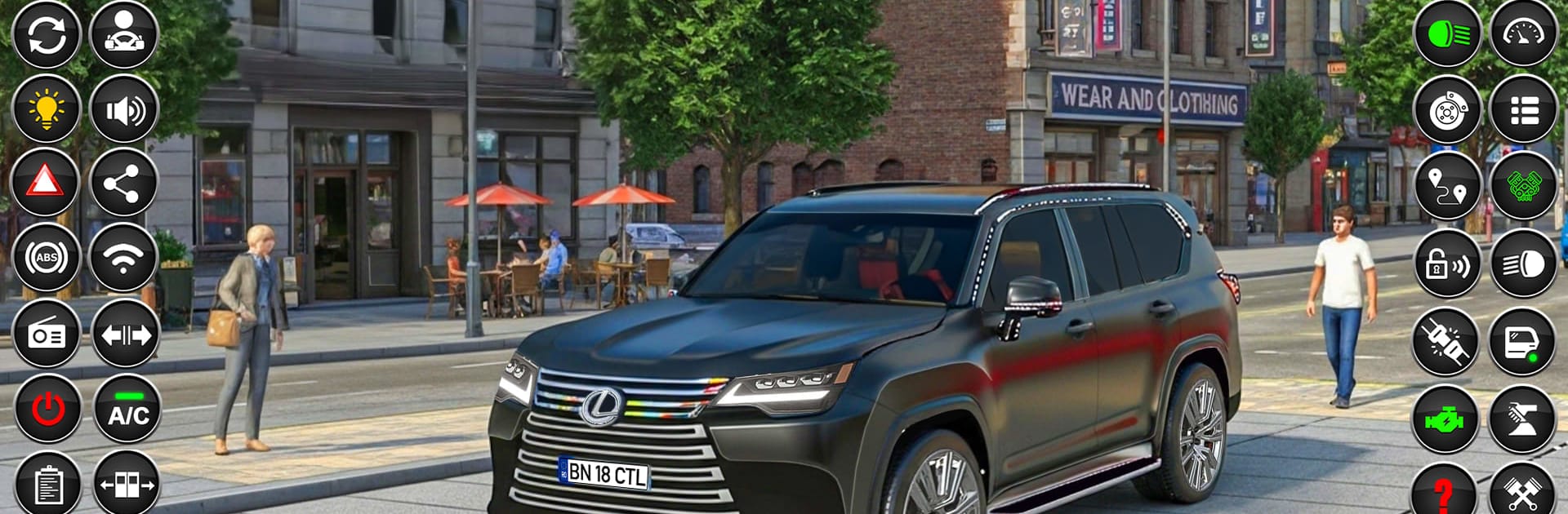
Open World Car Games Offline is exactly what it sounds like, a free roam city where the whole point is to drive, mess with traffic, and just enjoy the cars. It leans hard into realistic handling, more driving school than arcade, so cars have weight, brakes bite differently, and taking a corner too hot actually matters. There is a proper city with traffic and pedestrians milling around, signals to obey or ignore, and a mix of highways and tighter streets that nudge players to switch between cruising and fast runs. A simple story mode strings together tasks, while free drive is the place to test new cars, practice parking style challenges, or just explore without pressure.

What stands out is the variety of control options and how responsive it feels once it clicks. On PC with BlueStacks, key mapping makes steering and camera control feel clean, and a controller works well too. The garage is solid, with a modern car list and customization that goes beyond paint, so tuning the look becomes part of the loop. Ambient city sounds and radio tracks give it a relaxed mood, sometimes a little repetitive, but it suits long drives. The AI traffic can be timid at intersections and textures are not going to rival big budget racers, yet the world feels alive enough to keep driving. Offline play helps, no waiting on connections, just pick a car and go.

Start your journey now. Download the game on BlueStacks, invite your friends, and march on a new adventure.


Game Features

Enhancements

  • Macros
  • Rerolling
  • Eco Mode
  • Multi Instance Sync
  • Enhancements
Macros

Macros

Focus more on the fun part of the game, skip the tedious aspects. Master Open World Car Games Offline with Macros. Record yourself completing the monotonous tasks you wish to automate and replay them later with just one keypress.
Rerolling

Rerolling

Speed up the rerolling process in Open World Car Games Offline. Perform multiple summons and keep looking for the best Heroes. Use Multi-Instance sync to replicate the rerolling mechanism in all instances.
Eco Mode

Eco Mode

Farm in-game resources with ease in Open World Car Games Offline. Enable the Eco Mode when running the game in multiple instances. And lower your PC's resource consumption.
Multi Instance Sync

Multi Instance Sync

With the Multi-instance Sync, you can do even more in Open World Car Games Offline. Sync the action of the main instance and repeat them in real time for all other instances. Sync and sit back, let the game progress unfold.
Read More

How to Download and Play Open World Car Games Offline on PC or Mac

  • Download and install BlueStacks on your PC or Mac

  • Complete Google sign-in to access the Play Store, or do it later

  • Look for Open World Car Games Offline in the search bar at the top right corner

  • Click to install Open World Car Games Offline from the search results

  • Complete Google sign-in (if you skipped step 2) to install Open World Car Games Offline

  • Click the Open World Car Games Offline icon on the home screen to start playing

video
Watch Video

Minimum System Requirements

With BlueStacks 5, you can get started on a PC that fulfills the following requirements.

  • Operating System

    Microsoft Windows 7 or above, macOS 11 (Big Sur) or above

  • Processor

    Intel, AMD or Apple Silicon Processor

  • RAM

    at least 4GB

  • HDD

    10GB Free Disk Space

Note:

* You must be an Administrator on your PC. Up to date graphics drivers from Microsoft or the chipset vendor.

Open World Car Games Offline - FAQs

  • How to play Open World Car Games Offline on Windows PC & Mac?

    Play Open World Car Games Offline on your PC or Mac by following these simple steps.

    • Click on 'Play Open World Car Games Offline on PC’ to download BlueStacks
    • Install it and log-in to Google Play Store
    • Launch and play the game.
  • Why is BlueStacks the fastest and safest platform to play games on PC?

    BlueStacks respects your privacy and is always safe and secure to use. It does not carry any malware, spyware, or any sort of additional software that could harm your PC.

    It is engineered to optimize speed and performance for a seamless gaming experience.

  • What are Open World Car Games Offline PC requirements?

    Minimum requirement to run Open World Car Games Offline on your PC

    • OS: Microsoft Windows 7 or above MacOS 11 (Big Sur) or above
    • Processor: Intel, AMD or Apple Silicon Processor
    • RAM: Your PC must have at least 4GB of RAM. (Note that having 4GB or more disk space is not a substitute for RAM)
    • HDD: 10GB Free Disk Space.
    • You must be an Administrator on your PC.