Exclusive Gaming Content. And More.
Get the latest updates on the BlueStacks Blog.
See MorePlay on PC with BlueStacks or from our cloud
Page Modified On: November 10, 2025
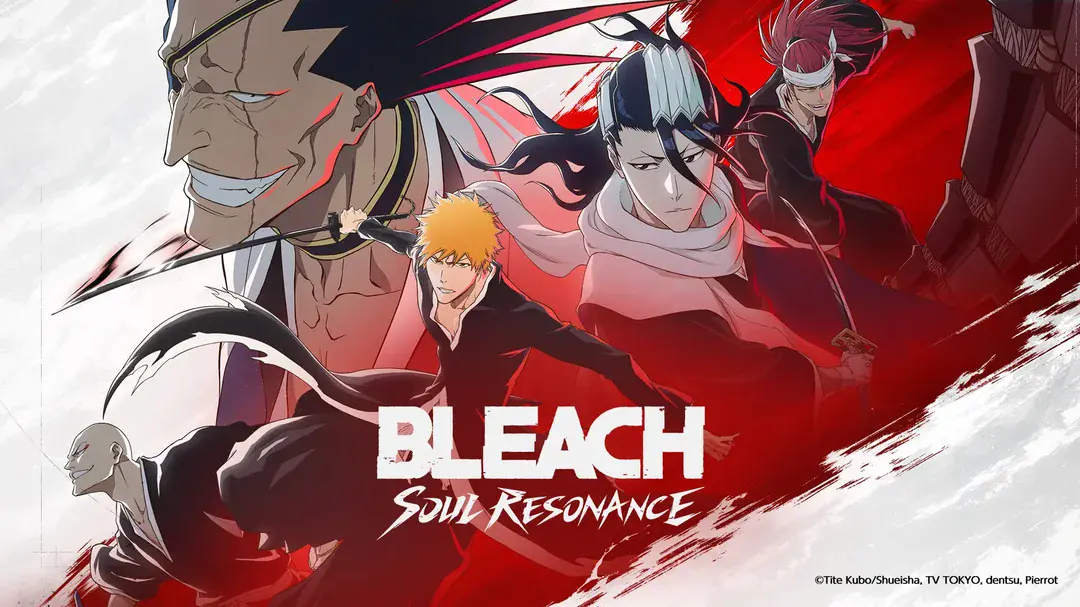
Bleach: Soul Resonance (CBT) is Role Playing game developed by Nuverse Games. BlueStacks app player is the best platform to play this Android Game on your PC or Mac for an immersive gaming experience. Players assume the role of a Shinigami in Bleach: Soul Resonance, a soul reaper tasked with preserving harmony between the physical world and the spiritual realm. You’ll fight ferocious battles as a Shinigami against hollows, arrancars, and other powerful adversaries.
The combat system in the game seamlessly combines tactical decision-making with quick action, making each battle an exhilarating experience. To defeat your opponents, use your special Zanpakuto abilities, special attacks, and powerful Bankai forms. Players can collect and summon their preferred Bleach characters, such as Ichigo Kurosaki, Rukia Kuchiki, Byakuya Kuchiki, and Kenpachi Zaraki, to join their team. Each character has their own special attacks, skills, and abilities that can change the course of a battle.
Your characters can be strengthened and upgraded as you advance through the game, revealing their full potential and enhancing their ferocity. Follow Ichigo and his friends as they solve the mysteries of the Soul Society, battle formidable foes, and defend the world from looming dangers in this exhilarating adventure for players. Fans can relive their favorite moments and interactively discover new ones thanks to the game’s incorporation of significant story arcs and iconic moments from the show.
Form guilds, take part in guild wars, and defeat tough bosses by cooperating with other players. Battle other players online in thrilling PvP matches to demonstrate your tactical prowess and teamwork. Rise through the ranks, collect rewards, and prove your superiority in the Bleach: Soul Resonance community.
Download Bleach: Soul Resonance on PC with BlueStacks.
Focus more on the fun part of the game, skip the tedious aspects. Master Bleach: Soul Resonance (CBT) with Macros. Record yourself completing the monotonous tasks you wish to automate and replay them later with just one keypress.
Speed up the rerolling process in Bleach: Soul Resonance (CBT). Perform multiple summons and keep looking for the best Heroes. Use Multi-Instance sync to replicate the rerolling mechanism in all instances.
Farm in-game resources with ease in Bleach: Soul Resonance (CBT). Enable the Eco Mode when running the game in multiple instances. And lower your PC's resource consumption.
With the Multi-instance Sync, you can do even more in Bleach: Soul Resonance (CBT). Sync the action of the main instance and repeat them in real time for all other instances. Sync and sit back, let the game progress unfold.
Download and install BlueStacks on your PC or Mac
Complete Google sign-in to access the Play Store, or do it later
Look for Bleach: Soul Resonance (CBT) in the search bar at the top right corner
Click to install Bleach: Soul Resonance (CBT) from the search results
Complete Google sign-in (if you skipped step 2) to install Bleach: Soul Resonance (CBT)
Click the Bleach: Soul Resonance (CBT) icon on the home screen to start playing
With BlueStacks 5, you can get started on a PC that fulfills the following requirements.
Microsoft Windows 7 or above, macOS 11 (Big Sur) or above
Intel, AMD or Apple Silicon Processor
at least 4GB
10GB Free Disk Space
* You must be an Administrator on your PC. Up to date graphics drivers from Microsoft or the chipset vendor.
Leave your email and we will notify
you when the game launches
Play Bleach: Soul Resonance (CBT) on your PC or Mac by following these simple steps.
BlueStacks respects your privacy and is always safe and secure to use. It does not carry any malware, spyware, or any sort of additional software that could harm your PC.
It is engineered to optimize speed and performance for a seamless gaming experience.
Minimum requirement to run Bleach: Soul Resonance (CBT) on your PC
Since you are on your phone, we are going to send you to the Google Play page.
In some cases BlueStacks uses affiliate links when linking to Google Play
BlueStacks 4 is not available on Windows XP. You must have Windows 7 or higher. Windows 10 is recommended.