Võ Kiếm Origin
Võ Kiếm Origin

Võ Kiếm Origin

Role Playing

| SKYWAY VN

Play on PC with BlueStacks or from our cloud

  • Overview
  • Game Features
  • How to Play

Page Modified On: September 19, 2025

Play Võ Kiếm Origin on PC or Mac

Võ Kiếm Origin brings the Role Playing genre to life, and throws up exciting challenges for gamers. Developed by SKYWAY VN, this Android game is best experienced on BlueStacks, the World’s #1 app player for PC and Mac users.

About the Game

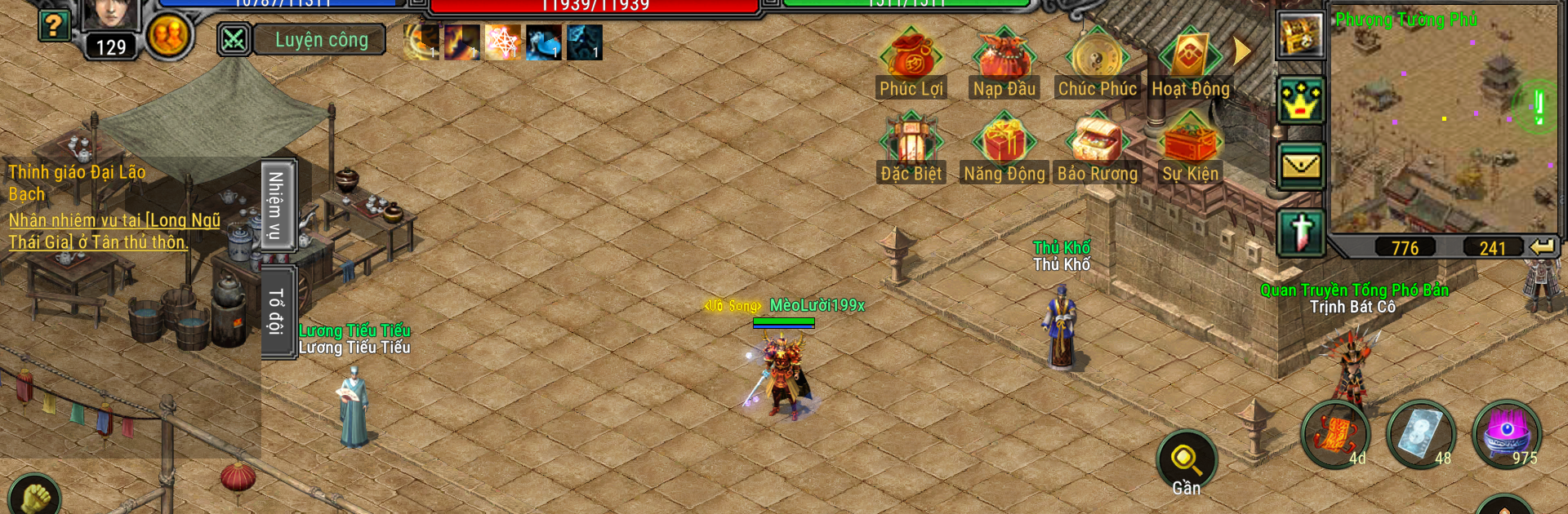
Võ Kiếm Origin brings classic wuxia swordplay back with a fresh, modern flow. This Role Playing adventure from SKYWAY VN keeps the spirit of old-school PC MMORPGs while smoothing out the grind and making every session feel rewarding. Whether you’re chasing solo glory or teaming up with your guild, there’s always something to jump into.

Prefer playing on a bigger screen? It runs great on BlueStacks too.

Game Features

  • Classic look, modern feel: Clean, PC-style visuals with an interface that’s been tuned for smooth, quick play on mobile.
  • Fast-track progression: Earn tons of EXP from daily activities and events so you’re growing even when you’ve only got a short window to play.
  • Flexible trading: Strengthen gear, trade freely, and post items on the market; listings keep selling even while you’re offline.
  • Smart automation: Handy auto-combat with PvP options plus activity reminders so you don’t miss key events or rewards.
  • Server-paced rollouts: New features and systems unlock on a clear schedule based on each server’s timeline, keeping competition fair.
  • Deep build options: Refine equipment, socket upgrades, and raise powerful horses to fine-tune your combat style.
  • Reward-rich systems: A dynamic points setup feeds you useful loot as you hit milestones, not just endgame grinds.
  • Weekly rankings: Personal and guild leaderboards reset weekly, with valuable prizes for the top performers.
  • Raid challenges: Coordinate in Raid battles for teamwork-heavy encounters and high-tier drops.
  • Competitive arenas: Test yourself in Death Arena for solo skill checks or face top duelists in Hoa Son Luan Kiem.
  • Guild warfare: Rally the squad for Bao Ke Bai Train and other large-scale conflicts that decide territory and bragging rights.
  • Extra activities: Tackle Family Level, Military Camp, and more side modes that mix progression with quick-hit fun.

Ready to top the leaderboard? We bet you do. Let precise controls and sharp visuals optimized on BlueStacks lead you to victory.


Game Features

Enhancements

  • Macros
  • Rerolling
  • Eco Mode
  • Multi Instance Sync
  • Enhancements
Macros

Macros

Focus more on the fun part of the game, skip the tedious aspects. Master Võ Kiếm Origin with Macros. Record yourself completing the monotonous tasks you wish to automate and replay them later with just one keypress.
Rerolling

Rerolling

Speed up the rerolling process in Võ Kiếm Origin. Perform multiple summons and keep looking for the best Heroes. Use Multi-Instance sync to replicate the rerolling mechanism in all instances.
Eco Mode

Eco Mode

Farm in-game resources with ease in Võ Kiếm Origin. Enable the Eco Mode when running the game in multiple instances. And lower your PC's resource consumption.
Multi Instance Sync

Multi Instance Sync

With the Multi-instance Sync, you can do even more in Võ Kiếm Origin. Sync the action of the main instance and repeat them in real time for all other instances. Sync and sit back, let the game progress unfold.
Read More

How to Download and Play Võ Kiếm Origin on PC or Mac

  • Download and install BlueStacks on your PC or Mac

  • Complete Google sign-in to access the Play Store, or do it later

  • Look for Võ Kiếm Origin in the search bar at the top right corner

  • Click to install Võ Kiếm Origin from the search results

  • Complete Google sign-in (if you skipped step 2) to install Võ Kiếm Origin

  • Click the Võ Kiếm Origin icon on the home screen to start playing

video
Watch Video

Minimum System Requirements

With BlueStacks 5, you can get started on a PC that fulfills the following requirements.

  • Operating System

    Microsoft Windows 7 or above, macOS 11 (Big Sur) or above

  • Processor

    Intel, AMD or Apple Silicon Processor

  • RAM

    at least 4GB

  • HDD

    10GB Free Disk Space

Note:

* You must be an Administrator on your PC. Up to date graphics drivers from Microsoft or the chipset vendor.

Võ Kiếm Origin - FAQs

  • How to play Võ Kiếm Origin on Windows PC & Mac?

    Play Võ Kiếm Origin on your PC or Mac by following these simple steps.

    • Click on 'Play Võ Kiếm Origin on PC’ to download BlueStacks
    • Install it and log-in to Google Play Store
    • Launch and play the game.
  • Why is BlueStacks the fastest and safest platform to play games on PC?

    BlueStacks respects your privacy and is always safe and secure to use. It does not carry any malware, spyware, or any sort of additional software that could harm your PC.

    It is engineered to optimize speed and performance for a seamless gaming experience.

  • What are Võ Kiếm Origin PC requirements?

    Minimum requirement to run Võ Kiếm Origin on your PC

    • OS: Microsoft Windows 7 or above MacOS 11 (Big Sur) or above
    • Processor: Intel, AMD or Apple Silicon Processor
    • RAM: Your PC must have at least 4GB of RAM. (Note that having 4GB or more disk space is not a substitute for RAM)
    • HDD: 10GB Free Disk Space.
    • You must be an Administrator on your PC.