Amusement PhysBox
Amusement PhysBox

Amusement PhysBox

Simulation

| EVG GAME STUDIO

Play on PC with BlueStacks or from our cloud

  • Overview
  • Game Features
  • How to Play

Page Modified On: June 18, 2025

Play Amusement PhysBox on PC or Mac

Bring your A-game to Amusement PhysBox, the Simulation game sensation from EVG GAME STUDIO. Give your gameplay the much-needed boost with precise game controls, high FPS graphics, and top-tier features on your PC or Mac with BlueStacks.

About the Game

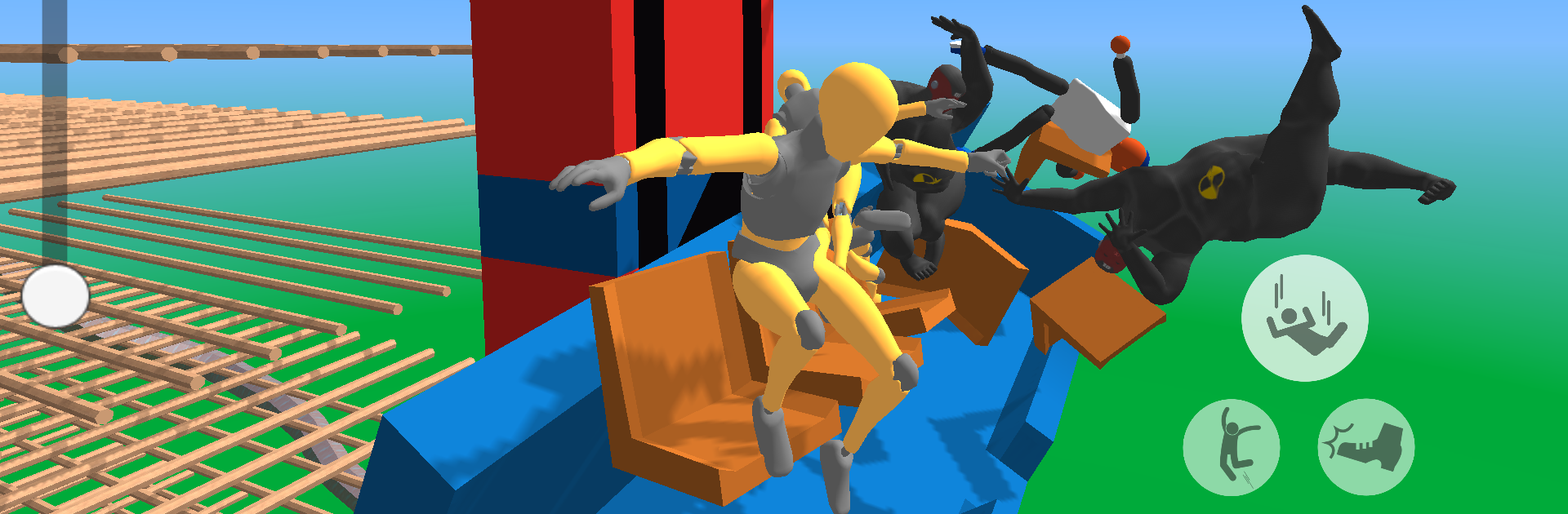
Ever wondered what would happen if you really cranked up the power on your favorite amusement park rides? Amusement PhysBox lets you find out—without leaving your seat. It’s a laid-back Simulation game from EVG GAME STUDIO where your only passengers are brave crash test dummies and the laws of physics are your playground. Want to see some hilarious ride disasters or try out wild ride setups? This is your sandbox.

Game Features

  • Full Ride Control
    You’re in charge! Choose from a bunch of classic amusement rides and decide how gentle—or how extreme—you want them to go. Crank the speed up past normal limits and see what happens.

  • Wacky Dummy Experiments
    Place your test dummies wherever you like and watch as they tumble, fumble, and fly according to real-world physics. It’s oddly satisfying and sometimes laugh-out-loud funny.

  • Custom Structure Building
    Think you can make an even crazier ride? Build custom structures or tweak the existing ones to experiment with hilarious possibilities. Your creativity sets the rules here.

  • Realistic Physics Engine
    Everything that happens, from flips to crashes, follows actual physics, so every wild creation or chaotic ride unfolds differently each time.

  • Endless Amusement Scenarios
    No two runs are quite the same. Tinker, replay, and mash up different rides or settings whenever you want. Try it out on BlueStacks for smooth controls and even bigger laughs.

Get ready for a buttery smooth, high-performance gaming action only on BlueStacks.

Game Features

Enhancements

  • Macros
  • Multi Instance
  • Multi Instance Sync
  • Script
  • Enhancements
Macros

Macros

Automate the predictable in Amusement PhysBox and transform your gameplay with Macros. Get access to inventive Macros in the BlueStacks Macro Community
Multi Instance

Multi Instance

Play Amusement PhysBox on one window. And chat with your friend on the other. Press CTRL + Shift + 8 to open the Multi-Instance Manager. And start creating fresh instances or clone an existing one.
Multi Instance Sync

Multi Instance Sync

Play Amusement PhysBox with the power of Multi-Instance Sync. Replicate what you are doing on the main instance on all other instances. Level up faster, play more.
Script

Script

Script your way to gaming glory in Amusement PhysBox with BlueStacks Script. Write and run a set of commands to automate repeated tasks. Trigger the command by assigning it to any key.
Read More

How to Download and Play Amusement PhysBox on PC or Mac

  • Download and install BlueStacks on your PC or Mac

  • Complete Google sign-in to access the Play Store, or do it later

  • Look for Amusement PhysBox in the search bar at the top right corner

  • Click to install Amusement PhysBox from the search results

  • Complete Google sign-in (if you skipped step 2) to install Amusement PhysBox

  • Click the Amusement PhysBox icon on the home screen to start playing

video
Watch Video

Minimum System Requirements

With BlueStacks 5, you can get started on a PC that fulfills the following requirements.

  • Operating System

    Microsoft Windows 7 or above, macOS 11 (Big Sur) or above

  • Processor

    Intel, AMD or Apple Silicon Processor

  • RAM

    at least 4GB

  • HDD

    10GB Free Disk Space

Note:

* You must be an Administrator on your PC. Up to date graphics drivers from Microsoft or the chipset vendor.

Amusement PhysBox - FAQs

  • How to play Amusement PhysBox on Windows PC & Mac?

    Play Amusement PhysBox on your PC or Mac by following these simple steps.

    • Click on 'Play Amusement PhysBox on PC’ to download BlueStacks
    • Install it and log-in to Google Play Store
    • Launch and play the game.
  • Why is BlueStacks the fastest and safest platform to play games on PC?

    BlueStacks respects your privacy and is always safe and secure to use. It does not carry any malware, spyware, or any sort of additional software that could harm your PC.

    It is engineered to optimize speed and performance for a seamless gaming experience.

  • What are Amusement PhysBox PC requirements?

    Minimum requirement to run Amusement PhysBox on your PC

    • OS: Microsoft Windows 7 or above MacOS 11 (Big Sur) or above
    • Processor: Intel, AMD or Apple Silicon Processor
    • RAM: Your PC must have at least 4GB of RAM. (Note that having 4GB or more disk space is not a substitute for RAM)
    • HDD: 10GB Free Disk Space.
    • You must be an Administrator on your PC.