Car Crash Simulator Accident 2

Car Crash Simulator Accident 2

Simulation

| SevenGears Games

Play on PC with BlueStacks or from our cloud

  • Overview
  • Game Features
  • How to Play

Page Modified On: May 25, 2026

Play Car Crash Simulator Accident 2 on PC or Mac

Play Car Crash Simulator Accident 2 by SevenGears Games on PC or Mac with BlueStacks. Use a bigger screen, mouse and keyboard controls, and smoother performance while you play.

About the Game

Car Crash Simulator Accident 2 is a physics-heavy playground where metal bends, glass shatters, and every impact tells a story. It’s all about tinkering with speed, angles, and terrain to see how different cars hold up when things go very wrong—in the best possible way. Want a wider view and comfy controls? It also runs great on PC through BlueStacks.

Game Features

  • Huge map variety: Pick from 40+ locations, including controlled test tracks, sky-high ramps, rugged mountain paths, open-world areas, and bumpy obstacle courses designed to wreck—or survive.
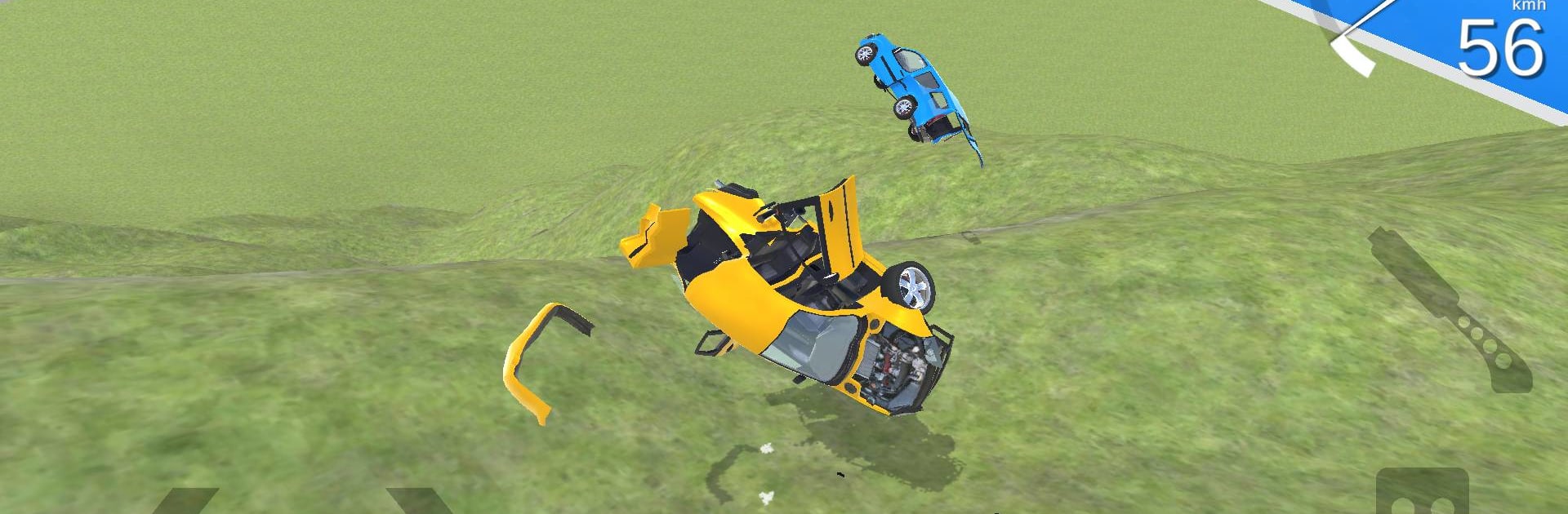
  • Impact-driven physics: Soft-body–style deformation lets cars crumple, flex, and tear realistically, with panels popping off and frames twisting based on how and where you hit.
  • Purpose-built crash tests: Use dedicated test maps to line up head-on smashes, side swipes, and high-speed ramp launches, then study the results like a pro.
  • A garage of extremes: Try sleek sports cars, cushy luxury rides, sturdy 4×4 off-roaders, family-size SUVs, and even heavy trucks—each reacts differently when pushed to the limit.
  • Cameras that catch everything: Swap angles on the fly—cockpit, chase, and more—to analyze collisions from every possible viewpoint.
  • Handling that feels right: Tight steering, weighty suspension, and believable traction make the driving feel grounded before the chaos kicks in.
  • 3D visuals that sting: Clean, detailed graphics highlight dents, scrapes, sparks, and debris so every crash looks painfully convincing.
  • Destruction your way: Expect everything from minor fender scrapes to full-on total losses across maps and scenarios, keeping each attempt fresh in this Simulation staple.

Start playing Car Crash Simulator Accident 2 on BlueStacks and get a smoother, more comfortable PC or Mac setup.


Game Features

Enhancements

  • Macros
  • Multi Instance
  • Multi Instance Sync
  • Script
  • Enhancements
Macros

Macros

Automate the predictable in Car Crash Simulator Accident 2 and transform your gameplay with Macros. Get access to inventive Macros in the BlueStacks Macro Community
Multi Instance

Multi Instance

Play Car Crash Simulator Accident 2 on one window. And chat with your friend on the other. Press CTRL + Shift + 8 to open the Multi-Instance Manager. And start creating fresh instances or clone an existing one.
Multi Instance Sync

Multi Instance Sync

Play Car Crash Simulator Accident 2 with the power of Multi-Instance Sync. Replicate what you are doing on the main instance on all other instances. Level up faster, play more.
Script

Script

Script your way to gaming glory in Car Crash Simulator Accident 2 with BlueStacks Script. Write and run a set of commands to automate repeated tasks. Trigger the command by assigning it to any key.
Read More

How to Download and Play Car Crash Simulator Accident 2 on PC or Mac

  • Download and install BlueStacks on your PC or Mac

  • Complete Google sign-in to access the Play Store, or do it later

  • Look for Car Crash Simulator Accident 2 in the search bar at the top right corner

  • Click to install Car Crash Simulator Accident 2 from the search results

  • Complete Google sign-in (if you skipped step 2) to install Car Crash Simulator Accident 2

  • Click the Car Crash Simulator Accident 2 icon on the home screen to start playing

video
Watch Video

Minimum System Requirements

With BlueStacks 5, you can get started on a PC that fulfills the following requirements.

  • Operating System

    Microsoft Windows 7 or above, macOS 11 (Big Sur) or above

  • Processor

    Intel, AMD or Apple Silicon Processor

  • RAM

    at least 4GB

  • HDD

    10GB Free Disk Space

Note:

* You must be an Administrator on your PC. Up to date graphics drivers from Microsoft or the chipset vendor.

Car Crash Simulator Accident 2 - FAQs

  • How to play Car Crash Simulator Accident 2 on Windows PC & Mac?

    Play Car Crash Simulator Accident 2 on your PC or Mac by following these simple steps.

    • Click on 'Play Car Crash Simulator Accident 2 on PC’ to download BlueStacks
    • Install it and log-in to Google Play Store
    • Launch and play the game.
  • Why is BlueStacks the fastest and safest platform to play games on PC?

    BlueStacks respects your privacy and is always safe and secure to use. It does not carry any malware, spyware, or any sort of additional software that could harm your PC.

    It is engineered to optimize speed and performance for a seamless gaming experience.

  • What are Car Crash Simulator Accident 2 PC requirements?

    Minimum requirement to run Car Crash Simulator Accident 2 on your PC

    • OS: Microsoft Windows 7 or above MacOS 11 (Big Sur) or above
    • Processor: Intel, AMD or Apple Silicon Processor
    • RAM: Your PC must have at least 4GB of RAM. (Note that having 4GB or more disk space is not a substitute for RAM)
    • HDD: 10GB Free Disk Space.
    • You must be an Administrator on your PC.