
Choon Paan GAME
Choon Paan GAME

Choon Paan GAME

Simulation

| KodeX Sri Lanka

Play on PC with BlueStacks or from our cloud

  • Overview
  • Game Features
  • How to Play

Page Modified On: June 18, 2025

Play Choon Paan GAME on PC or Mac

Bring your A-game to Choon Paan GAME, the Simulation game sensation from KodeX Sri Lanka. Give your gameplay the much-needed boost with precise game controls, high FPS graphics, and top-tier features on your PC or Mac with BlueStacks.

About the Game

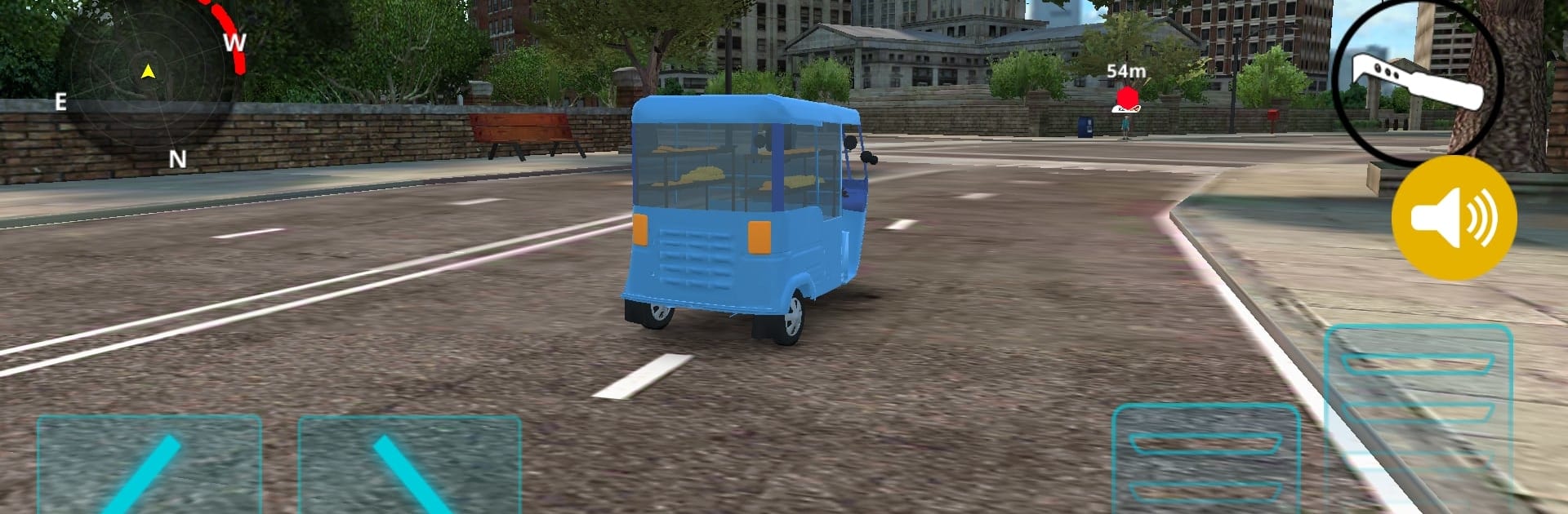
If you’ve ever caught the familiar sound of the Choon Paan truck winding through neighborhoods, you’ll feel right at home in Choon Paan GAME. This Simulation from KodeX Sri Lanka puts you in the driver’s seat—literally—letting you experience the hustle and charm of selling fresh bread all around town. Expect a quirky, light-hearted ride where you manage deliveries, interact with customers, and soak in those everyday moments you’ve probably seen a hundred times, now recreated on your screen.

Game Features

  • Drive the Iconic Choon Paan Truck
    Take control of the classic Choon Paan vehicle, weaving through busy streets to reach hungry customers. You’ll need both skill and a sense of timing to make all your stops.

  • Serve Up Fresh Bread
    As the neighborhood bread seller, you get to stock your truck and hand-deliver buns and pastries to regulars. The locals are counting on you, so don’t leave them waiting!

  • Meet Local Characters
    Your daily route introduces a cast of quirky customers, each with their own little stories. You never know who you’ll run into or what fun requests they’ll have.

  • Chill Sri Lankan Atmosphere
    From the street sounds to the familiar scenery, the game captures those unmistakable vibes. It’s got that relaxed, nostalgic Sri Lankan charm all the way through.

  • Easy to Pick Up
    Whether you have a few minutes or a free afternoon, the controls are straightforward and anyone can jump right in. Try it out on BlueStacks for a smooth, laid-back experience.

Slay your opponents with your epic moves. Play it your way on BlueStacks and dominate the battlefield.


Game Features

Enhancements

  • Macros
  • Multi Instance
  • Multi Instance Sync
  • Script
  • Enhancements
Macros

Macros

Automate the predictable in Choon Paan GAME and transform your gameplay with Macros. Get access to inventive Macros in the BlueStacks Macro Community
Multi Instance

Multi Instance

Play Choon Paan GAME on one window. And chat with your friend on the other. Press CTRL + Shift + 8 to open the Multi-Instance Manager. And start creating fresh instances or clone an existing one.
Multi Instance Sync

Multi Instance Sync

Play Choon Paan GAME with the power of Multi-Instance Sync. Replicate what you are doing on the main instance on all other instances. Level up faster, play more.
Script

Script

Script your way to gaming glory in Choon Paan GAME with BlueStacks Script. Write and run a set of commands to automate repeated tasks. Trigger the command by assigning it to any key.
Read More

How to Download and Play Choon Paan GAME on PC or Mac

  • Download and install BlueStacks on your PC or Mac

  • Complete Google sign-in to access the Play Store, or do it later

  • Look for Choon Paan GAME in the search bar at the top right corner

  • Click to install Choon Paan GAME from the search results

  • Complete Google sign-in (if you skipped step 2) to install Choon Paan GAME

  • Click the Choon Paan GAME icon on the home screen to start playing

video
Watch Video

Minimum System Requirements

With BlueStacks 5, you can get started on a PC that fulfills the following requirements.

  • Operating System

    Microsoft Windows 7 or above, macOS 11 (Big Sur) or above

  • Processor

    Intel, AMD or Apple Silicon Processor

  • RAM

    at least 4GB

  • HDD

    10GB Free Disk Space

Note:

* You must be an Administrator on your PC. Up to date graphics drivers from Microsoft or the chipset vendor.

Choon Paan GAME - FAQs

  • How to play Choon Paan GAME on Windows PC & Mac?

    Play Choon Paan GAME on your PC or Mac by following these simple steps.

    • Click on 'Play Choon Paan GAME on PC’ to download BlueStacks
    • Install it and log-in to Google Play Store
    • Launch and play the game.
  • Why is BlueStacks the fastest and safest platform to play games on PC?

    BlueStacks respects your privacy and is always safe and secure to use. It does not carry any malware, spyware, or any sort of additional software that could harm your PC.

    It is engineered to optimize speed and performance for a seamless gaming experience.

  • What are Choon Paan GAME PC requirements?

    Minimum requirement to run Choon Paan GAME on your PC

    • OS: Microsoft Windows 7 or above MacOS 11 (Big Sur) or above
    • Processor: Intel, AMD or Apple Silicon Processor
    • RAM: Your PC must have at least 4GB of RAM. (Note that having 4GB or more disk space is not a substitute for RAM)
    • HDD: 10GB Free Disk Space.
    • You must be an Administrator on your PC.







