DirtRoad – Offroad Simulator

DirtRoad – Offroad Simulator

Simulation

| WhizTest Pvt. Ltd.

Play on PC with BlueStacks or from our cloud

  • Overview
  • Game Features
  • How to Play

Page Modified On: November 10, 2025

Play DirtRoad – Offroad Simulator on PC or Mac

From the innovators and creators at WhizTest Pvt. Ltd., DirtRoad – Offroad Simulator is another fun addition to the World of Simulation games. Go beyond your mobile screen and play it bigger and better on your PC or Mac. An immersive experience awaits you.

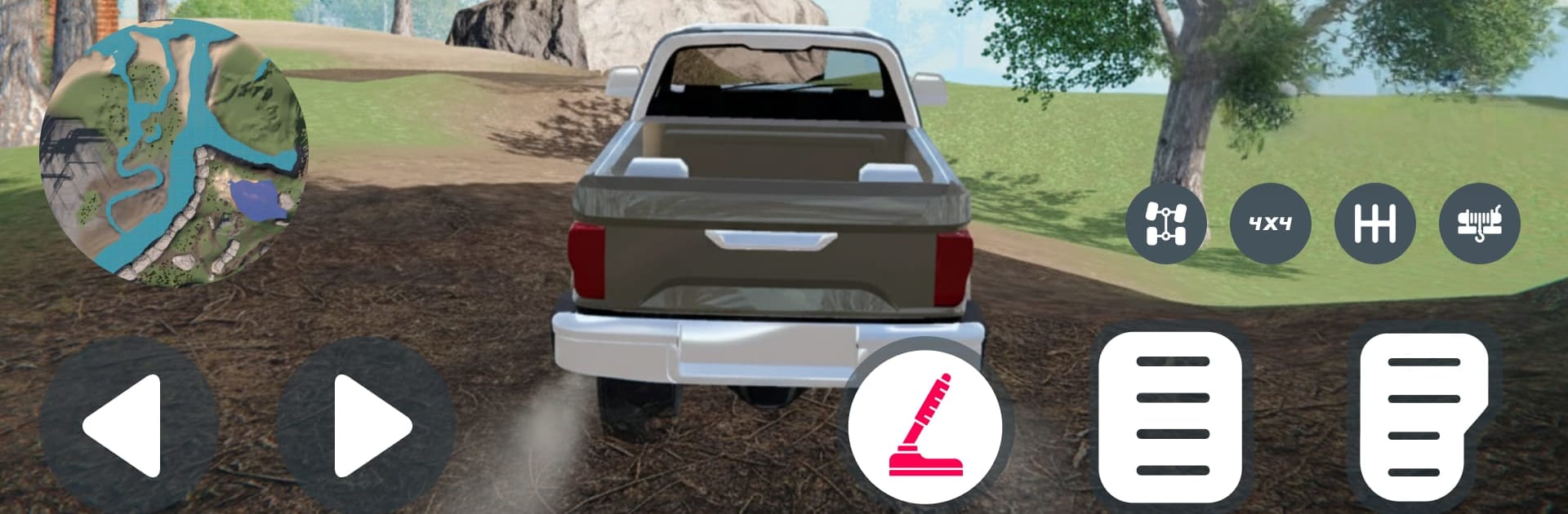
DirtRoad – Offroad Simulator is all about wrestling chunky SUVs through rough country, not blasting around at 120. Players pick from four trucks, tweak a few upgrades, and head into a big map that mixes dust, mud, sand, rivers, and rocks. The driving has weight to it. Tires spin and bite, ruts tug the wheels, and you really feel the truck settle when it hits a muddy pocket. Steep hills ask for a slow crawl and careful throttle, and when things go south there is a winch to clip onto a tree or boulder and drag out a foot at a time. It sounds great too, with gravel crunch, suspension clunks, and engines that actually strain.

Most of the game revolves around delivery runs through forests, mountain switchbacks, and rocky creek beds. Routes can turn into small puzzles where planning the line matters more than power. The upgrades and customization are straightforward enough to keep focus on the trail, not menus. Controls are clear for newer players but there is room to get precise. On BlueStacks, keyboard or a controller mapping works nicely and helps keep the truck steady through tight spots. The look is clean and readable, with mud and water that sell the mess without tanking performance. If slow, deliberate off-roading sounds better than pure racing, this scratches that itch. It rewards patience and stubborness, and every successful climb feels earned.

Ready to top the leaderboard? We bet you do. Let precise controls and sharp visuals optimized on BlueStacks lead you to victory.


Game Features

Enhancements

  • Macros
  • Multi Instance
  • Multi Instance Sync
  • Script
  • Enhancements
Macros

Macros

Automate the predictable in DirtRoad – Offroad Simulator and transform your gameplay with Macros. Get access to inventive Macros in the BlueStacks Macro Community
Multi Instance

Multi Instance

Play DirtRoad – Offroad Simulator on one window. And chat with your friend on the other. Press CTRL + Shift + 8 to open the Multi-Instance Manager. And start creating fresh instances or clone an existing one.
Multi Instance Sync

Multi Instance Sync

Play DirtRoad – Offroad Simulator with the power of Multi-Instance Sync. Replicate what you are doing on the main instance on all other instances. Level up faster, play more.
Script

Script

Script your way to gaming glory in DirtRoad – Offroad Simulator with BlueStacks Script. Write and run a set of commands to automate repeated tasks. Trigger the command by assigning it to any key.
Read More

How to Download and Play DirtRoad – Offroad Simulator on PC or Mac

  • Download and install BlueStacks on your PC or Mac

  • Complete Google sign-in to access the Play Store, or do it later

  • Look for DirtRoad – Offroad Simulator in the search bar at the top right corner

  • Click to install DirtRoad – Offroad Simulator from the search results

  • Complete Google sign-in (if you skipped step 2) to install DirtRoad – Offroad Simulator

  • Click the DirtRoad – Offroad Simulator icon on the home screen to start playing

video
Watch Video

Minimum System Requirements

With BlueStacks 5, you can get started on a PC that fulfills the following requirements.

  • Operating System

    Microsoft Windows 7 or above, macOS 11 (Big Sur) or above

  • Processor

    Intel, AMD or Apple Silicon Processor

  • RAM

    at least 4GB

  • HDD

    10GB Free Disk Space

Note:

* You must be an Administrator on your PC. Up to date graphics drivers from Microsoft or the chipset vendor.

DirtRoad – Offroad Simulator - FAQs

  • How to play DirtRoad – Offroad Simulator on Windows PC & Mac?

    Play DirtRoad – Offroad Simulator on your PC or Mac by following these simple steps.

    • Click on 'Play DirtRoad – Offroad Simulator on PC’ to download BlueStacks
    • Install it and log-in to Google Play Store
    • Launch and play the game.
  • Why is BlueStacks the fastest and safest platform to play games on PC?

    BlueStacks respects your privacy and is always safe and secure to use. It does not carry any malware, spyware, or any sort of additional software that could harm your PC.

    It is engineered to optimize speed and performance for a seamless gaming experience.

  • What are DirtRoad – Offroad Simulator PC requirements?

    Minimum requirement to run DirtRoad – Offroad Simulator on your PC

    • OS: Microsoft Windows 7 or above MacOS 11 (Big Sur) or above
    • Processor: Intel, AMD or Apple Silicon Processor
    • RAM: Your PC must have at least 4GB of RAM. (Note that having 4GB or more disk space is not a substitute for RAM)
    • HDD: 10GB Free Disk Space.
    • You must be an Administrator on your PC.