Drag Bike Indo: Moto Racing

Drag Bike Indo: Moto Racing

Simulation

| Fredy Rau Studio

Play on PC with BlueStacks or from our cloud

  • Overview
  • Game Features
  • How to Play

Page Modified On: July 27, 2026

Play Drag Bike Indo: Moto Racing on PC or Mac

Drag Bike Indo: Moto Racing brings the Simulation genre to life, and throws up exciting challenges for gamers. Developed by Fredy Rau Studio, this Android game is best experienced on BlueStacks, the World’s #1 app player for PC and Mac users.

About the Game

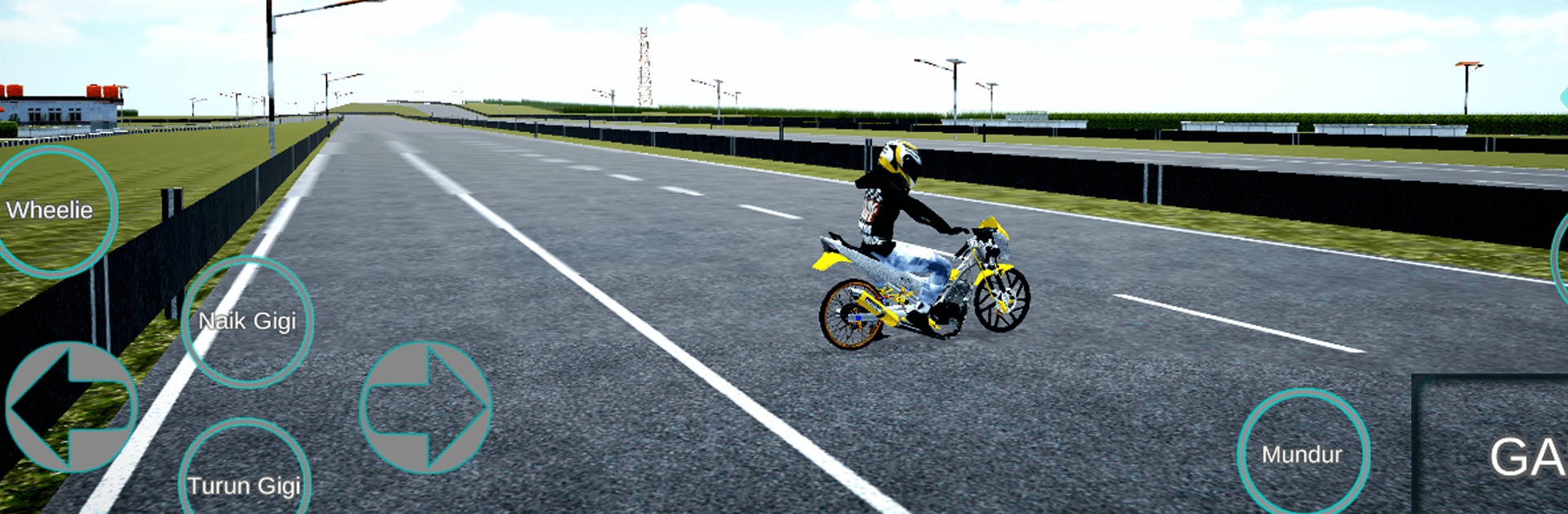
Drag Bike Indo: Moto Racing puts you on the strip for pure straight-line speed. It’s all about timing your launch, nailing each manual shift, and squeezing out every millisecond. Expect quick, high-stakes races across street routes and official circuits, with tight finishes that reward skill over luck.

Game Features

  • Genre: Simulation: Built around realistic manual shifting and race timing that make every heat feel hands-on and technical.
  • Manual Gear Shifting: You’re in charge of every upshift and rev, turning simple sprints into tense, skill-based showdowns.
  • Street and Official Circuits: Swap between gritty road sections and sanctioned tracks, each with its own vibe and rhythm.
  • Online Races with Friends: Create or join rooms, race head-to-head, and see who really has the cleanest start and sharpest shifting.
  • Earn Coins, Grow Your Garage: Finish races to collect coins, then unlock more bikes and expand your lineup for different matchups.
  • Authentic Drag Bikes: A wide range of herex-style machines tuned for straight-line speed, so you can find a favorite and master its feel.
  • Snappy Races, Big Payoffs: Short heats keep the action moving, and solid runs are instantly rewarding when you hit that perfect gear sequence.
  • BlueStacks Support: Prefer a bigger screen and steadier inputs? You can play on PC with BlueStacks for comfortable, consistent control.

Start your journey now. Download the game on BlueStacks, invite your friends, and march on a new adventure.


Game Features

Enhancements

  • Macros
  • Multi Instance
  • Multi Instance Sync
  • Script
  • Enhancements
Macros

Macros

Automate the predictable in Drag Bike Indo: Moto Racing and transform your gameplay with Macros. Get access to inventive Macros in the BlueStacks Macro Community
Multi Instance

Multi Instance

Play Drag Bike Indo: Moto Racing on one window. And chat with your friend on the other. Press CTRL + Shift + 8 to open the Multi-Instance Manager. And start creating fresh instances or clone an existing one.
Multi Instance Sync

Multi Instance Sync

Play Drag Bike Indo: Moto Racing with the power of Multi-Instance Sync. Replicate what you are doing on the main instance on all other instances. Level up faster, play more.
Script

Script

Script your way to gaming glory in Drag Bike Indo: Moto Racing with BlueStacks Script. Write and run a set of commands to automate repeated tasks. Trigger the command by assigning it to any key.
Read More

How to Download and Play Drag Bike Indo: Moto Racing on PC or Mac

  • Download and install BlueStacks on your PC or Mac

  • Complete Google sign-in to access the Play Store, or do it later

  • Look for Drag Bike Indo: Moto Racing in the search bar at the top right corner

  • Click to install Drag Bike Indo: Moto Racing from the search results

  • Complete Google sign-in (if you skipped step 2) to install Drag Bike Indo: Moto Racing

  • Click the Drag Bike Indo: Moto Racing icon on the home screen to start playing

video
Watch Video

Minimum System Requirements

With BlueStacks 5, you can get started on a PC that fulfills the following requirements.

  • Operating System

    Microsoft Windows 7 or above, macOS 11 (Big Sur) or above

  • Processor

    Intel, AMD or Apple Silicon Processor

  • RAM

    at least 4GB

  • HDD

    10GB Free Disk Space

Note:

* You must be an Administrator on your PC. Up to date graphics drivers from Microsoft or the chipset vendor.

Drag Bike Indo: Moto Racing - FAQs

  • How to play Drag Bike Indo: Moto Racing on Windows PC & Mac?

    Play Drag Bike Indo: Moto Racing on your PC or Mac by following these simple steps.

    • Click on 'Play Drag Bike Indo: Moto Racing on PC’ to download BlueStacks
    • Install it and log-in to Google Play Store
    • Launch and play the game.
  • Why is BlueStacks the fastest and safest platform to play games on PC?

    BlueStacks respects your privacy and is always safe and secure to use. It does not carry any malware, spyware, or any sort of additional software that could harm your PC.

    It is engineered to optimize speed and performance for a seamless gaming experience.

  • What are Drag Bike Indo: Moto Racing PC requirements?

    Minimum requirement to run Drag Bike Indo: Moto Racing on your PC

    • OS: Microsoft Windows 7 or above MacOS 11 (Big Sur) or above
    • Processor: Intel, AMD or Apple Silicon Processor
    • RAM: Your PC must have at least 4GB of RAM. (Note that having 4GB or more disk space is not a substitute for RAM)
    • HDD: 10GB Free Disk Space.
    • You must be an Administrator on your PC.