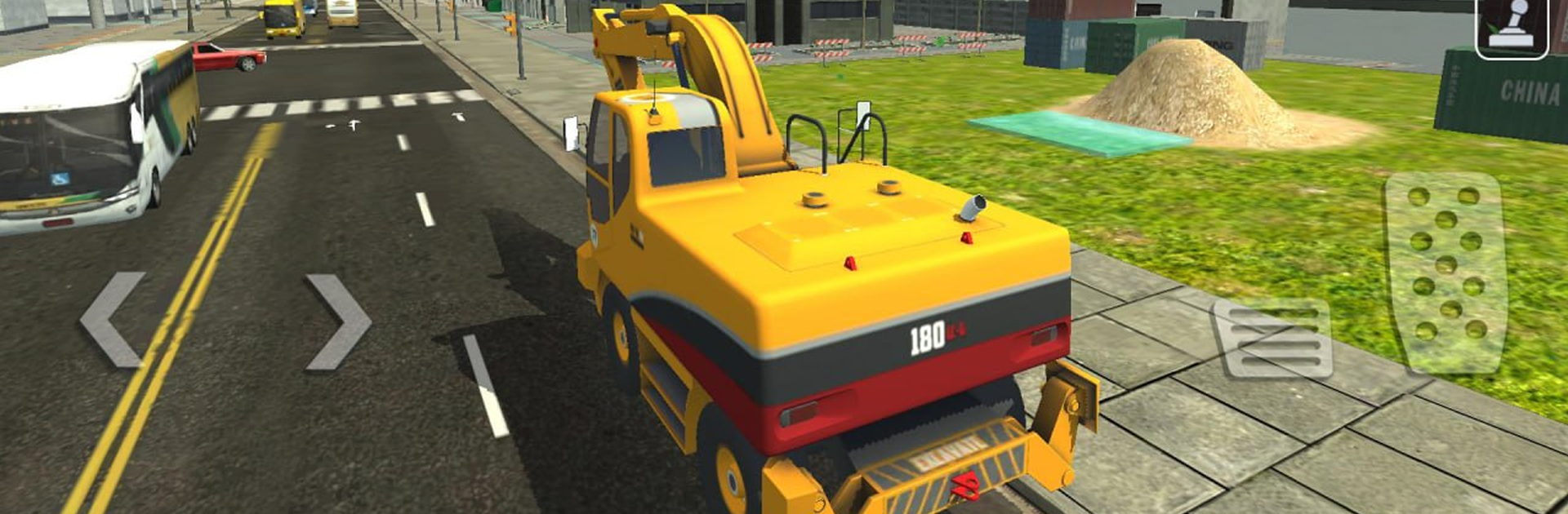
Excavator City Builder

Excavator City Builder

Simulation

| Wayfu Game Studio

Play on PC with BlueStacks or from our cloud

  • Overview
  • Game Features
  • How to Play

Page Modified On: January 05, 2026

Play Excavator City Builder on PC or Mac

Excavator City Builder brings the Simulation genre to life, and throws up exciting challenges for gamers. Developed by Wayfu Game Studio, this Android game is best experienced on BlueStacks, the Worldโ€™s #1 app player for PC and Mac users.

Excavator City Builder is a calm, hands-on construction game where the player actually does the work. It hands over the keys to an excavator, loader, dump truck, and a road roller, then sends the crew out to dig soil, scoop sand, load up trucks, and patch broken stretches of road. Missions feel like real jobs on a site. One task might be clearing debris and carving a trench, the next is hauling dirt across a rough path and compacting a fresh road section. Controls are straightforward, and the excavator arm has a nice weight to it, so scooping and dumping feels tidy when it all lines up. Nothing super complicated to memorize, just follow the checklist, move the right material, and see the area open up.

What stands out is the rhythm. Drive out to a marked zone, set the bucket, take a scoop, swing it, drop it, repeat. The physics are smooth enough to make that loop stay satisfying without getting fussy. Terrain shifts between work yards, sand piles, and a bit of offroad, so routes matter a little and backing a dump truck into place can be oddly relaxing. On PC with BlueStacks, the bigger screen helps with judging depth, and mapped keys make the arm feel more precise, which is nice when lining up a bucket or rolling a clean edge on fresh asphalt. It aims for easygoing and it hits it, good for anyone who wants construction tasks without a ton of stress or hardcore sim menus, just steady progress and new sections of the city to build out.

Ready to top the leaderboard? We bet you do. Let precise controls and sharp visuals optimized on BlueStacks lead you to victory.


Game Features

Enhancements

  • Macros
  • Multi Instance
  • Multi Instance Sync
  • Script
  • Enhancements
Macros

Macros

Automate the predictable in Excavator City Builder and transform your gameplay with Macros. Get access to inventive Macros in the BlueStacks Macro Community
Multi Instance

Multi Instance

Play Excavator City Builder on one window. And chat with your friend on the other. Press CTRL + Shift + 8 to open the Multi-Instance Manager. And start creating fresh instances or clone an existing one.
Multi Instance Sync

Multi Instance Sync

Play Excavator City Builder with the power of Multi-Instance Sync. Replicate what you are doing on the main instance on all other instances. Level up faster, play more.
Script

Script

Script your way to gaming glory in Excavator City Builder with BlueStacks Script. Write and run a set of commands to automate repeated tasks. Trigger the command by assigning it to any key.
Read More

How to Download and Play Excavator City Builder on PC or Mac

  • Download and install BlueStacks on your PC or Mac

  • Complete Google sign-in to access the Play Store, or do it later

  • Look for Excavator City Builder in the search bar at the top right corner

  • Click to install Excavator City Builder from the search results

  • Complete Google sign-in (if you skipped step 2) to install Excavator City Builder

  • Click the Excavator City Builder icon on the home screen to start playing

video
Watch Video

Minimum System Requirements

With BlueStacks 5, you can get started on a PC that fulfills the following requirements.

  • Operating System

    Microsoft Windows 7 or above, macOS 11 (Big Sur) or above

  • Processor

    Intel, AMD or Apple Silicon Processor

  • RAM

    at least 4GB

  • HDD

    10GB Free Disk Space

Note:

* You must be an Administrator on your PC. Up to date graphics drivers from Microsoft or the chipset vendor.

Excavator City Builder - FAQs

  • How to play Excavator City Builder on Windows PC & Mac?

    Play Excavator City Builder on your PC or Mac by following these simple steps.

    • Click on 'Play Excavator City Builder on PCโ€™ to download BlueStacks
    • Install it and log-in to Google Play Store
    • Launch and play the game.
  • Why is BlueStacks the fastest and safest platform to play games on PC?

    BlueStacks respects your privacy and is always safe and secure to use. It does not carry any malware, spyware, or any sort of additional software that could harm your PC.

    It is engineered to optimize speed and performance for a seamless gaming experience.

  • What are Excavator City Builder PC requirements?

    Minimum requirement to run Excavator City Builder on your PC

    • OS: Microsoft Windows 7 or above MacOS 11 (Big Sur) or above
    • Processor: Intel, AMD or Apple Silicon Processor
    • RAM: Your PC must have at least 4GB of RAM. (Note that having 4GB or more disk space is not a substitute for RAM)
    • HDD: 10GB Free Disk Space.
    • You must be an Administrator on your PC.