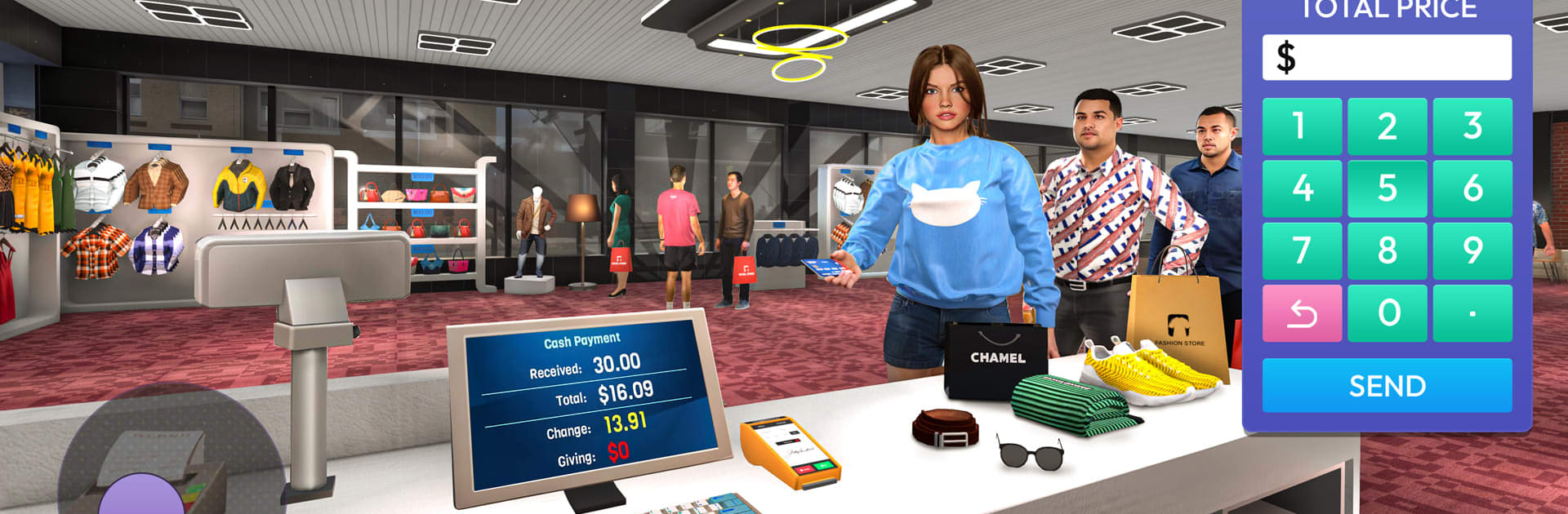
Fashion Store Simulator 3D

Fashion Store Simulator 3D

Simulation

| ILK TEKNOLOJI

Play on PC with BlueStacks or from our cloud

  • Overview
  • Game Features
  • How to Play

Page Modified On: August 15, 2026

Play Fashion Store Simulator 3D on PC or Mac

Fashion Store Simulator 3D by ILK TEKNOLOJI has plenty to keep you busy. BlueStacks lets you play it on PC or Mac with more screen space, better control, and fewer mobile limits.

About the Game

Fashion Store Simulator 3D is a Simulation where you run a stylish boutique from the ground up. You’ll stock shelves, style customers, balance the books, and turn a tiny shop into a buzzing fashion destination. Prefer playing on a bigger screen? It works great on PC with BlueStacks.

Game Features

  • Run the floor: Keep racks full, accept deliveries, track inventory, and handle both cash and card payments while moving checkout lines fast.
  • Dress-Up Mode: Style each shopper with complete looks—tops, pants, dresses, heels, sneakers, and bags—then match colors and accessories to nail the brief and boost your rewards.
  • Smart merchandising: Arrange displays, group items that go well together, and use better lighting and decor to make outfits pop and improve sales.
  • Security matters: Set up safeguards to deter theft and protect your profits without slowing down the shopping flow.
  • Grow the space: Start small and expand your store with new sections for casual wear, party outfits, sports gear, nightwear, and more.
  • Price it right: Adjust pricing, plan promos, and find that sweet spot between demand and profit to keep the register ringing.
  • Build a team: Hire a reliable cashier and floor staff, then train them to check out faster, restock efficiently, and handle customer requests smoothly.
  • Follow the trends: Keep your catalog fresh with polos, T-shirts, coats, dresses, sneakers, high heels, and statement bags—rotate stock to stay in demand.
  • Realistic 3D feel: Enjoy clean visuals, lively crowds, and believable customer behavior that make the store feel busy and alive.
  • Customer happiness: Offer quick service, tidy displays, and clear signage so shoppers find what they want—and come back for more.

BlueStacks gives you more room to focus on the game and less time adjusting around mobile limitations.


Game Features

Enhancements

  • Macros
  • Multi Instance
  • Multi Instance Sync
  • Script
  • Enhancements
Macros

Macros

Automate the predictable in Fashion Store Simulator 3D and transform your gameplay with Macros. Get access to inventive Macros in the BlueStacks Macro Community
Multi Instance

Multi Instance

Play Fashion Store Simulator 3D on one window. And chat with your friend on the other. Press CTRL + Shift + 8 to open the Multi-Instance Manager. And start creating fresh instances or clone an existing one.
Multi Instance Sync

Multi Instance Sync

Play Fashion Store Simulator 3D with the power of Multi-Instance Sync. Replicate what you are doing on the main instance on all other instances. Level up faster, play more.
Script

Script

Script your way to gaming glory in Fashion Store Simulator 3D with BlueStacks Script. Write and run a set of commands to automate repeated tasks. Trigger the command by assigning it to any key.
Read More

How to Download and Play Fashion Store Simulator 3D on PC or Mac

  • Download and install BlueStacks on your PC or Mac

  • Complete Google sign-in to access the Play Store, or do it later

  • Look for Fashion Store Simulator 3D in the search bar at the top right corner

  • Click to install Fashion Store Simulator 3D from the search results

  • Complete Google sign-in (if you skipped step 2) to install Fashion Store Simulator 3D

  • Click the Fashion Store Simulator 3D icon on the home screen to start playing

video
Watch Video

Minimum System Requirements

With BlueStacks 5, you can get started on a PC that fulfills the following requirements.

  • Operating System

    Microsoft Windows 7 or above, macOS 11 (Big Sur) or above

  • Processor

    Intel, AMD or Apple Silicon Processor

  • RAM

    at least 4GB

  • HDD

    10GB Free Disk Space

Note:

* You must be an Administrator on your PC. Up to date graphics drivers from Microsoft or the chipset vendor.

Fashion Store Simulator 3D - FAQs

  • How to play Fashion Store Simulator 3D on Windows PC & Mac?

    Play Fashion Store Simulator 3D on your PC or Mac by following these simple steps.

    • Click on 'Play Fashion Store Simulator 3D on PC’ to download BlueStacks
    • Install it and log-in to Google Play Store
    • Launch and play the game.
  • Why is BlueStacks the fastest and safest platform to play games on PC?

    BlueStacks respects your privacy and is always safe and secure to use. It does not carry any malware, spyware, or any sort of additional software that could harm your PC.

    It is engineered to optimize speed and performance for a seamless gaming experience.

  • What are Fashion Store Simulator 3D PC requirements?

    Minimum requirement to run Fashion Store Simulator 3D on your PC

    • OS: Microsoft Windows 7 or above MacOS 11 (Big Sur) or above
    • Processor: Intel, AMD or Apple Silicon Processor
    • RAM: Your PC must have at least 4GB of RAM. (Note that having 4GB or more disk space is not a substitute for RAM)
    • HDD: 10GB Free Disk Space.
    • You must be an Administrator on your PC.