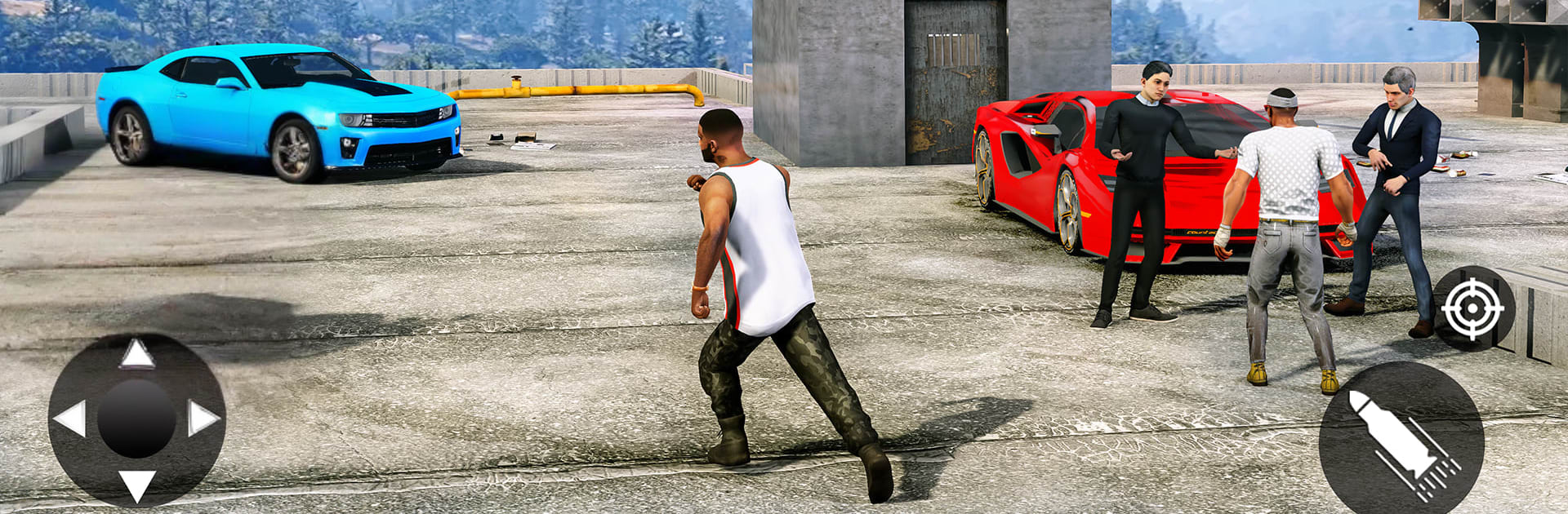
Gangster Grand Mafia Thug City

Gangster Grand Mafia Thug City

Simulation

| Impel Games

Play on PC with BlueStacks or from our cloud

  • Overview
  • Game Features
  • How to Play

Page Modified On: August 11, 2026

Play Gangster Grand Mafia Thug City on PC or Mac

Step into the World of Gangster Grand Mafia Thug City, a thrilling Simulation game from the house of Impel Games. Play this Android game on BlueStacks App Player and experience immersive gaming on PC or Mac.

About the Game

Gangster Grand Mafia Thug City is a gritty open-world crime Simulation where you hustle, scheme, and claw your way up from nobody to neighborhood problem. The city’s huge, unpredictable, and constantly pushing back—cops on your tail, rival crews in your lane, and paydays that are always one risky move away. Prefer slick getaways or loud chaos? You can do both.

Game Features

  • Open-world city playground: Cruise through dense downtown streets, industrial docks, and rooftop routes, picking up side gigs, street brawls, and shady opportunities as you go.
  • Heists and car thefts: Case a target, steal luxury rides, and plan clean exits. High-speed chases are a given—smart routes and faster wheels keep you breathing.
  • Rope-hero movement: Swing between skyscrapers, zip across gaps, and pull off stylish escapes when things get loud. It’s mobility with attitude.
  • Faction wars and turf control: Snag territory, protect your rackets, and push back on crews looking to take what’s yours. The map tells the story of who’s winning.
  • Police, “heroes,” and trouble: Expect escalating heat—from patrol cars to full tactical teams—and even flashy do-gooders ready to crash your party.
  • Choices shape your rise: Your calls affect allies, payouts, and who respects (or fears) you. Reputation opens doors or starts fights—sometimes both.
  • Gear, rides, and style: Stack an arsenal, stash useful gadgets, and build a garage of “borrowed” cars. Switch outfits to fit the job or the heat level.
  • Quick hits or long cons: Jump into fast jobs between chases or commit to multi-stage robberies and turf grinds when you want the big payout.
  • Subtle PC comfort: Prefer playing on a larger screen? BlueStacks handles the city’s chaos smoothly without getting in your way.

Start playing Gangster Grand Mafia Thug City on BlueStacks and get a smoother, more comfortable PC or Mac setup.


Game Features

Enhancements

  • Macros
  • Multi Instance
  • Multi Instance Sync
  • Script
  • Enhancements
Macros

Macros

Automate the predictable in Gangster Grand Mafia Thug City and transform your gameplay with Macros. Get access to inventive Macros in the BlueStacks Macro Community
Multi Instance

Multi Instance

Play Gangster Grand Mafia Thug City on one window. And chat with your friend on the other. Press CTRL + Shift + 8 to open the Multi-Instance Manager. And start creating fresh instances or clone an existing one.
Multi Instance Sync

Multi Instance Sync

Play Gangster Grand Mafia Thug City with the power of Multi-Instance Sync. Replicate what you are doing on the main instance on all other instances. Level up faster, play more.
Script

Script

Script your way to gaming glory in Gangster Grand Mafia Thug City with BlueStacks Script. Write and run a set of commands to automate repeated tasks. Trigger the command by assigning it to any key.
Read More

How to Download and Play Gangster Grand Mafia Thug City on PC or Mac

  • Download and install BlueStacks on your PC or Mac

  • Complete Google sign-in to access the Play Store, or do it later

  • Look for Gangster Grand Mafia Thug City in the search bar at the top right corner

  • Click to install Gangster Grand Mafia Thug City from the search results

  • Complete Google sign-in (if you skipped step 2) to install Gangster Grand Mafia Thug City

  • Click the Gangster Grand Mafia Thug City icon on the home screen to start playing

video
Watch Video

Minimum System Requirements

With BlueStacks 5, you can get started on a PC that fulfills the following requirements.

  • Operating System

    Microsoft Windows 7 or above, macOS 11 (Big Sur) or above

  • Processor

    Intel, AMD or Apple Silicon Processor

  • RAM

    at least 4GB

  • HDD

    10GB Free Disk Space

Note:

* You must be an Administrator on your PC. Up to date graphics drivers from Microsoft or the chipset vendor.

Gangster Grand Mafia Thug City - FAQs

  • How to play Gangster Grand Mafia Thug City on Windows PC & Mac?

    Play Gangster Grand Mafia Thug City on your PC or Mac by following these simple steps.

    • Click on 'Play Gangster Grand Mafia Thug City on PC’ to download BlueStacks
    • Install it and log-in to Google Play Store
    • Launch and play the game.
  • Why is BlueStacks the fastest and safest platform to play games on PC?

    BlueStacks respects your privacy and is always safe and secure to use. It does not carry any malware, spyware, or any sort of additional software that could harm your PC.

    It is engineered to optimize speed and performance for a seamless gaming experience.

  • What are Gangster Grand Mafia Thug City PC requirements?

    Minimum requirement to run Gangster Grand Mafia Thug City on your PC

    • OS: Microsoft Windows 7 or above MacOS 11 (Big Sur) or above
    • Processor: Intel, AMD or Apple Silicon Processor
    • RAM: Your PC must have at least 4GB of RAM. (Note that having 4GB or more disk space is not a substitute for RAM)
    • HDD: 10GB Free Disk Space.
    • You must be an Administrator on your PC.