Happy Harvest Farm
Happy Harvest Farm

Happy Harvest Farm

Simulation

| Harvest Life Studio

Play on PC with BlueStacks or from our cloud

  • Overview
  • Game Features
  • How to Play

Page Modified On: June 17, 2026

Play Happy Harvest Farm on PC or Mac

Happy Harvest Farm brings the Simulation genre to life, and throws up exciting challenges for gamers. Developed by Harvest Life Studio, this Android game is best experienced on BlueStacks, the World’s #1 app player for PC and Mac users.

About the Game

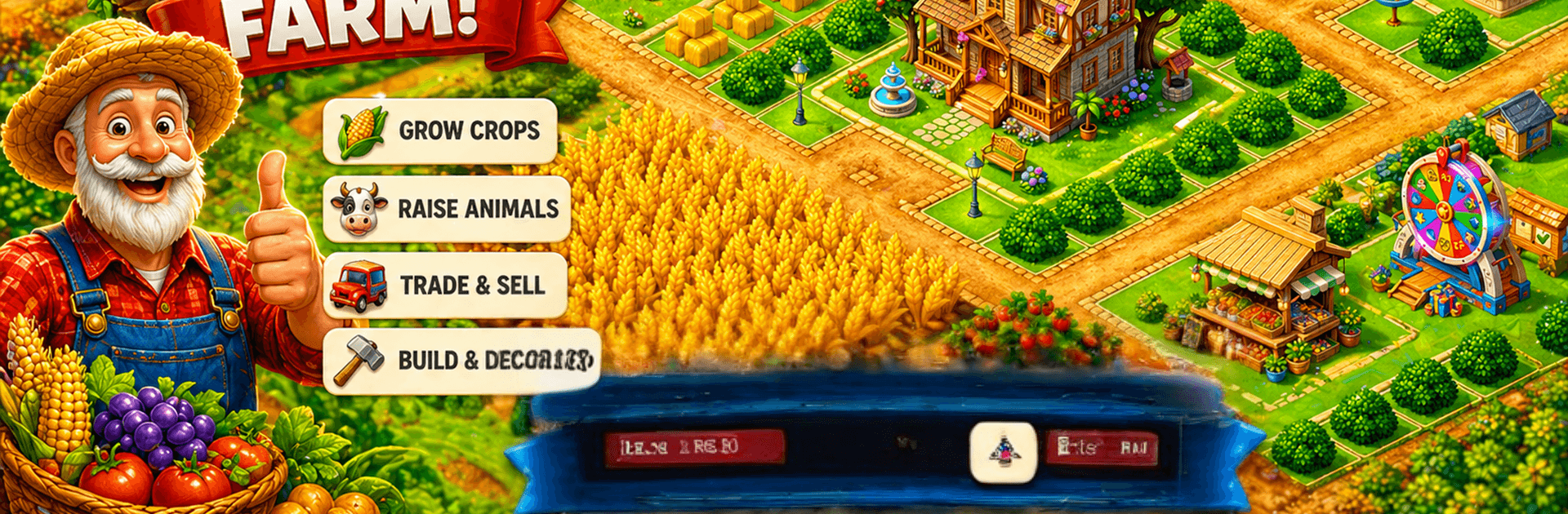
Happy Harvest Farm is a laid-back Simulation where you turn a simple plot into a thriving countryside business. Plant fields, run machines, trade smart, and make your place look like the cozy farm you’ve always pictured. Want more screen space to manage it all? Playing on BlueStacks lets you keep an eye on fields, animals, and orders with plenty of room.

Game Features

  • Big Crop Variety: Grow everything from wheat, rice, and corn to strawberries, grapes, coffee, lemons, and cacao. Mix short harvests with longer ones to keep the barns busy and the market stocked.
  • Production Chains: Feed your machines—like the bakery, flour mill, coffee maker, oven, smoothie stand, sewing station, refinery, candy machine, and ice cream maker—to turn raw goods into premium products.
  • Adorable Livestock: Raise chickens, cows, pigs, and sheep. Keep them happy, collect fresh resources, and expand your barns as demand grows.
  • Mining and Crafting: Head into the mines for silver, gold, rubies, and emeralds, then craft high-value items that sell for a tidy profit.
  • Harbor and Ocean Trade: Send boats out for tuna, shrimp, squid, and octopus. Turn that haul into crowd-pleasers like sushi to fill special orders.
  • Market and Orders: List quick sales for fast cash, or hold out for better prices. Complete order boards to earn coins and experience while clearing warehouse space.
  • Smart Management: Use the Library to boost production efficiency and the Bank to stash coins and watch savings grow.
  • Special Creatures: Unlock pets and magical pals—dog, cat, fox, unicorn, even a golden dragon. Each one brings handy bonuses that nudge your farm forward.
  • Build and Decorate: Place homes, paths, fences, and seasonal decor to design a farm that actually feels like yours.

Get ready for a buttery smooth, high-performance gaming action only on BlueStacks.

Game Features

Enhancements

  • Macros
  • Multi Instance
  • Multi Instance Sync
  • Script
  • Enhancements
Macros

Macros

Automate the predictable in Happy Harvest Farm and transform your gameplay with Macros. Get access to inventive Macros in the BlueStacks Macro Community
Multi Instance

Multi Instance

Play Happy Harvest Farm on one window. And chat with your friend on the other. Press CTRL + Shift + 8 to open the Multi-Instance Manager. And start creating fresh instances or clone an existing one.
Multi Instance Sync

Multi Instance Sync

Play Happy Harvest Farm with the power of Multi-Instance Sync. Replicate what you are doing on the main instance on all other instances. Level up faster, play more.
Script

Script

Script your way to gaming glory in Happy Harvest Farm with BlueStacks Script. Write and run a set of commands to automate repeated tasks. Trigger the command by assigning it to any key.
Read More

How to Download and Play Happy Harvest Farm on PC or Mac

  • Download and install BlueStacks on your PC or Mac

  • Complete Google sign-in to access the Play Store, or do it later

  • Look for Happy Harvest Farm in the search bar at the top right corner

  • Click to install Happy Harvest Farm from the search results

  • Complete Google sign-in (if you skipped step 2) to install Happy Harvest Farm

  • Click the Happy Harvest Farm icon on the home screen to start playing

video
Watch Video

Minimum System Requirements

With BlueStacks 5, you can get started on a PC that fulfills the following requirements.

  • Operating System

    Microsoft Windows 7 or above, macOS 11 (Big Sur) or above

  • Processor

    Intel, AMD or Apple Silicon Processor

  • RAM

    at least 4GB

  • HDD

    10GB Free Disk Space

Note:

* You must be an Administrator on your PC. Up to date graphics drivers from Microsoft or the chipset vendor.

Happy Harvest Farm - FAQs

  • How to play Happy Harvest Farm on Windows PC & Mac?

    Play Happy Harvest Farm on your PC or Mac by following these simple steps.

    • Click on 'Play Happy Harvest Farm on PC’ to download BlueStacks
    • Install it and log-in to Google Play Store
    • Launch and play the game.
  • Why is BlueStacks the fastest and safest platform to play games on PC?

    BlueStacks respects your privacy and is always safe and secure to use. It does not carry any malware, spyware, or any sort of additional software that could harm your PC.

    It is engineered to optimize speed and performance for a seamless gaming experience.

  • What are Happy Harvest Farm PC requirements?

    Minimum requirement to run Happy Harvest Farm on your PC

    • OS: Microsoft Windows 7 or above MacOS 11 (Big Sur) or above
    • Processor: Intel, AMD or Apple Silicon Processor
    • RAM: Your PC must have at least 4GB of RAM. (Note that having 4GB or more disk space is not a substitute for RAM)
    • HDD: 10GB Free Disk Space.
    • You must be an Administrator on your PC.