
Indian City Bike Simulator

Indian City Bike Simulator

Simulation

| BI GAMES

Play on PC with BlueStacks or from our cloud

  • Overview
  • Game Features
  • How to Play

Page Modified On: May 05, 2026

Play Indian City Bike Simulator on PC or Mac

Step into the World of Indian City Bike Simulator, a thrilling Simulation game from the house of BI GAMES. Play this Android game on BlueStacks App Player and experience immersive gaming on PC or Mac.

About the Game

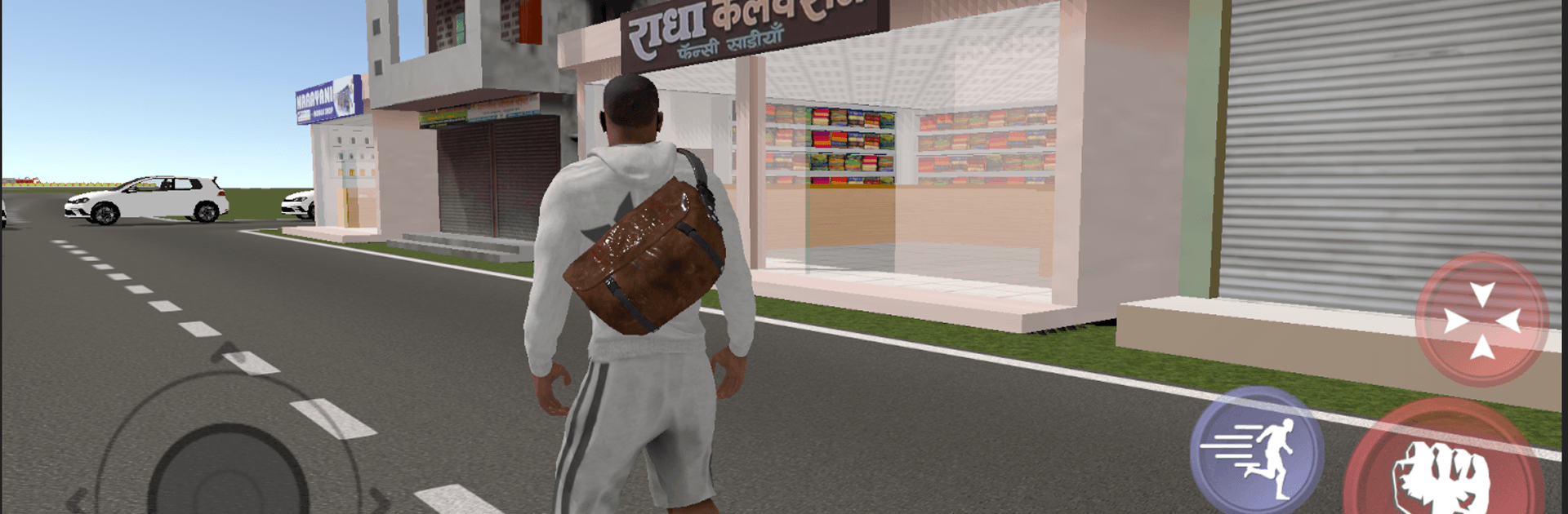
Indian City Bike Simulator is all about the joy of two wheels and a city that never really slows down. This Simulation from BI GAMES drops you into a lively Indian metropolis where you can just ride—no pressure, no timer—exploring streets, shortcuts, and unexpected corners at your own pace. Want to roll past everyday spots most games ignore? You’ll even find routes that take you by the railway station and around the airport. Prefer a bigger screen? It also feels great on BlueStacks.

Game Features

  • Open-world riding: Cruise through a sprawling city inspired by India, from broad avenues to tight back lanes, and pick your own path every time.
  • Landmark zones: Check out detailed areas near the railway station and airport, giving your rides a real sense of place.
  • Realistic bike feel: Smooth acceleration, believable handling, and a grounded sense of speed make each turn and straightaway feel rewarding.
  • Simple controls: Hop on and go with pick-up-and-ride inputs that stay out of your way while you learn the streets.
  • City vibes: Expect busy intersections, long flyovers, and clear stretches where you can open it up—each neighborhood has its own rhythm.
  • Ride your way: Cruise slowly to take in the scenery or practice cleaner lines and tighter corners when you’re in the zone.
  • Switchable views: Change camera angles to match your comfort—go closer for immersion or pull back for a wider look.
  • PC-friendly option: If you like playing on desktop, Indian City Bike Simulator runs smoothly on BlueStacks for a clean, comfy setup.

Make your gaming sessions memorable with precise controls that give you an edge in close combats and visuals that pop up, bringing every character to life.


Game Features

Enhancements

  • Macros
  • Multi Instance
  • Multi Instance Sync
  • Script
  • Enhancements
Macros

Macros

Automate the predictable in Indian City Bike Simulator and transform your gameplay with Macros. Get access to inventive Macros in the BlueStacks Macro Community
Multi Instance

Multi Instance

Play Indian City Bike Simulator on one window. And chat with your friend on the other. Press CTRL + Shift + 8 to open the Multi-Instance Manager. And start creating fresh instances or clone an existing one.
Multi Instance Sync

Multi Instance Sync

Play Indian City Bike Simulator with the power of Multi-Instance Sync. Replicate what you are doing on the main instance on all other instances. Level up faster, play more.
Script

Script

Script your way to gaming glory in Indian City Bike Simulator with BlueStacks Script. Write and run a set of commands to automate repeated tasks. Trigger the command by assigning it to any key.
Read More

How to Download and Play Indian City Bike Simulator on PC or Mac

  • Download and install BlueStacks on your PC or Mac

  • Complete Google sign-in to access the Play Store, or do it later

  • Look for Indian City Bike Simulator in the search bar at the top right corner

  • Click to install Indian City Bike Simulator from the search results

  • Complete Google sign-in (if you skipped step 2) to install Indian City Bike Simulator

  • Click the Indian City Bike Simulator icon on the home screen to start playing

video
Watch Video

Minimum System Requirements

With BlueStacks 5, you can get started on a PC that fulfills the following requirements.

  • Operating System

    Microsoft Windows 7 or above, macOS 11 (Big Sur) or above

  • Processor

    Intel, AMD or Apple Silicon Processor

  • RAM

    at least 4GB

  • HDD

    10GB Free Disk Space

Note:

* You must be an Administrator on your PC. Up to date graphics drivers from Microsoft or the chipset vendor.

Indian City Bike Simulator - FAQs

  • How to play Indian City Bike Simulator on Windows PC & Mac?

    Play Indian City Bike Simulator on your PC or Mac by following these simple steps.

    • Click on 'Play Indian City Bike Simulator on PC’ to download BlueStacks
    • Install it and log-in to Google Play Store
    • Launch and play the game.
  • Why is BlueStacks the fastest and safest platform to play games on PC?

    BlueStacks respects your privacy and is always safe and secure to use. It does not carry any malware, spyware, or any sort of additional software that could harm your PC.

    It is engineered to optimize speed and performance for a seamless gaming experience.

  • What are Indian City Bike Simulator PC requirements?

    Minimum requirement to run Indian City Bike Simulator on your PC

    • OS: Microsoft Windows 7 or above MacOS 11 (Big Sur) or above
    • Processor: Intel, AMD or Apple Silicon Processor
    • RAM: Your PC must have at least 4GB of RAM. (Note that having 4GB or more disk space is not a substitute for RAM)
    • HDD: 10GB Free Disk Space.
    • You must be an Administrator on your PC.







