
Sprunki Ragdoll Playground

Sprunki Ragdoll Playground

Simulation

| Doublentil

Play on PC with BlueStacks or from our cloud

  • Overview
  • Game Features
  • How to Play

Page Modified On: August 31, 2026

Play Sprunki Ragdoll Playground on PC or Mac

Explore a whole new adventure with Sprunki Ragdoll Playground, a Simulation game created by Doublentil. Experience great gameplay with BlueStacks, the most popular gaming platform to play Android games on your PC or Mac.

About the Game

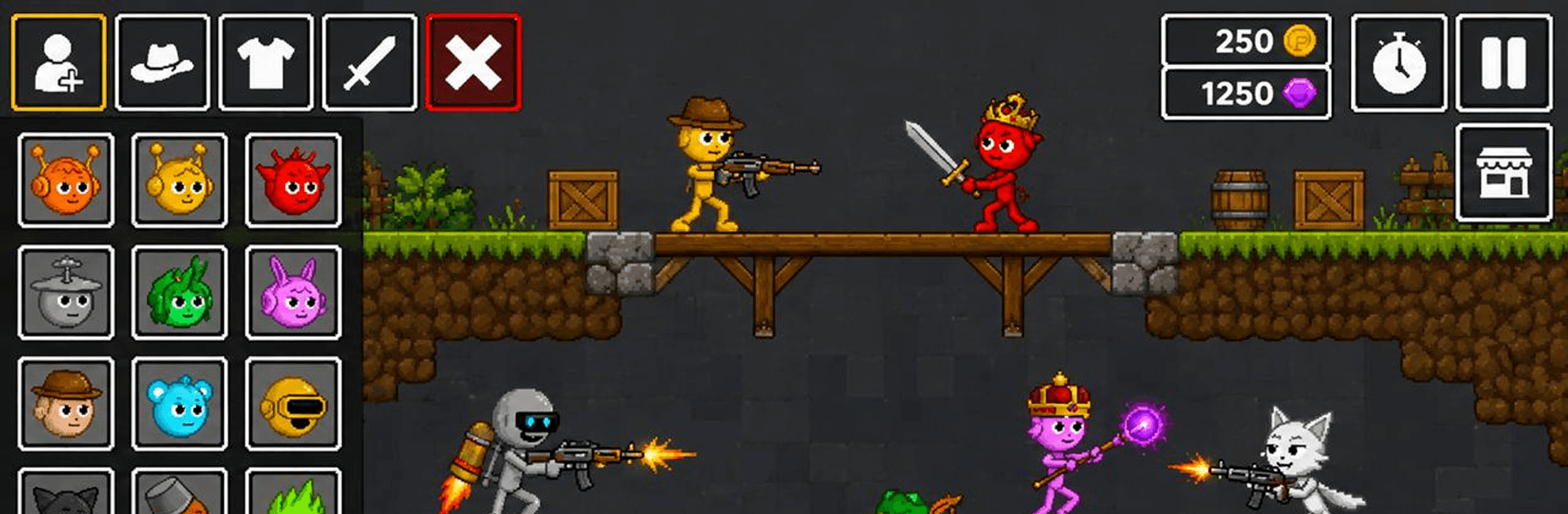
Sprunki Ragdoll Playground is a playful physics sandbox where your curiosity calls the shots. Stack parts into wild contraptions, fling ragdolls into cushioned chaos, and see what oddball chains of cause-and-effect you can cook up. It’s a Simulation that feels equal parts toy box and science lab, perfect for quick experiments or long building sessions. Prefer a bigger workspace and steady controls? You can run it on PC with BlueStacks while you tinker.

Game Features

  • Open playground: Start with a blank stage and shape it into arenas, labs, or crash-test courses—no scripts, just your ideas.
  • Lively physics: Objects tumble, bend, and collide in ways that look and feel right, making every mess-up funny and every success satisfying.
  • Build or wreck: Snap together structures, then stress-test them with drops, crashes, and whatever “what if?” pops into your head.
  • Big toolbox: Browse a chunky catalog of parts, props, and interactive objects to wire up experiments or silly stunts.
  • Boom, bang, pow: From fireworks to heavy hitters, trigger explosions and chain reactions that turn tiny nudges into huge payoffs.
  • Ragdoll antics: Toss, stack, and sling hapless characters to see their noodle-limbed reactions to gravity and gadgets.
  • Scenario maker: Craft obstacle runs, timing puzzles, or mini battle set-ups and fine-tune until they’re just right.
  • Smooth feel and clean look: Responsive controls and crisp visuals keep your focus on the action, not the interface.
  • Play offline: Tinker wherever you are without a connection, perfect for quick sessions or deep experiments.
  • Fresh additions: Expect new toys and tweaks over time that spark fresh ideas and new kinds of chaos.

Get ready for a buttery smooth, high-performance gaming action only on BlueStacks.

Game Features

Enhancements

  • Macros
  • Multi Instance
  • Multi Instance Sync
  • Script
  • Enhancements
Macros

Macros

Automate the predictable in Sprunki Ragdoll Playground and transform your gameplay with Macros. Get access to inventive Macros in the BlueStacks Macro Community
Multi Instance

Multi Instance

Play Sprunki Ragdoll Playground on one window. And chat with your friend on the other. Press CTRL + Shift + 8 to open the Multi-Instance Manager. And start creating fresh instances or clone an existing one.
Multi Instance Sync

Multi Instance Sync

Play Sprunki Ragdoll Playground with the power of Multi-Instance Sync. Replicate what you are doing on the main instance on all other instances. Level up faster, play more.
Script

Script

Script your way to gaming glory in Sprunki Ragdoll Playground with BlueStacks Script. Write and run a set of commands to automate repeated tasks. Trigger the command by assigning it to any key.
Read More

How to Download and Play Sprunki Ragdoll Playground on PC or Mac

  • Download and install BlueStacks on your PC or Mac

  • Complete Google sign-in to access the Play Store, or do it later

  • Look for Sprunki Ragdoll Playground in the search bar at the top right corner

  • Click to install Sprunki Ragdoll Playground from the search results

  • Complete Google sign-in (if you skipped step 2) to install Sprunki Ragdoll Playground

  • Click the Sprunki Ragdoll Playground icon on the home screen to start playing

video
Watch Video

Minimum System Requirements

With BlueStacks 5, you can get started on a PC that fulfills the following requirements.

  • Operating System

    Microsoft Windows 7 or above, macOS 11 (Big Sur) or above

  • Processor

    Intel, AMD or Apple Silicon Processor

  • RAM

    at least 4GB

  • HDD

    10GB Free Disk Space

Note:

* You must be an Administrator on your PC. Up to date graphics drivers from Microsoft or the chipset vendor.

Sprunki Ragdoll Playground - FAQs

  • How to play Sprunki Ragdoll Playground on Windows PC & Mac?

    Play Sprunki Ragdoll Playground on your PC or Mac by following these simple steps.

    • Click on 'Play Sprunki Ragdoll Playground on PC’ to download BlueStacks
    • Install it and log-in to Google Play Store
    • Launch and play the game.
  • Why is BlueStacks the fastest and safest platform to play games on PC?

    BlueStacks respects your privacy and is always safe and secure to use. It does not carry any malware, spyware, or any sort of additional software that could harm your PC.

    It is engineered to optimize speed and performance for a seamless gaming experience.

  • What are Sprunki Ragdoll Playground PC requirements?

    Minimum requirement to run Sprunki Ragdoll Playground on your PC

    • OS: Microsoft Windows 7 or above MacOS 11 (Big Sur) or above
    • Processor: Intel, AMD or Apple Silicon Processor
    • RAM: Your PC must have at least 4GB of RAM. (Note that having 4GB or more disk space is not a substitute for RAM)
    • HDD: 10GB Free Disk Space.
    • You must be an Administrator on your PC.








