Minicraft - Block Craftarena

Minicraft - Block Craftarena

Simulation

| Anamika conductors

Play on PC with BlueStacks or from our cloud

  • Overview
  • Game Features
  • How to Play

Page Modified On: April 01, 2026

Play Minicraft - Block Craftarena on PC or Mac

Minicraft – Block Craftarena brings the Simulation genre to life, and throws up exciting challenges for gamers. Developed by Anamika conductors, this Android game is best experienced on BlueStacks, the World’s #1 app player for PC and Mac users.

About the Game

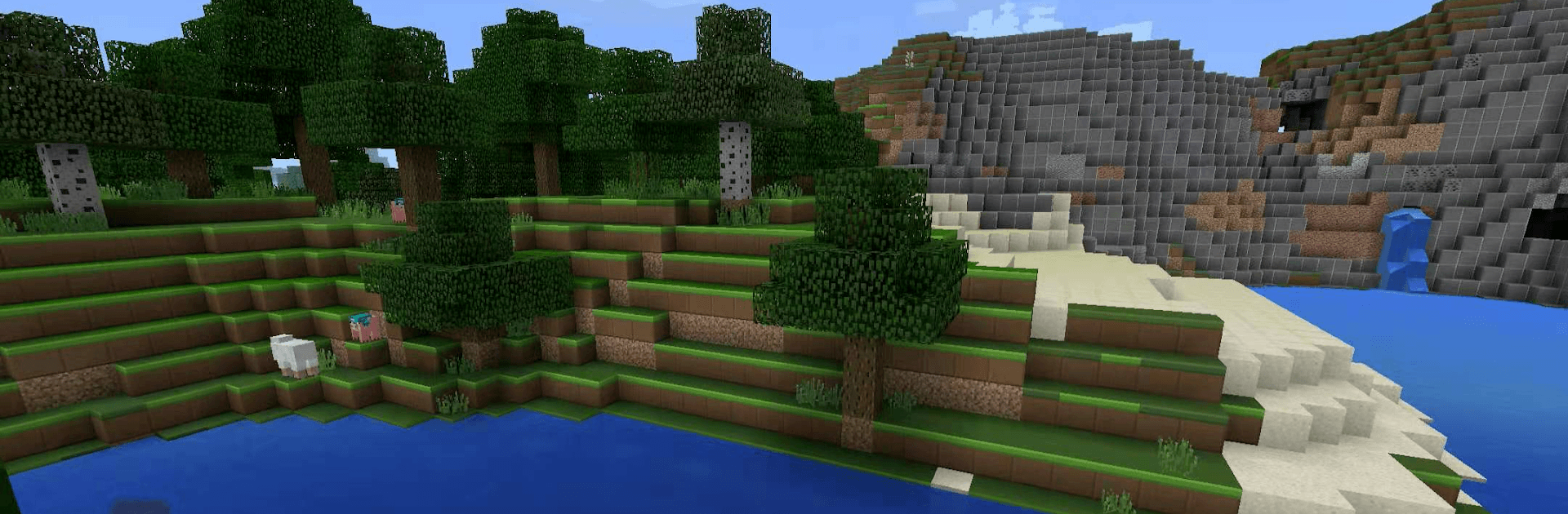
Minicraft – Block Craftarena gives you a big, blocky playground where you can build, roam, and try out survival without overcomplicating things. This Simulation sandbox from Anamika conductors blends open-world exploration with crafting and construction, letting you swap between chill creativity and tense “hope I make it through the night” moments. Sketch a cozy cabin, plan a towering fortress, or just wander off to see what’s over the next hill—there’s room for all of it.

Game Features

  • Ever-changing worlds: Venture through sprawling, procedurally generated maps packed with forests, deserts, caves, oceans, and the odd secret spot you’ll want to claim.
  • Build without limits: Place blocks fast and clean, from simple shelters to mega castles, whole towns, survival bases, and scenic showpieces.
  • Survival that keeps you thinking: Gather resources, craft tools and weapons, watch your health and hunger, and brace for tougher nights with unfriendly creatures.
  • Creative mode freedom: Turn off the danger, fly around, and use unlimited blocks for pure designing and tinkering—no grind required.
  • Mining and crafting that matter: Dig up useful materials and rare ores, then use a straightforward grid to make gear, armor, and advanced items that push your progress.
  • Deeper systems to master: Upgrade tools, enhance items, mix potion-style boosts, and experiment with automation-flavored blocks for smarter builds.
  • Biomes with personality: Each region has its own look, resources, and quirks, so exploration keeps sparking new ideas.
  • Built for solo or friends: Team up for shared projects, race through survival challenges, or just explore together in multiplayer.
  • Smooth and responsive: Clean UI, stable 3D performance, and controls that feel right whether you’re building or battling.
  • Plays great on PC too: Prefer a bigger screen and keyboard? It runs comfortably with BlueStacks while staying crisp and snappy.

Start your journey now. Download the game on BlueStacks, invite your friends, and march on a new adventure.


Game Features

Enhancements

  • Macros
  • Multi Instance
  • Multi Instance Sync
  • Script
  • Enhancements
Macros

Macros

Automate the predictable in Minicraft - Block Craftarena and transform your gameplay with Macros. Get access to inventive Macros in the BlueStacks Macro Community
Multi Instance

Multi Instance

Play Minicraft - Block Craftarena on one window. And chat with your friend on the other. Press CTRL + Shift + 8 to open the Multi-Instance Manager. And start creating fresh instances or clone an existing one.
Multi Instance Sync

Multi Instance Sync

Play Minicraft - Block Craftarena with the power of Multi-Instance Sync. Replicate what you are doing on the main instance on all other instances. Level up faster, play more.
Script

Script

Script your way to gaming glory in Minicraft - Block Craftarena with BlueStacks Script. Write and run a set of commands to automate repeated tasks. Trigger the command by assigning it to any key.
Read More

How to Download and Play Minicraft - Block Craftarena on PC or Mac

  • Download and install BlueStacks on your PC or Mac

  • Complete Google sign-in to access the Play Store, or do it later

  • Look for Minicraft - Block Craftarena in the search bar at the top right corner

  • Click to install Minicraft - Block Craftarena from the search results

  • Complete Google sign-in (if you skipped step 2) to install Minicraft - Block Craftarena

  • Click the Minicraft - Block Craftarena icon on the home screen to start playing

video
Watch Video

Minimum System Requirements

With BlueStacks 5, you can get started on a PC that fulfills the following requirements.

  • Operating System

    Microsoft Windows 7 or above, macOS 11 (Big Sur) or above

  • Processor

    Intel, AMD or Apple Silicon Processor

  • RAM

    at least 4GB

  • HDD

    10GB Free Disk Space

Note:

* You must be an Administrator on your PC. Up to date graphics drivers from Microsoft or the chipset vendor.

Minicraft - Block Craftarena - FAQs

  • How to play Minicraft - Block Craftarena on Windows PC & Mac?

    Play Minicraft - Block Craftarena on your PC or Mac by following these simple steps.

    • Click on 'Play Minicraft - Block Craftarena on PC’ to download BlueStacks
    • Install it and log-in to Google Play Store
    • Launch and play the game.
  • Why is BlueStacks the fastest and safest platform to play games on PC?

    BlueStacks respects your privacy and is always safe and secure to use. It does not carry any malware, spyware, or any sort of additional software that could harm your PC.

    It is engineered to optimize speed and performance for a seamless gaming experience.

  • What are Minicraft - Block Craftarena PC requirements?

    Minimum requirement to run Minicraft - Block Craftarena on your PC

    • OS: Microsoft Windows 7 or above MacOS 11 (Big Sur) or above
    • Processor: Intel, AMD or Apple Silicon Processor
    • RAM: Your PC must have at least 4GB of RAM. (Note that having 4GB or more disk space is not a substitute for RAM)
    • HDD: 10GB Free Disk Space.
    • You must be an Administrator on your PC.