Pigeon Simulator
Pigeon Simulator

Pigeon Simulator

Simulation

| Hittite Games

Play on PC with BlueStacks or from our cloud

  • Overview
  • Game Features
  • How to Play

Page Modified On: October 05, 2026

Play Pigeon Simulator on PC or Mac

Step into the World of Pigeon Simulator, a thrilling Simulation game from the house of Hittite Games. Play this Android game on BlueStacks App Player and experience immersive gaming on PC or Mac.

About the Game

Pigeon Simulator puts you in charge of a scrappy backyard loft and the lively birds that call it home. This is a relaxed Simulation experience where you’ll build a flock, care for every beak and feather, and then head skyward to fly right alongside them. Prefer a bigger screen? It runs nicely on BlueStacks, too.

Game Features

  • Build Your Loft: Grow a cozy loft for your birds and organize your space as your flock gets larger.
  • 23 Pigeon Varieties: Collect and raise 23 distinct pigeons inspired by places near and far, from Istanbul and Cappadocia to Paris, Tokyo, New York, and more.
  • Türkiye and World Collections: Fill themed sets named after destinations like Bosphorus, Pamukkale, Ephesus, Troy, Antalya, Ankara, Mardin, Mount Ararat, Gallipoli, Gobeklitepe, Rome, London, Cairo, Dubai, Rio, Sydney, Machu Picchu, and the Sahara.
  • Real Care, Simple Tools: Keep an eye on hunger, thirst, and overall health; provide food and water, treat illness, and keep everyone in top shape.
  • Pairing and Breeding: Match suitable birds, hatch new chicks, and raise the next generation of flyers for your loft.
  • Bird Market Trading: Buy promising newcomers or sell your well-raised pigeons to shape the flock you want.
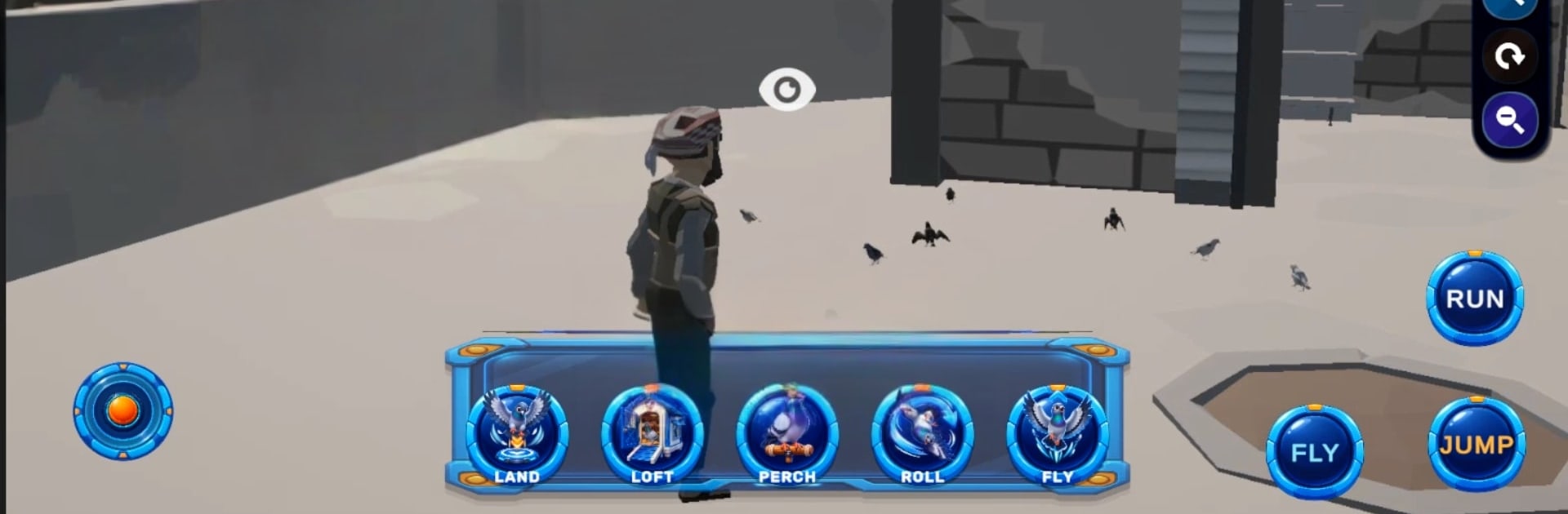
  • Be There in the Air: Walk, run, and jump on the ground—or take to the skies to fly right beside your pigeons.
  • Flight Camera Control: Use a zoomable camera mid-flight to track a bird up close or pull back for a full-flock view.
  • Flock Commands: Tell the squad when to take off, land, perch, pull off flips, or head back to the loft with a tap.
  • Stylized 3D World: Enjoy a clean, colorful look that keeps the focus on your birds and their aerial antics.

Get ready for a buttery smooth, high-performance gaming action only on BlueStacks.

Game Features

Enhancements

  • Macros
  • Multi Instance
  • Multi Instance Sync
  • Script
  • Enhancements
Macros

Macros

Automate the predictable in Pigeon Simulator and transform your gameplay with Macros. Get access to inventive Macros in the BlueStacks Macro Community
Multi Instance

Multi Instance

Play Pigeon Simulator on one window. And chat with your friend on the other. Press CTRL + Shift + 8 to open the Multi-Instance Manager. And start creating fresh instances or clone an existing one.
Multi Instance Sync

Multi Instance Sync

Play Pigeon Simulator with the power of Multi-Instance Sync. Replicate what you are doing on the main instance on all other instances. Level up faster, play more.
Script

Script

Script your way to gaming glory in Pigeon Simulator with BlueStacks Script. Write and run a set of commands to automate repeated tasks. Trigger the command by assigning it to any key.
Read More

How to Download and Play Pigeon Simulator on PC or Mac

  • Download and install BlueStacks on your PC or Mac

  • Complete Google sign-in to access the Play Store, or do it later

  • Look for Pigeon Simulator in the search bar at the top right corner

  • Click to install Pigeon Simulator from the search results

  • Complete Google sign-in (if you skipped step 2) to install Pigeon Simulator

  • Click the Pigeon Simulator icon on the home screen to start playing

video
Watch Video

Minimum System Requirements

With BlueStacks 5, you can get started on a PC that fulfills the following requirements.

  • Operating System

    Microsoft Windows 7 or above, macOS 11 (Big Sur) or above

  • Processor

    Intel, AMD or Apple Silicon Processor

  • RAM

    at least 4GB

  • HDD

    10GB Free Disk Space

Note:

* You must be an Administrator on your PC. Up to date graphics drivers from Microsoft or the chipset vendor.

Pigeon Simulator - FAQs

  • How to play Pigeon Simulator on Windows PC & Mac?

    Play Pigeon Simulator on your PC or Mac by following these simple steps.

    • Click on 'Play Pigeon Simulator on PC’ to download BlueStacks
    • Install it and log-in to Google Play Store
    • Launch and play the game.
  • Why is BlueStacks the fastest and safest platform to play games on PC?

    BlueStacks respects your privacy and is always safe and secure to use. It does not carry any malware, spyware, or any sort of additional software that could harm your PC.

    It is engineered to optimize speed and performance for a seamless gaming experience.

  • What are Pigeon Simulator PC requirements?

    Minimum requirement to run Pigeon Simulator on your PC

    • OS: Microsoft Windows 7 or above MacOS 11 (Big Sur) or above
    • Processor: Intel, AMD or Apple Silicon Processor
    • RAM: Your PC must have at least 4GB of RAM. (Note that having 4GB or more disk space is not a substitute for RAM)
    • HDD: 10GB Free Disk Space.
    • You must be an Administrator on your PC.