Hyundai Game - Munda kunda

Hyundai Game - Munda kunda

Simulation

| Game Tap

Play on PC with BlueStacks or from our cloud

  • Overview
  • Game Features
  • How to Play

Page Modified On: September 01, 2026

Play Hyundai Game - Munda kunda on PC or Mac

Hyundai Game – Munda kunda brings the Simulation genre to life, and throws up exciting challenges for gamers. Developed by Game Tap, this Android game is best experienced on BlueStacks, the World’s #1 app player for PC and Mac users.

About the Game

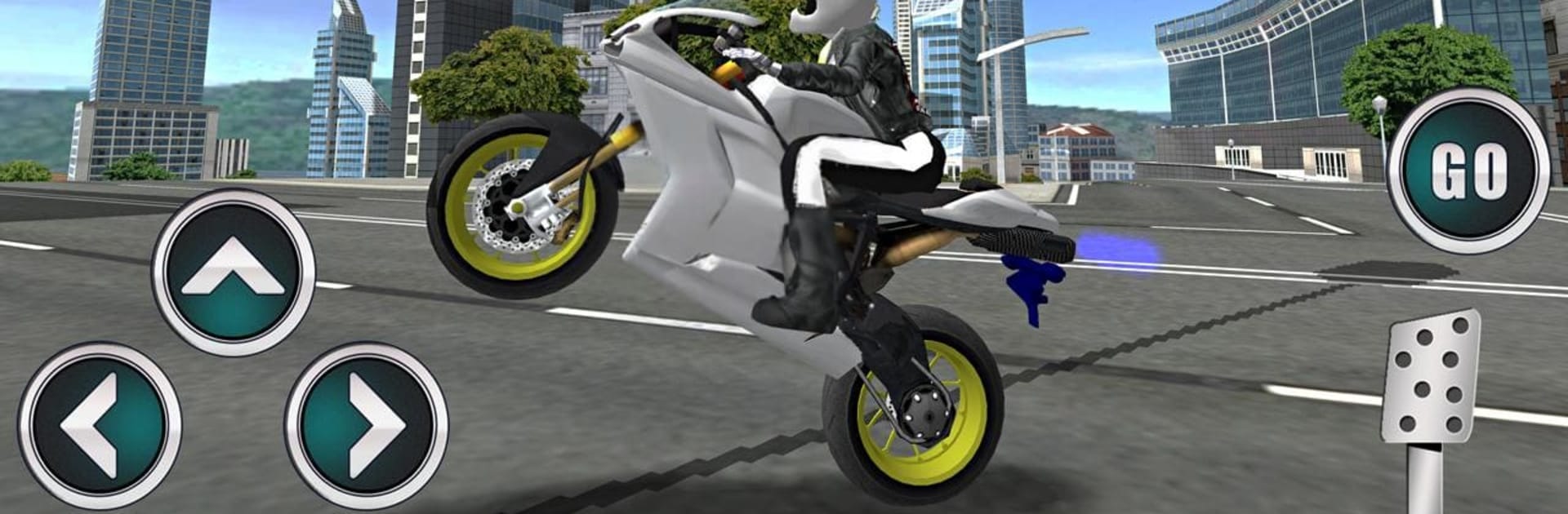
Hyundai Game – Munda kunda throws you onto a fast patrol bike and lets you cut through packed city streets like you own them. It’s a high-speed rush with jumps, near-misses, and tight turns where every second—and every ounce of throttle—counts. This is a Simulation experience built around believable handling, punchy acceleration, and stunts that feel earned, not scripted. Prefer playing on a bigger screen? It’s smooth and responsive on BlueStacks, too.

Game Features

  • Open-city traffic runs: Thread your way through busy avenues, slip past cars, and spot ramp opportunities as you chase better times and cleaner lines.
  • Lifelike handling model: Feel the weight shift, grip, and braking bite as the bike reacts naturally to your inputs at low and high speeds.
  • Stunts and airtime: Launch off ramps, hold wheelies, and string together gutsy maneuvers to keep your momentum (and your heart rate) up.
  • Nitro boost on tap: Hit NOS for a burst of speed that turns long straights into launch pads and tight gaps into easy passes.
  • Beat the clock, watch the tank: Hustle to the finish before time—and fuel—runs out, rewarding smooth riding and smart risk-taking.
  • Patrol-style bike design: Ride a sleek police-inspired machine that looks the part and feels built for pursuit-grade performance.
  • Flexible controls: Use tilt or on-screen steering, with separate gas and brake, so you can dial in the feel that fits your style.
  • Multiple camera views: Swap angles—from tight, close-up action to wider perspectives—for better awareness or just a different vibe.
  • Smooth, responsive feel: Clean frame pacing and tuned inputs keep the bike stable at speed, so your lines stay sharp and your landings stick.

Ready to top the leaderboard? We bet you do. Let precise controls and sharp visuals optimized on BlueStacks lead you to victory.


Game Features

Enhancements

  • Macros
  • Multi Instance
  • Multi Instance Sync
  • Script
  • Enhancements
Macros

Macros

Automate the predictable in Hyundai Game - Munda kunda and transform your gameplay with Macros. Get access to inventive Macros in the BlueStacks Macro Community
Multi Instance

Multi Instance

Play Hyundai Game - Munda kunda on one window. And chat with your friend on the other. Press CTRL + Shift + 8 to open the Multi-Instance Manager. And start creating fresh instances or clone an existing one.
Multi Instance Sync

Multi Instance Sync

Play Hyundai Game - Munda kunda with the power of Multi-Instance Sync. Replicate what you are doing on the main instance on all other instances. Level up faster, play more.
Script

Script

Script your way to gaming glory in Hyundai Game - Munda kunda with BlueStacks Script. Write and run a set of commands to automate repeated tasks. Trigger the command by assigning it to any key.
Read More

How to Download and Play Hyundai Game - Munda kunda on PC or Mac

  • Download and install BlueStacks on your PC or Mac

  • Complete Google sign-in to access the Play Store, or do it later

  • Look for Hyundai Game - Munda kunda in the search bar at the top right corner

  • Click to install Hyundai Game - Munda kunda from the search results

  • Complete Google sign-in (if you skipped step 2) to install Hyundai Game - Munda kunda

  • Click the Hyundai Game - Munda kunda icon on the home screen to start playing

video
Watch Video

Minimum System Requirements

With BlueStacks 5, you can get started on a PC that fulfills the following requirements.

  • Operating System

    Microsoft Windows 7 or above, macOS 11 (Big Sur) or above

  • Processor

    Intel, AMD or Apple Silicon Processor

  • RAM

    at least 4GB

  • HDD

    10GB Free Disk Space

Note:

* You must be an Administrator on your PC. Up to date graphics drivers from Microsoft or the chipset vendor.

Hyundai Game - Munda kunda - FAQs

  • How to play Hyundai Game - Munda kunda on Windows PC & Mac?

    Play Hyundai Game - Munda kunda on your PC or Mac by following these simple steps.

    • Click on 'Play Hyundai Game - Munda kunda on PC’ to download BlueStacks
    • Install it and log-in to Google Play Store
    • Launch and play the game.
  • Why is BlueStacks the fastest and safest platform to play games on PC?

    BlueStacks respects your privacy and is always safe and secure to use. It does not carry any malware, spyware, or any sort of additional software that could harm your PC.

    It is engineered to optimize speed and performance for a seamless gaming experience.

  • What are Hyundai Game - Munda kunda PC requirements?

    Minimum requirement to run Hyundai Game - Munda kunda on your PC

    • OS: Microsoft Windows 7 or above MacOS 11 (Big Sur) or above
    • Processor: Intel, AMD or Apple Silicon Processor
    • RAM: Your PC must have at least 4GB of RAM. (Note that having 4GB or more disk space is not a substitute for RAM)
    • HDD: 10GB Free Disk Space.
    • You must be an Administrator on your PC.