Raft® Multiplayer: Survival

Raft® Multiplayer: Survival

Simulation

| Survival Games Ltd

Play on PC with BlueStacks or from our cloud

  • Overview
  • Game Features
  • How to Play

Page Modified On: May 11, 2026

Play Raft® Multiplayer: Survival on PC or Mac

Bring your A-game to Raft® Multiplayer: Survival, the Simulation game sensation from Survival Games Ltd. Give your gameplay the much-needed boost with precise game controls, high FPS graphics, and top-tier features on your PC or Mac with BlueStacks.

About the Game

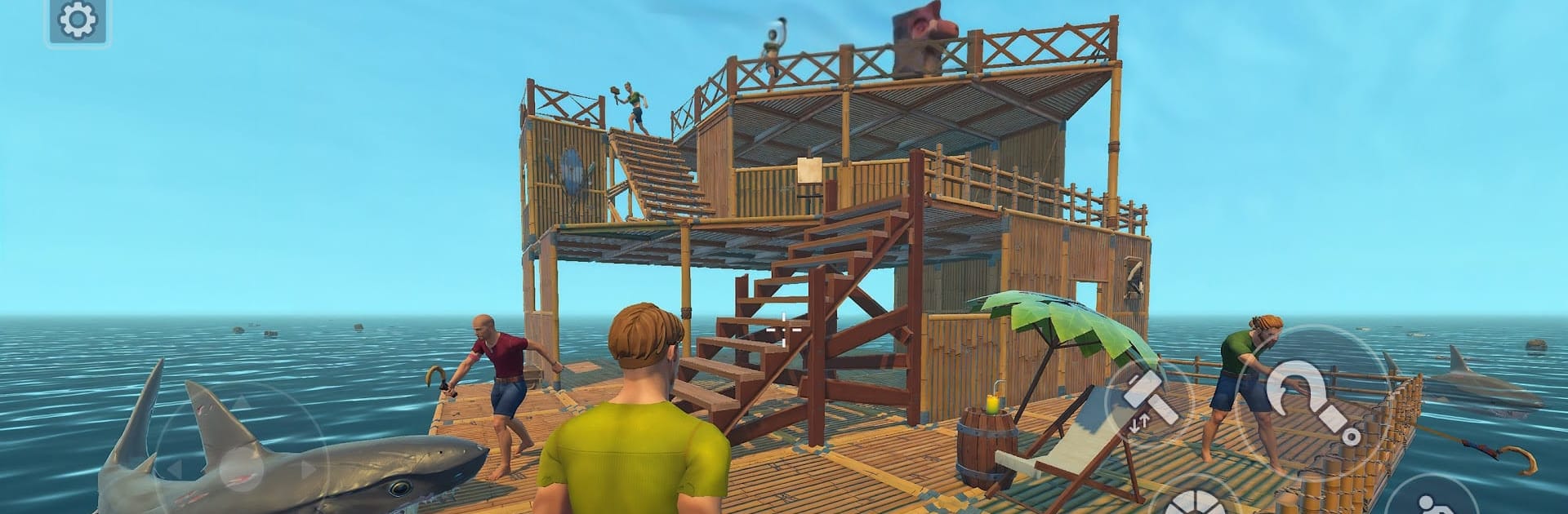
Raft® Multiplayer: Survival from Survival Games Ltd is a Simulation game where the ocean is both your backyard and your biggest test. You’ll start on a tiny platform, haul in whatever the waves bring, and slowly turn scraps into a floating home worth showing off. Play solo or with friends, with a handy third-person view that makes scanning the horizon and managing your build feel natural—and if you like keyboard and mouse, it plays great on BlueStacks.

Game Features

  • Your raft, your rules: Expand from a few planks to a full-on base with floors, walls, furniture, and storage—organized or chaotic, it’s your call.
  • Hook, haul, hoard: Snag drifting loot, stash the good stuff, and keep your raft patched up. Every plank counts when a storm hits.
  • Craft and improve: Turn raw finds into tools, stations, and defenses. Build smarter gear as you grow and keep threats at bay.
  • Clear third-person view: Keep an eye on incoming resources, check your layout, and steer around hazards without wrestling the camera.
  • Co-op made simple: Team up with other rafters, swing by their builds, lend a hand, or get ideas for your own layout.
  • Quick reactions, no typing: Use a reaction wheel to greet, call for help, or share a mood without stopping the action.
  • Waters with bite: Waves can steal loot—and you—if you’re careless. Prep better tools and keep weapons close for the rough patches.
  • Make it your style: Go chill builder, efficient scavenger, or community helper in a shared online world that rewards creativity and teamwork.

Ready to top the leaderboard? We bet you do. Let precise controls and sharp visuals optimized on BlueStacks lead you to victory.


Game Features

Enhancements

  • Macros
  • Multi Instance
  • Multi Instance Sync
  • Script
  • Enhancements
Macros

Macros

Automate the predictable in Raft® Multiplayer: Survival and transform your gameplay with Macros. Get access to inventive Macros in the BlueStacks Macro Community
Multi Instance

Multi Instance

Play Raft® Multiplayer: Survival on one window. And chat with your friend on the other. Press CTRL + Shift + 8 to open the Multi-Instance Manager. And start creating fresh instances or clone an existing one.
Multi Instance Sync

Multi Instance Sync

Play Raft® Multiplayer: Survival with the power of Multi-Instance Sync. Replicate what you are doing on the main instance on all other instances. Level up faster, play more.
Script

Script

Script your way to gaming glory in Raft® Multiplayer: Survival with BlueStacks Script. Write and run a set of commands to automate repeated tasks. Trigger the command by assigning it to any key.
Read More

How to Download and Play Raft® Multiplayer: Survival on PC or Mac

  • Download and install BlueStacks on your PC or Mac

  • Complete Google sign-in to access the Play Store, or do it later

  • Look for Raft® Multiplayer: Survival in the search bar at the top right corner

  • Click to install Raft® Multiplayer: Survival from the search results

  • Complete Google sign-in (if you skipped step 2) to install Raft® Multiplayer: Survival

  • Click the Raft® Multiplayer: Survival icon on the home screen to start playing

video
Watch Video

Minimum System Requirements

With BlueStacks 5, you can get started on a PC that fulfills the following requirements.

  • Operating System

    Microsoft Windows 7 or above, macOS 11 (Big Sur) or above

  • Processor

    Intel, AMD or Apple Silicon Processor

  • RAM

    at least 4GB

  • HDD

    10GB Free Disk Space

Note:

* You must be an Administrator on your PC. Up to date graphics drivers from Microsoft or the chipset vendor.

Raft® Multiplayer: Survival - FAQs

  • How to play Raft® Multiplayer: Survival on Windows PC & Mac?

    Play Raft® Multiplayer: Survival on your PC or Mac by following these simple steps.

    • Click on 'Play Raft® Multiplayer: Survival on PC’ to download BlueStacks
    • Install it and log-in to Google Play Store
    • Launch and play the game.
  • Why is BlueStacks the fastest and safest platform to play games on PC?

    BlueStacks respects your privacy and is always safe and secure to use. It does not carry any malware, spyware, or any sort of additional software that could harm your PC.

    It is engineered to optimize speed and performance for a seamless gaming experience.

  • What are Raft® Multiplayer: Survival PC requirements?

    Minimum requirement to run Raft® Multiplayer: Survival on your PC

    • OS: Microsoft Windows 7 or above MacOS 11 (Big Sur) or above
    • Processor: Intel, AMD or Apple Silicon Processor
    • RAM: Your PC must have at least 4GB of RAM. (Note that having 4GB or more disk space is not a substitute for RAM)
    • HDD: 10GB Free Disk Space.
    • You must be an Administrator on your PC.