Russian Village Simulator 3D

Russian Village Simulator 3D

Simulation

| Zealand Team

Play on PC with BlueStacks or from our cloud

  • Overview
  • Game Features
  • How to Play

Page Modified On: January 05, 2026

Play Russian Village Simulator 3D on PC or Mac

From the innovators and creators at Zealand Team, Russian Village Simulator 3D is another fun addition to the World of Simulation games. Go beyond your mobile screen and play it bigger and better on your PC or Mac. An immersive experience awaits you.

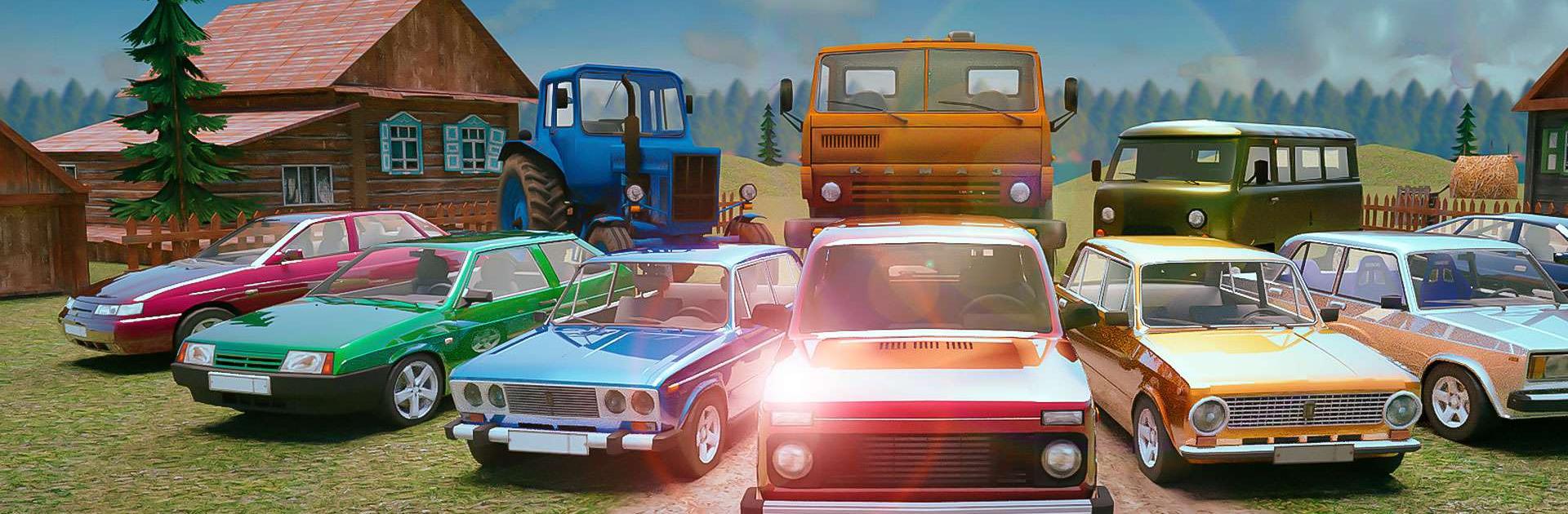
Russian Village Simulator 3D drops the player into Malinovka as a simple country guy and lets them roam without a checklist. It is an open world that swaps city noise for dirt roads, a quiet river, and the feeling of empty fields turning into forest trails. There are cows, pigs, chickens wandering around, an old VAZ 2101 to rattle through town, and side distractions like a village disco that somehow turns into a story all by itself. Fights can happen if someone pushes it, and the locals do not forget, so starting trouble has a price. Here and there are odd secrets and little moments, plus the occasional sip of grandma’s concoction that gives the place a goofy, homemade charm.

Driving is the highlight. The car handles chunky and real, takes damage when a fence post wins, and has just enough wobble to make every dirt sprint feel risky. First person view makes everything feel close, and the ragdoll physics mean objects and people react in funny, messy ways. The AI villagers are feisty enough to keep the village from feeling empty. On PC with BlueStacks, keyboard steering and mouse look makes cruising, scuffles, and quick turns smoother than on a phone. It is not about strict objectives or a deep storyline. It is a laid-back sandbox with a rough rural edge, where breaking stuff and poking around fields is the whole point.

Ready to top the leaderboard? We bet you do. Let precise controls and sharp visuals optimized on BlueStacks lead you to victory.


Game Features

Enhancements

  • Macros
  • Multi Instance
  • Multi Instance Sync
  • Script
  • Enhancements
Macros

Macros

Automate the predictable in Russian Village Simulator 3D and transform your gameplay with Macros. Get access to inventive Macros in the BlueStacks Macro Community
Multi Instance

Multi Instance

Play Russian Village Simulator 3D on one window. And chat with your friend on the other. Press CTRL + Shift + 8 to open the Multi-Instance Manager. And start creating fresh instances or clone an existing one.
Multi Instance Sync

Multi Instance Sync

Play Russian Village Simulator 3D with the power of Multi-Instance Sync. Replicate what you are doing on the main instance on all other instances. Level up faster, play more.
Script

Script

Script your way to gaming glory in Russian Village Simulator 3D with BlueStacks Script. Write and run a set of commands to automate repeated tasks. Trigger the command by assigning it to any key.
Read More

How to Download and Play Russian Village Simulator 3D on PC or Mac

  • Download and install BlueStacks on your PC or Mac

  • Complete Google sign-in to access the Play Store, or do it later

  • Look for Russian Village Simulator 3D in the search bar at the top right corner

  • Click to install Russian Village Simulator 3D from the search results

  • Complete Google sign-in (if you skipped step 2) to install Russian Village Simulator 3D

  • Click the Russian Village Simulator 3D icon on the home screen to start playing

video
Watch Video

Minimum System Requirements

With BlueStacks 5, you can get started on a PC that fulfills the following requirements.

  • Operating System

    Microsoft Windows 7 or above, macOS 11 (Big Sur) or above

  • Processor

    Intel, AMD or Apple Silicon Processor

  • RAM

    at least 4GB

  • HDD

    10GB Free Disk Space

Note:

* You must be an Administrator on your PC. Up to date graphics drivers from Microsoft or the chipset vendor.

Russian Village Simulator 3D - FAQs

  • How to play Russian Village Simulator 3D on Windows PC & Mac?

    Play Russian Village Simulator 3D on your PC or Mac by following these simple steps.

    • Click on 'Play Russian Village Simulator 3D on PC’ to download BlueStacks
    • Install it and log-in to Google Play Store
    • Launch and play the game.
  • Why is BlueStacks the fastest and safest platform to play games on PC?

    BlueStacks respects your privacy and is always safe and secure to use. It does not carry any malware, spyware, or any sort of additional software that could harm your PC.

    It is engineered to optimize speed and performance for a seamless gaming experience.

  • What are Russian Village Simulator 3D PC requirements?

    Minimum requirement to run Russian Village Simulator 3D on your PC

    • OS: Microsoft Windows 7 or above MacOS 11 (Big Sur) or above
    • Processor: Intel, AMD or Apple Silicon Processor
    • RAM: Your PC must have at least 4GB of RAM. (Note that having 4GB or more disk space is not a substitute for RAM)
    • HDD: 10GB Free Disk Space.
    • You must be an Administrator on your PC.