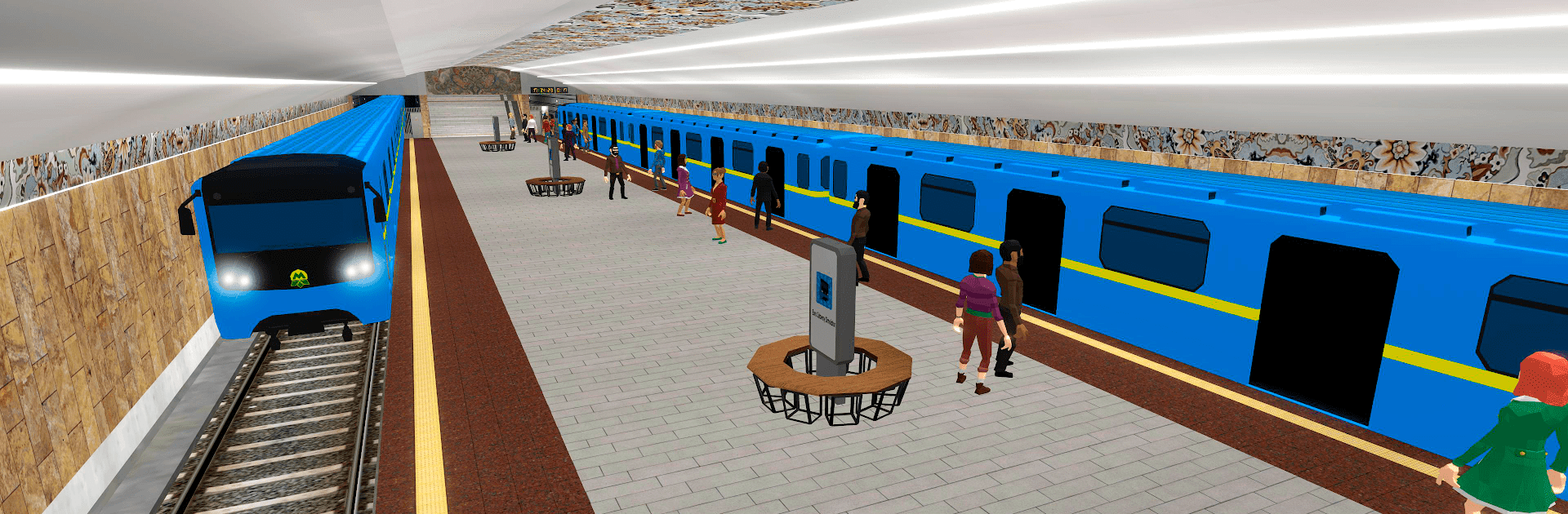
Train Simulator: metro 3D Pro

Train Simulator: metro 3D Pro

Simulation

| Gem Jam

Play on PC with BlueStacks or from our cloud

  • Overview
  • Game Features
  • How to Play

Page Modified On: January 06, 2026

Play Train Simulator: metro 3D Pro on PC or Mac

Bring your A-game to Train Simulator: metro 3D Pro, the Simulation game sensation from Gem Jam. Give your gameplay the much-needed boost with precise game controls, high FPS graphics, and top-tier features on your PC or Mac with BlueStacks.

Train Simulator: metro 3D Pro is a slow-and-steady subway sim where the player actually sits in a cab and runs a real route. It is all about the little routines that make a train feel alive. There are buttons and levers to manage, doors to open and close at the right moment, and a marker to line up with on the platform so passengers can board without fuss. A short tutorial at the so called subway university explains the controls, then it is on to carrying people between stations and keeping things on schedule. It feels methodical in a nice way, the kind of game where a smooth stop or a perfect departure is more satisfying than it sounds.

Between runs, there is a light tycoon layer. Earnings go into repairs and upgrades, like stronger engines for better acceleration, extra cars for more capacity, and new paint jobs. New stations and branches can be unlocked, which bumps up passenger flow and cash, so a tiny line slowly grows into a busier network. Trains are collectible too, with several real-world styled models to buy and some small bits of history attached to them. There are achievements to chase and leaderboards to compare with other drivers. It works offline, and there are optional purchases if someone wants to speed things up. On PC through BlueStacks, the dashboard is easier to read and mapping keys to doors and brakes makes control feel cleaner. If a player likes practical sims that reward attention and does not mind learning a cockpit of switches, this scratches that itch without being overly complex. Currently it rides through Ukraine, with more cities teased for later, so there is room to grow.

Ready to top the leaderboard? We bet you do. Let precise controls and sharp visuals optimized on BlueStacks lead you to victory.


Game Features

Enhancements

  • Macros
  • Multi Instance
  • Multi Instance Sync
  • Script
  • Enhancements
Macros

Macros

Automate the predictable in Train Simulator: metro 3D Pro and transform your gameplay with Macros. Get access to inventive Macros in the BlueStacks Macro Community
Multi Instance

Multi Instance

Play Train Simulator: metro 3D Pro on one window. And chat with your friend on the other. Press CTRL + Shift + 8 to open the Multi-Instance Manager. And start creating fresh instances or clone an existing one.
Multi Instance Sync

Multi Instance Sync

Play Train Simulator: metro 3D Pro with the power of Multi-Instance Sync. Replicate what you are doing on the main instance on all other instances. Level up faster, play more.
Script

Script

Script your way to gaming glory in Train Simulator: metro 3D Pro with BlueStacks Script. Write and run a set of commands to automate repeated tasks. Trigger the command by assigning it to any key.
Read More

How to Download and Play Train Simulator: metro 3D Pro on PC or Mac

  • Download and install BlueStacks on your PC or Mac

  • Complete Google sign-in to access the Play Store, or do it later

  • Look for Train Simulator: metro 3D Pro in the search bar at the top right corner

  • Click to install Train Simulator: metro 3D Pro from the search results

  • Complete Google sign-in (if you skipped step 2) to install Train Simulator: metro 3D Pro

  • Click the Train Simulator: metro 3D Pro icon on the home screen to start playing

video
Watch Video

Minimum System Requirements

With BlueStacks 5, you can get started on a PC that fulfills the following requirements.

  • Operating System

    Microsoft Windows 7 or above, macOS 11 (Big Sur) or above

  • Processor

    Intel, AMD or Apple Silicon Processor

  • RAM

    at least 4GB

  • HDD

    10GB Free Disk Space

Note:

* You must be an Administrator on your PC. Up to date graphics drivers from Microsoft or the chipset vendor.

Train Simulator: metro 3D Pro - FAQs

  • How to play Train Simulator: metro 3D Pro on Windows PC & Mac?

    Play Train Simulator: metro 3D Pro on your PC or Mac by following these simple steps.

    • Click on 'Play Train Simulator: metro 3D Pro on PC’ to download BlueStacks
    • Install it and log-in to Google Play Store
    • Launch and play the game.
  • Why is BlueStacks the fastest and safest platform to play games on PC?

    BlueStacks respects your privacy and is always safe and secure to use. It does not carry any malware, spyware, or any sort of additional software that could harm your PC.

    It is engineered to optimize speed and performance for a seamless gaming experience.

  • What are Train Simulator: metro 3D Pro PC requirements?

    Minimum requirement to run Train Simulator: metro 3D Pro on your PC

    • OS: Microsoft Windows 7 or above MacOS 11 (Big Sur) or above
    • Processor: Intel, AMD or Apple Silicon Processor
    • RAM: Your PC must have at least 4GB of RAM. (Note that having 4GB or more disk space is not a substitute for RAM)
    • HDD: 10GB Free Disk Space.
    • You must be an Administrator on your PC.