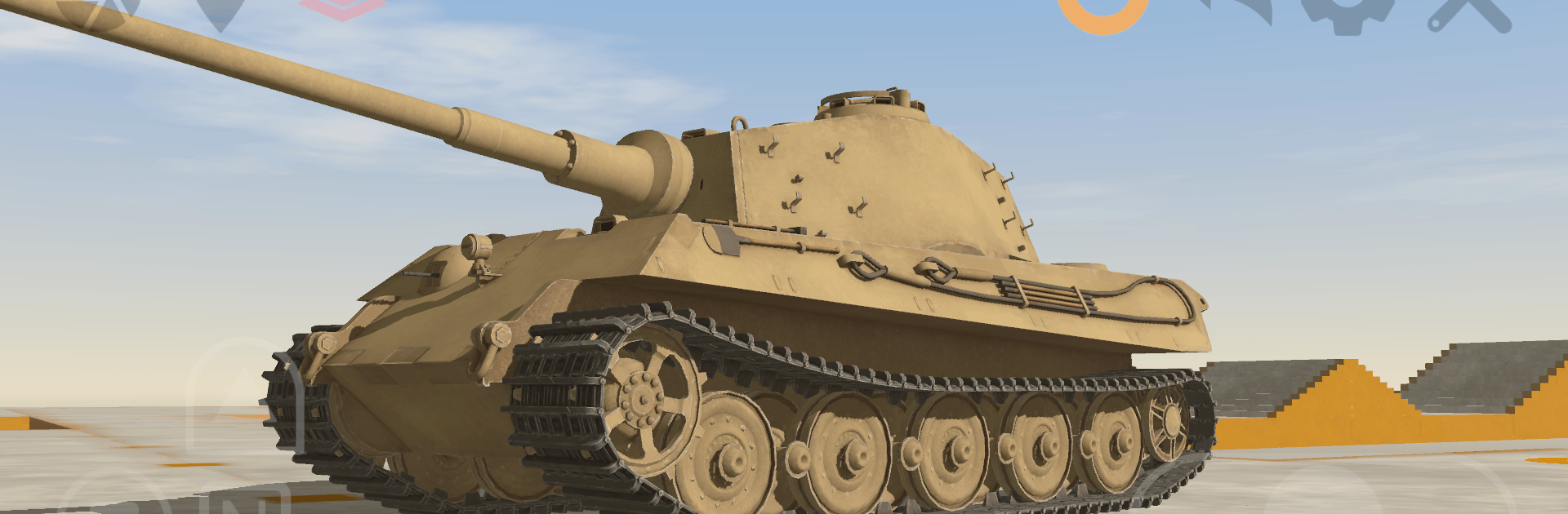
Tank Physics Mobile Vol.3

Tank Physics Mobile Vol.3

Simulation

| Chobi Software

Play on PC with BlueStacks or from our cloud

  • Overview
  • Game Features
  • How to Play

Page Modified On: September 07, 2026

Play Tank Physics Mobile Vol.3 on PC or Mac

Tank Physics Mobile Vol.3 brings the Simulation genre to life, and throws up exciting challenges for gamers. Developed by Chobi Software, this Android game is best experienced on BlueStacks, the World’s #1 app player for PC and Mac users.

About the Game

Tank Physics Mobile Vol.3 is a chill, oddly satisfying playground for anyone who loves heavy machines and precise movement. This Simulation skips combat entirely and focuses on the good stuff: watching real tanks roll, flex, and settle as their suspensions and tracks do all the hard work. Want a clearer look at every bounce and shift? It also works nicely on BlueStacks for a bigger, more comfortable view.

Game Features

  • Physics-first movement: Weight shifts, track tension, and wheel travel play out in real time as these steel beasts crawl, turn, and settle.
  • Operable classics: Take the controls of icons like Tiger II, Jagdtiger, Panzer III, StuG III, Maus, Karl Gerät, IS-2, T-35, CV33 (L3/33), and Type 74 MBT.
  • Suspension showcase: Watch road wheels articulate and tracks hug the ground, making every bump and lean feel authentic and grounded.
  • No combat, just mechanics: There are no enemies or explosions here—just pure machine behavior and the beauty of movement.
  • Simple, hands-on control: Ease forward, pivot, and roll while keeping an eye on how mass and traction affect the ride.
  • Up-close viewing: Take your time and observe from different angles to catch subtle details like track slack, wheel compression, and how everything works together.
  • Great for tinkering minds: Perfect if you’re curious about how tracked vehicles actually move—or if you just enjoy the calm of smooth, realistic motion.

Ready to top the leaderboard? We bet you do. Let precise controls and sharp visuals optimized on BlueStacks lead you to victory.


Game Features

Enhancements

  • Macros
  • Multi Instance
  • Multi Instance Sync
  • Script
  • Enhancements
Macros

Macros

Automate the predictable in Tank Physics Mobile Vol.3 and transform your gameplay with Macros. Get access to inventive Macros in the BlueStacks Macro Community
Multi Instance

Multi Instance

Play Tank Physics Mobile Vol.3 on one window. And chat with your friend on the other. Press CTRL + Shift + 8 to open the Multi-Instance Manager. And start creating fresh instances or clone an existing one.
Multi Instance Sync

Multi Instance Sync

Play Tank Physics Mobile Vol.3 with the power of Multi-Instance Sync. Replicate what you are doing on the main instance on all other instances. Level up faster, play more.
Script

Script

Script your way to gaming glory in Tank Physics Mobile Vol.3 with BlueStacks Script. Write and run a set of commands to automate repeated tasks. Trigger the command by assigning it to any key.
Read More

How to Download and Play Tank Physics Mobile Vol.3 on PC or Mac

  • Download and install BlueStacks on your PC or Mac

  • Complete Google sign-in to access the Play Store, or do it later

  • Look for Tank Physics Mobile Vol.3 in the search bar at the top right corner

  • Click to install Tank Physics Mobile Vol.3 from the search results

  • Complete Google sign-in (if you skipped step 2) to install Tank Physics Mobile Vol.3

  • Click the Tank Physics Mobile Vol.3 icon on the home screen to start playing

video
Watch Video

Minimum System Requirements

With BlueStacks 5, you can get started on a PC that fulfills the following requirements.

  • Operating System

    Microsoft Windows 7 or above, macOS 11 (Big Sur) or above

  • Processor

    Intel, AMD or Apple Silicon Processor

  • RAM

    at least 4GB

  • HDD

    10GB Free Disk Space

Note:

* You must be an Administrator on your PC. Up to date graphics drivers from Microsoft or the chipset vendor.

Tank Physics Mobile Vol.3 - FAQs

  • How to play Tank Physics Mobile Vol.3 on Windows PC & Mac?

    Play Tank Physics Mobile Vol.3 on your PC or Mac by following these simple steps.

    • Click on 'Play Tank Physics Mobile Vol.3 on PC’ to download BlueStacks
    • Install it and log-in to Google Play Store
    • Launch and play the game.
  • Why is BlueStacks the fastest and safest platform to play games on PC?

    BlueStacks respects your privacy and is always safe and secure to use. It does not carry any malware, spyware, or any sort of additional software that could harm your PC.

    It is engineered to optimize speed and performance for a seamless gaming experience.

  • What are Tank Physics Mobile Vol.3 PC requirements?

    Minimum requirement to run Tank Physics Mobile Vol.3 on your PC

    • OS: Microsoft Windows 7 or above MacOS 11 (Big Sur) or above
    • Processor: Intel, AMD or Apple Silicon Processor
    • RAM: Your PC must have at least 4GB of RAM. (Note that having 4GB or more disk space is not a substitute for RAM)
    • HDD: 10GB Free Disk Space.
    • You must be an Administrator on your PC.