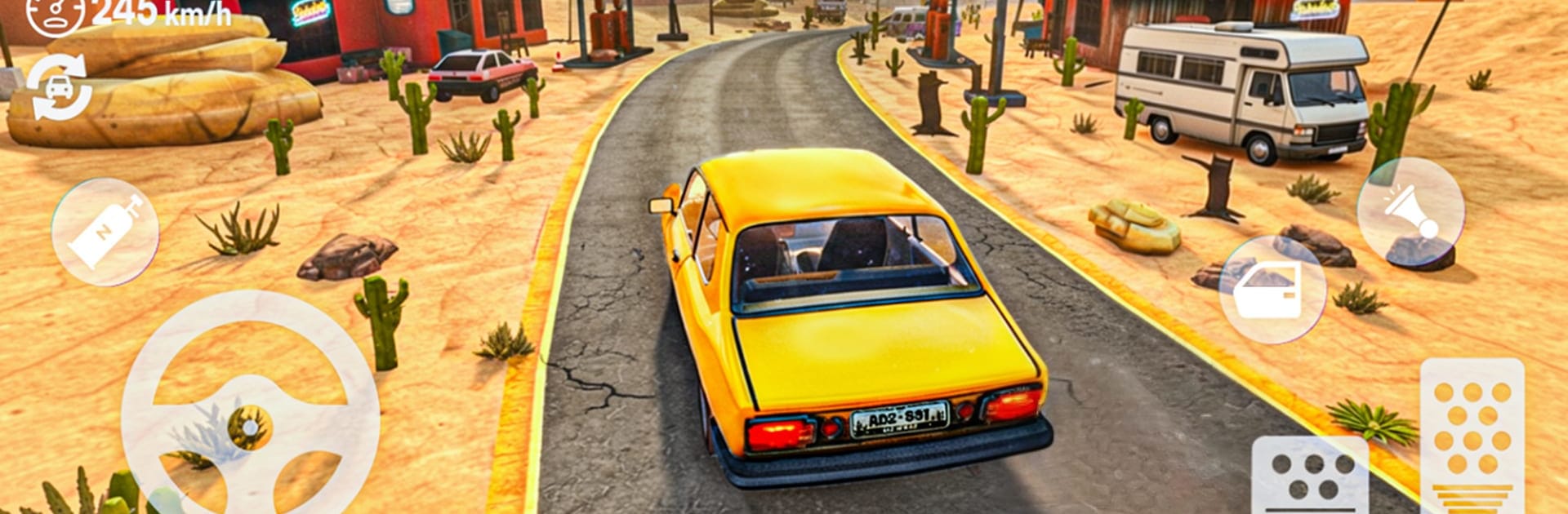
The Long way Desert Road

The Long way Desert Road

Simulation

| Emerging Games Studio

Play on PC with BlueStacks or from our cloud

  • Overview
  • Game Features
  • How to Play

Page Modified On: July 28, 2026

Play The Long way Desert Road on PC or Mac

Step into the World of The Long way Desert Road, a thrilling Simulation game from the house of Emerging Games Studio. Play this Android game on BlueStacks App Player and experience immersive gaming on PC or Mac.

About the Game

The Long way Desert Road is a gritty, road-trip Survival Simulation where your car is your lifeline and the desert doesn’t forgive mistakes. You’ll roam a vast wasteland of cracked highways, wind-swept dunes, and forgotten towns, scavenging parts and supplies to keep rolling. Every mile throws something new at you—maybe a stash of fuel, maybe trouble.

Prefer a bigger screen and keyboard controls? It also plays smoothly on BlueStacks.

Game Features

  • Build Your Survivor Ride: Scavenge engines, wheels, tools, and odd parts to assemble and fine-tune a car that can handle long hauls and rough terrain.
  • Go Where the Sand Takes You: Cruise endless highways, peel off onto dusty tracks, and poke around ghost towns—no handholding, just your instincts and the horizon.
  • Keep It Running: Patch damage, swap worn components, and manage fuel carefully. Smart maintenance means longer trips and fewer close calls.
  • Weighty, Realistic Handling: Feel the difference between loose sand, battered asphalt, and rocky stretches with physics that make every turn and slope matter.
  • Combat on the Road: Hostiles won’t wait politely. Use your driving skills and whatever weapons you’ve found to protect yourself and your ride.
  • Loot, Then Leave: Wrecked cars, shuttered stations, and crumbling structures hide useful gear—tools, upgrades, and occasionally something rare.
  • Choices With Consequences: Take the safe road or gamble on a shortcut. Load up on fuel or carry extra parts. Your calls shape how far you’ll get.
  • Sandbox Freedom: No set route, no timer breathing down your neck. Explore at your pace, chase rumors of resources, or just see what’s over the next ridge.
  • Tension in Every Trip: Changing conditions and unpredictable encounters make each run feel different, whether it’s a quick supply grab or a cross-desert push.

BlueStacks gives you more room to focus on the game and less time adjusting around mobile limitations.


Game Features

Enhancements

  • Macros
  • Multi Instance
  • Multi Instance Sync
  • Script
  • Enhancements
Macros

Macros

Automate the predictable in The Long way Desert Road and transform your gameplay with Macros. Get access to inventive Macros in the BlueStacks Macro Community
Multi Instance

Multi Instance

Play The Long way Desert Road on one window. And chat with your friend on the other. Press CTRL + Shift + 8 to open the Multi-Instance Manager. And start creating fresh instances or clone an existing one.
Multi Instance Sync

Multi Instance Sync

Play The Long way Desert Road with the power of Multi-Instance Sync. Replicate what you are doing on the main instance on all other instances. Level up faster, play more.
Script

Script

Script your way to gaming glory in The Long way Desert Road with BlueStacks Script. Write and run a set of commands to automate repeated tasks. Trigger the command by assigning it to any key.
Read More

How to Download and Play The Long way Desert Road on PC or Mac

  • Download and install BlueStacks on your PC or Mac

  • Complete Google sign-in to access the Play Store, or do it later

  • Look for The Long way Desert Road in the search bar at the top right corner

  • Click to install The Long way Desert Road from the search results

  • Complete Google sign-in (if you skipped step 2) to install The Long way Desert Road

  • Click the The Long way Desert Road icon on the home screen to start playing

video
Watch Video

Minimum System Requirements

With BlueStacks 5, you can get started on a PC that fulfills the following requirements.

  • Operating System

    Microsoft Windows 7 or above, macOS 11 (Big Sur) or above

  • Processor

    Intel, AMD or Apple Silicon Processor

  • RAM

    at least 4GB

  • HDD

    10GB Free Disk Space

Note:

* You must be an Administrator on your PC. Up to date graphics drivers from Microsoft or the chipset vendor.

The Long way Desert Road - FAQs

  • How to play The Long way Desert Road on Windows PC & Mac?

    Play The Long way Desert Road on your PC or Mac by following these simple steps.

    • Click on 'Play The Long way Desert Road on PC’ to download BlueStacks
    • Install it and log-in to Google Play Store
    • Launch and play the game.
  • Why is BlueStacks the fastest and safest platform to play games on PC?

    BlueStacks respects your privacy and is always safe and secure to use. It does not carry any malware, spyware, or any sort of additional software that could harm your PC.

    It is engineered to optimize speed and performance for a seamless gaming experience.

  • What are The Long way Desert Road PC requirements?

    Minimum requirement to run The Long way Desert Road on your PC

    • OS: Microsoft Windows 7 or above MacOS 11 (Big Sur) or above
    • Processor: Intel, AMD or Apple Silicon Processor
    • RAM: Your PC must have at least 4GB of RAM. (Note that having 4GB or more disk space is not a substitute for RAM)
    • HDD: 10GB Free Disk Space.
    • You must be an Administrator on your PC.