Waterpark Owner Simulator

Waterpark Owner Simulator

Simulation

| Blingames

Play on PC with BlueStacks or from our cloud

  • Overview
  • Game Features
  • How to Play

Page Modified On: December 15, 2025

Play Waterpark Owner Simulator on PC or Mac

Waterpark Owner Simulator brings the Simulation genre to life, and throws up exciting challenges for gamers. Developed by Blingames, this Android game is best experienced on BlueStacks, the World’s #1 app player for PC and Mac users.

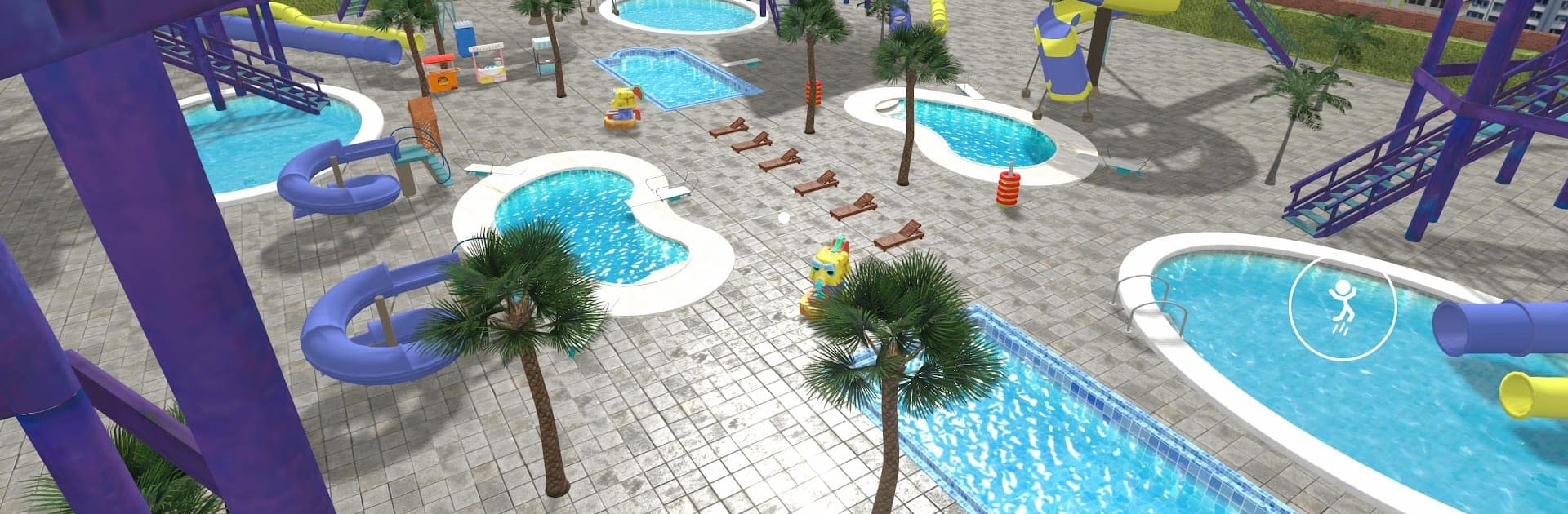
Waterpark Owner Simulator feels like being dropped into a busy summer park and told, alright, run the whole thing. It is first person, so every little task is hands-on. Early on the player sells tickets at the gate, grills hot dogs, restocks vending, fixes rides that keep acting up, and even skims the pools. It is hectic in a good way, with that satisfying loop of earning cash and spending it on bigger stuff. Building is the highlight. Slides can be shaped and stacked into wild layouts, with curves and drops that look ridiculous but somehow work. Guests tumble with goofy ragdoll physics when they wipe out, nothing mean, just slapstick energy that keeps the place lively.

As the park grows, there is a nice shift from doing everything to hiring staff and letting the routine jobs run themselves. Money goes into new zones, upgrades, and themed decorations, so the place slowly turns from a bare splash pad into a loud, colorful maze of water cannons, pools, and food stands. It is more about creative layouts and quick firefighting than spreadsheets, so management fans who want heavy numbers may find it lighter, but the moment to moment bustle makes up for it. On PC with BlueStacks, mouse placement helps a lot when snapping slide pieces, and bouncing between jobs feels quicker with keyboard shortcuts. There is alot of silly chaos, plenty to build, and enough unlocks to keep the park growing without getting stuck in menus forever.

Ready to top the leaderboard? We bet you do. Let precise controls and sharp visuals optimized on BlueStacks lead you to victory.


Game Features

Enhancements

  • Macros
  • Multi Instance
  • Multi Instance Sync
  • Script
  • Enhancements
Macros

Macros

Automate the predictable in Waterpark Owner Simulator and transform your gameplay with Macros. Get access to inventive Macros in the BlueStacks Macro Community
Multi Instance

Multi Instance

Play Waterpark Owner Simulator on one window. And chat with your friend on the other. Press CTRL + Shift + 8 to open the Multi-Instance Manager. And start creating fresh instances or clone an existing one.
Multi Instance Sync

Multi Instance Sync

Play Waterpark Owner Simulator with the power of Multi-Instance Sync. Replicate what you are doing on the main instance on all other instances. Level up faster, play more.
Script

Script

Script your way to gaming glory in Waterpark Owner Simulator with BlueStacks Script. Write and run a set of commands to automate repeated tasks. Trigger the command by assigning it to any key.
Read More

How to Download and Play Waterpark Owner Simulator on PC or Mac

  • Download and install BlueStacks on your PC or Mac

  • Complete Google sign-in to access the Play Store, or do it later

  • Look for Waterpark Owner Simulator in the search bar at the top right corner

  • Click to install Waterpark Owner Simulator from the search results

  • Complete Google sign-in (if you skipped step 2) to install Waterpark Owner Simulator

  • Click the Waterpark Owner Simulator icon on the home screen to start playing

video
Watch Video

Minimum System Requirements

With BlueStacks 5, you can get started on a PC that fulfills the following requirements.

  • Operating System

    Microsoft Windows 7 or above, macOS 11 (Big Sur) or above

  • Processor

    Intel, AMD or Apple Silicon Processor

  • RAM

    at least 4GB

  • HDD

    10GB Free Disk Space

Note:

* You must be an Administrator on your PC. Up to date graphics drivers from Microsoft or the chipset vendor.

Waterpark Owner Simulator - FAQs

  • How to play Waterpark Owner Simulator on Windows PC & Mac?

    Play Waterpark Owner Simulator on your PC or Mac by following these simple steps.

    • Click on 'Play Waterpark Owner Simulator on PC’ to download BlueStacks
    • Install it and log-in to Google Play Store
    • Launch and play the game.
  • Why is BlueStacks the fastest and safest platform to play games on PC?

    BlueStacks respects your privacy and is always safe and secure to use. It does not carry any malware, spyware, or any sort of additional software that could harm your PC.

    It is engineered to optimize speed and performance for a seamless gaming experience.

  • What are Waterpark Owner Simulator PC requirements?

    Minimum requirement to run Waterpark Owner Simulator on your PC

    • OS: Microsoft Windows 7 or above MacOS 11 (Big Sur) or above
    • Processor: Intel, AMD or Apple Silicon Processor
    • RAM: Your PC must have at least 4GB of RAM. (Note that having 4GB or more disk space is not a substitute for RAM)
    • HDD: 10GB Free Disk Space.
    • You must be an Administrator on your PC.