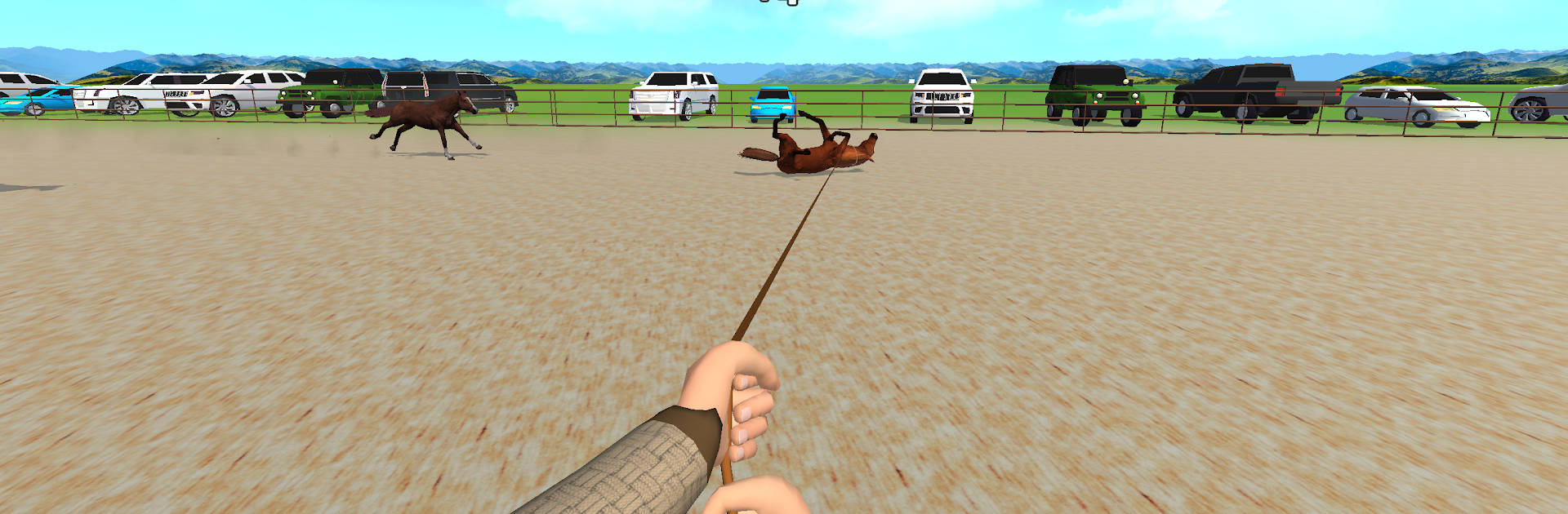
Aduuchin Game
Aduuchin Game

Aduuchin Game

Sports

| Naadgai Games

Play on PC with BlueStacks or from our cloud

  • Overview
  • Game Features
  • How to Play

Page Modified On: January 19, 2026

Play Aduuchin Game on PC or Mac

Explore a whole new adventure with Aduuchin Game, a Sports game created by Naadgai Games. Experience great gameplay with BlueStacks, the most popular gaming platform to play Android games on your PC or Mac.

About the Game

Aduuchin Game from Naadgai Games brings traditional Mongolian horsemanship into a hands-on Sports experience where your reflexes and focus actually matter. You’re not just tapping buttons—you’re chasing, roping, and handling restless horses across open country, with each mode asking for a different kind of control. It’s quick to learn, surprisingly tense in the moment, and packed with that grounded, practical feel you’d expect from real riding and roping.

Game Features

  • Traditional Lassoing: Swing a classic rope and snag loose horses before they bolt, using clean technique and smart positioning.
  • Timing That Counts: Nail the perfect moment with your lasso and whip—too early or too late, and the horse is gone.
  • On-Foot Roping: Leave the saddle, sprint on foot, and catch your target using sharp angles and steady hands.
  • Mounted Pursuits: Push your horse to full speed and rope while riding, balancing momentum with precision.
  • Break and Train: Calm wild steeds through careful handling and turn them into reliable partners over time.
  • Skill-First Gameplay: Success comes from speed, accuracy, and control; simple inputs give you room to master advanced rhythms.
  • Authentic Atmosphere: A look and feel shaped by nomadic culture, from the open landscapes to the tools you use.
  • Varied Challenges: Jump between focused drills and chase-style modes that keep your reflexes sharp and your technique honest.
  • Smooth, Responsive Controls: Pick-up-and-play ease with plenty of depth once you start shaving seconds and tightening your aim.
  • Optional PC Play: Prefer a bigger screen and crisp inputs? Aduuchin Game also plays nicely on BlueStacks for that extra bit of control.

Slay your opponents with your epic moves. Play it your way on BlueStacks and dominate the battlefield.


Game Features

Enhancements

  • Macros
  • Multi Instance
  • Multi Instance Sync
  • Script
  • Enhancements
Macros

Macros

Automate the predictable in Aduuchin Game and transform your gameplay with Macros. Get access to inventive Macros in the BlueStacks Macro Community
Multi Instance

Multi Instance

Play Aduuchin Game on one window. And chat with your friend on the other. Press CTRL + Shift + 8 to open the Multi-Instance Manager. And start creating fresh instances or clone an existing one.
Multi Instance Sync

Multi Instance Sync

Play Aduuchin Game with the power of Multi-Instance Sync. Replicate what you are doing on the main instance on all other instances. Level up faster, play more.
Script

Script

Script your way to gaming glory in Aduuchin Game with BlueStacks Script. Write and run a set of commands to automate repeated tasks. Trigger the command by assigning it to any key.
Read More

How to Download and Play Aduuchin Game on PC or Mac

  • Download and install BlueStacks on your PC or Mac

  • Complete Google sign-in to access the Play Store, or do it later

  • Look for Aduuchin Game in the search bar at the top right corner

  • Click to install Aduuchin Game from the search results

  • Complete Google sign-in (if you skipped step 2) to install Aduuchin Game

  • Click the Aduuchin Game icon on the home screen to start playing

video
Watch Video

Minimum System Requirements

With BlueStacks 5, you can get started on a PC that fulfills the following requirements.

  • Operating System

    Microsoft Windows 7 or above, macOS 11 (Big Sur) or above

  • Processor

    Intel, AMD or Apple Silicon Processor

  • RAM

    at least 4GB

  • HDD

    10GB Free Disk Space

Note:

* You must be an Administrator on your PC. Up to date graphics drivers from Microsoft or the chipset vendor.

Aduuchin Game - FAQs

  • How to play Aduuchin Game on Windows PC & Mac?

    Play Aduuchin Game on your PC or Mac by following these simple steps.

    • Click on 'Play Aduuchin Game on PC’ to download BlueStacks
    • Install it and log-in to Google Play Store
    • Launch and play the game.
  • Why is BlueStacks the fastest and safest platform to play games on PC?

    BlueStacks respects your privacy and is always safe and secure to use. It does not carry any malware, spyware, or any sort of additional software that could harm your PC.

    It is engineered to optimize speed and performance for a seamless gaming experience.

  • What are Aduuchin Game PC requirements?

    Minimum requirement to run Aduuchin Game on your PC

    • OS: Microsoft Windows 7 or above MacOS 11 (Big Sur) or above
    • Processor: Intel, AMD or Apple Silicon Processor
    • RAM: Your PC must have at least 4GB of RAM. (Note that having 4GB or more disk space is not a substitute for RAM)
    • HDD: 10GB Free Disk Space.
    • You must be an Administrator on your PC.