Football Champions
Football Champions

Football Champions

Sports

| Sweet Nitro SL

Play on PC with BlueStacks or from our cloud

  • Overview
  • Game Features
  • How to Play

Page Modified On: December 10, 2025

Play Football Champions on PC or Mac

Join millions to experience Football Champions, an exciting Sports game from Sweet Nitro SL. With BlueStacks App Player, you are always a step ahead of your opponent, ready to outplay them with faster gameplay and better control with the mouse and keyboard on your PC or Mac.

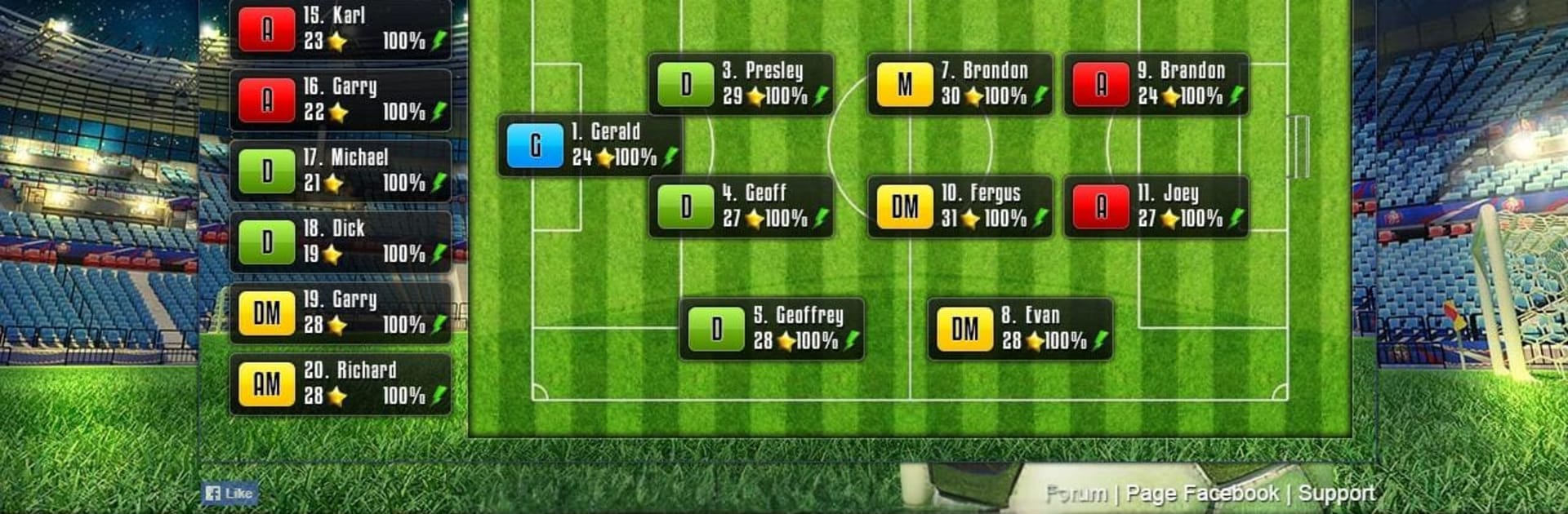
Football Champions is one of those manager games that leans hard into decisions and tinkering. It puts players in charge of building a squad, shaping a style, and then watching it all play out in live matches that actually feel tense. There are regular league fixtures, knockout cups, and a European style tournament, so there is always another match on the calendar. Training is not just a single bar to fill either. Players can be pushed in specific areas, so a winger can get quicker or a defender can tighten positioning, and those small tweaks really show up once the whistle goes.

The transfer side is a live bidding setup, so timing and patience matter. Snagging a bargain makes the roster click, or a bidding war can spiral if someone gets stubborn. Tactics go deeper than just picking a formation. There are individual instructions, little adjustments, and a strategy builder that helps shape how the team responds during different phases of play. Matches happen in real time, with subs and changes that can save a result or ruin it if a call is late. It is free to play with optional purchases, so progress sits on a mix of planning and time. On PC through BlueStacks it is easy to jump between training, scouting, and the live auction without fumbling through menus, which fits the whole manager vibe where every second and screen counts.

Start your journey now. Download the game on BlueStacks, invite your friends, and march on a new adventure.


Game Features

Enhancements

  • Macros
  • Multi Instance
  • Multi Instance Sync
  • Script
  • Enhancements
Macros

Macros

Automate the predictable in Football Champions and transform your gameplay with Macros. Get access to inventive Macros in the BlueStacks Macro Community
Multi Instance

Multi Instance

Play Football Champions on one window. And chat with your friend on the other. Press CTRL + Shift + 8 to open the Multi-Instance Manager. And start creating fresh instances or clone an existing one.
Multi Instance Sync

Multi Instance Sync

Play Football Champions with the power of Multi-Instance Sync. Replicate what you are doing on the main instance on all other instances. Level up faster, play more.
Script

Script

Script your way to gaming glory in Football Champions with BlueStacks Script. Write and run a set of commands to automate repeated tasks. Trigger the command by assigning it to any key.
Read More

How to Download and Play Football Champions on PC or Mac

  • Download and install BlueStacks on your PC or Mac

  • Complete Google sign-in to access the Play Store, or do it later

  • Look for Football Champions in the search bar at the top right corner

  • Click to install Football Champions from the search results

  • Complete Google sign-in (if you skipped step 2) to install Football Champions

  • Click the Football Champions icon on the home screen to start playing

video
Watch Video

Minimum System Requirements

With BlueStacks 5, you can get started on a PC that fulfills the following requirements.

  • Operating System

    Microsoft Windows 7 or above, macOS 11 (Big Sur) or above

  • Processor

    Intel, AMD or Apple Silicon Processor

  • RAM

    at least 4GB

  • HDD

    10GB Free Disk Space

Note:

* You must be an Administrator on your PC. Up to date graphics drivers from Microsoft or the chipset vendor.

Football Champions - FAQs

  • How to play Football Champions on Windows PC & Mac?

    Play Football Champions on your PC or Mac by following these simple steps.

    • Click on 'Play Football Champions on PC’ to download BlueStacks
    • Install it and log-in to Google Play Store
    • Launch and play the game.
  • Why is BlueStacks the fastest and safest platform to play games on PC?

    BlueStacks respects your privacy and is always safe and secure to use. It does not carry any malware, spyware, or any sort of additional software that could harm your PC.

    It is engineered to optimize speed and performance for a seamless gaming experience.

  • What are Football Champions PC requirements?

    Minimum requirement to run Football Champions on your PC

    • OS: Microsoft Windows 7 or above MacOS 11 (Big Sur) or above
    • Processor: Intel, AMD or Apple Silicon Processor
    • RAM: Your PC must have at least 4GB of RAM. (Note that having 4GB or more disk space is not a substitute for RAM)
    • HDD: 10GB Free Disk Space.
    • You must be an Administrator on your PC.