Galaxy Soccer :Rematch 3v3

Galaxy Soccer :Rematch 3v3

Sports

| peniaApps

Play on PC with BlueStacks or from our cloud

  • Overview
  • Game Features
  • How to Play

Page Modified On: November 20, 2025

Play Galaxy Soccer :Rematch 3v3 on PC or Mac

Explore a whole new adventure with Galaxy Soccer :Rematch 3v3, a Sports game created by peniaApps. Experience great gameplay with BlueStacks, the most popular gaming platform to play Android games on your PC or Mac.

About the Game

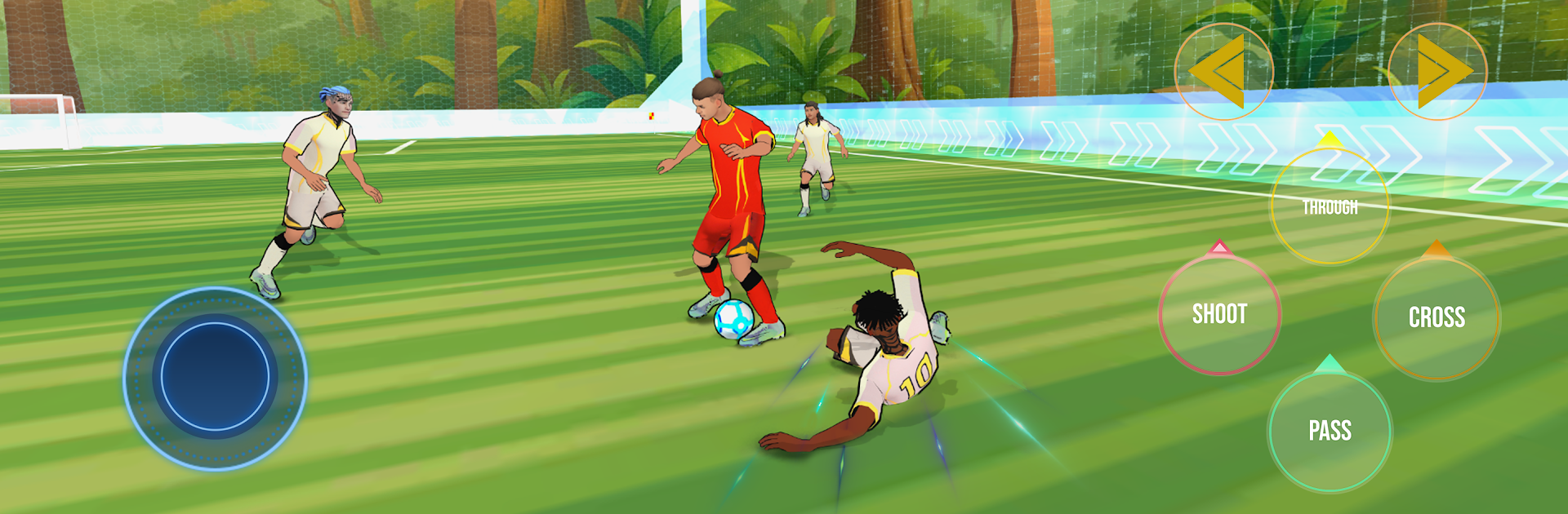
Galaxy Soccer :Rematch 3v3 is all about quick, punchy soccer sessions where your next shot could top your last run. It’s an arcade Sports take on the beautiful game—fast dribbles, clean strikes, and that irresistible urge to hit “rematch” the second you miss by an inch. Built by peniaApps, it leans into small‑sided intensity and score-chasing fun rather than long seasons or heavy sim stuff.

Game Features

  • Quick Solo Exhibitions: Jump into rapid matches that focus on your individual skill. Perfect when you’ve got a minute—and dangerous when you’ve got an hour.
  • Instant Rematch: Missed a sitter or want another crack at a better score? Tap rematch and you’re right back on the pitch with almost zero downtime.
  • Global Leaderboard: Stack your points against players worldwide and see exactly where your best run sits. Each goal nudges you higher.
  • Score-Based Progression: Every strike matters. Rack up points with every goal and push your Rematch EGO ranking to new heights.
  • Profile and EGO Customization: Tweak your player profile and style so your highlights look as sharp as they feel.
  • Tournaments: Step into bracket play and test your nerve in tighter, higher-stakes matchups.
  • Smooth, Pick‑Up Controls: Snappy dribbling and satisfying shooting make it easy to start—and hard to stop.
  • Big‑Screen Option: Prefer a wider view? You can play on PC with BlueStacks for extra space to place those pinpoint shots.

Start your journey now. Download the game on BlueStacks, invite your friends, and march on a new adventure.


Game Features

Enhancements

  • Macros
  • Multi Instance
  • Multi Instance Sync
  • Script
  • Enhancements
Macros

Macros

Automate the predictable in Galaxy Soccer :Rematch 3v3 and transform your gameplay with Macros. Get access to inventive Macros in the BlueStacks Macro Community
Multi Instance

Multi Instance

Play Galaxy Soccer :Rematch 3v3 on one window. And chat with your friend on the other. Press CTRL + Shift + 8 to open the Multi-Instance Manager. And start creating fresh instances or clone an existing one.
Multi Instance Sync

Multi Instance Sync

Play Galaxy Soccer :Rematch 3v3 with the power of Multi-Instance Sync. Replicate what you are doing on the main instance on all other instances. Level up faster, play more.
Script

Script

Script your way to gaming glory in Galaxy Soccer :Rematch 3v3 with BlueStacks Script. Write and run a set of commands to automate repeated tasks. Trigger the command by assigning it to any key.
Read More

How to Download and Play Galaxy Soccer :Rematch 3v3 on PC or Mac

  • Download and install BlueStacks on your PC or Mac

  • Complete Google sign-in to access the Play Store, or do it later

  • Look for Galaxy Soccer :Rematch 3v3 in the search bar at the top right corner

  • Click to install Galaxy Soccer :Rematch 3v3 from the search results

  • Complete Google sign-in (if you skipped step 2) to install Galaxy Soccer :Rematch 3v3

  • Click the Galaxy Soccer :Rematch 3v3 icon on the home screen to start playing

video
Watch Video

Minimum System Requirements

With BlueStacks 5, you can get started on a PC that fulfills the following requirements.

  • Operating System

    Microsoft Windows 7 or above, macOS 11 (Big Sur) or above

  • Processor

    Intel, AMD or Apple Silicon Processor

  • RAM

    at least 4GB

  • HDD

    10GB Free Disk Space

Note:

* You must be an Administrator on your PC. Up to date graphics drivers from Microsoft or the chipset vendor.

Galaxy Soccer :Rematch 3v3 - FAQs

  • How to play Galaxy Soccer :Rematch 3v3 on Windows PC & Mac?

    Play Galaxy Soccer :Rematch 3v3 on your PC or Mac by following these simple steps.

    • Click on 'Play Galaxy Soccer :Rematch 3v3 on PC’ to download BlueStacks
    • Install it and log-in to Google Play Store
    • Launch and play the game.
  • Why is BlueStacks the fastest and safest platform to play games on PC?

    BlueStacks respects your privacy and is always safe and secure to use. It does not carry any malware, spyware, or any sort of additional software that could harm your PC.

    It is engineered to optimize speed and performance for a seamless gaming experience.

  • What are Galaxy Soccer :Rematch 3v3 PC requirements?

    Minimum requirement to run Galaxy Soccer :Rematch 3v3 on your PC

    • OS: Microsoft Windows 7 or above MacOS 11 (Big Sur) or above
    • Processor: Intel, AMD or Apple Silicon Processor
    • RAM: Your PC must have at least 4GB of RAM. (Note that having 4GB or more disk space is not a substitute for RAM)
    • HDD: 10GB Free Disk Space.
    • You must be an Administrator on your PC.