Street Soccer: Futsal Games

Street Soccer: Futsal Games

Sports

| Red Tiger Games

Play on PC with BlueStacks or from our cloud

  • Overview
  • Game Features
  • How to Play

Page Modified On: January 02, 2026

Play Street Soccer: Futsal Games on PC or Mac

Street Soccer: Futsal Games brings the Sports genre to life, and throws up exciting challenges for gamers. Developed by Red Tiger Games, this Android game is best experienced on BlueStacks, the World’s #1 app player for PC and Mac users.

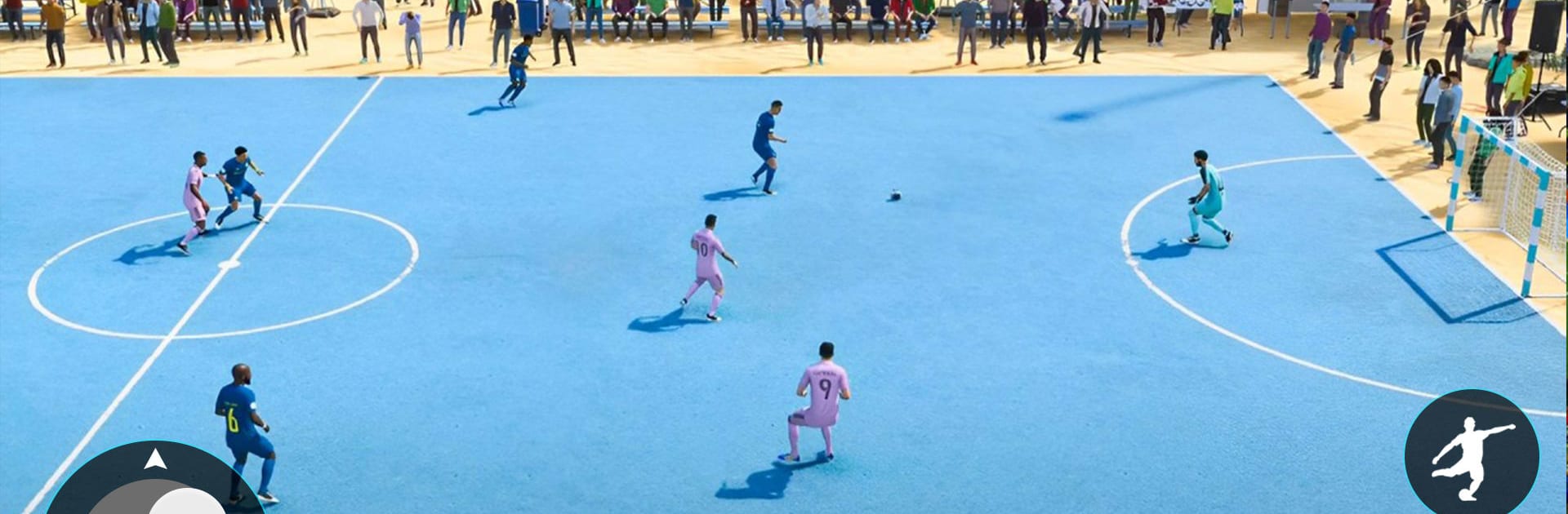
Street Soccer: Futsal Games plays like a small-court football fix with fast rounds and a big focus on shooting. The pitch is tight, the passes are quick, and most of the tension is about beating a sharp goalkeeper rather than building long plays. It rewards precision, so curling the ball near the crossbar or sneaking it past the post racks up more points, and adding spin actually matters. A lot of the action feels like striker versus keeper drills mixed with free kicks and penalties, which suits short sessions and quick retries.

Challenge modes throw in different rules and goals to chase, so players end up trying weird angles, targets, and time limits that test accuracy. There is basic progression too. Unlock gear with in-game cash, dress up the player, and push through a simple career for cups. The look is bright 3D with punchy animations and that indoor futsal vibe. Physics lean arcadey over sim, which keeps it snappy without feeling random.

On PC with BlueStacks, aiming and curling shots with the mouse feels very precise, and simple keymapping can make movement and passing less fussy than touch. It fits anyone who enjoys score chasing, skill shots, and quick matches more than full eleven a side tactics or heavy management. It also reads friendly for younger players, since it focuses on clean shooting and timing rather than complicated systems.

Get ready for a buttery smooth, high-performance gaming action only on BlueStacks.

Game Features

Enhancements

  • Macros
  • Multi Instance
  • Multi Instance Sync
  • Script
  • Enhancements
Macros

Macros

Automate the predictable in Street Soccer: Futsal Games and transform your gameplay with Macros. Get access to inventive Macros in the BlueStacks Macro Community
Multi Instance

Multi Instance

Play Street Soccer: Futsal Games on one window. And chat with your friend on the other. Press CTRL + Shift + 8 to open the Multi-Instance Manager. And start creating fresh instances or clone an existing one.
Multi Instance Sync

Multi Instance Sync

Play Street Soccer: Futsal Games with the power of Multi-Instance Sync. Replicate what you are doing on the main instance on all other instances. Level up faster, play more.
Script

Script

Script your way to gaming glory in Street Soccer: Futsal Games with BlueStacks Script. Write and run a set of commands to automate repeated tasks. Trigger the command by assigning it to any key.
Read More

How to Download and Play Street Soccer: Futsal Games on PC or Mac

  • Download and install BlueStacks on your PC or Mac

  • Complete Google sign-in to access the Play Store, or do it later

  • Look for Street Soccer: Futsal Games in the search bar at the top right corner

  • Click to install Street Soccer: Futsal Games from the search results

  • Complete Google sign-in (if you skipped step 2) to install Street Soccer: Futsal Games

  • Click the Street Soccer: Futsal Games icon on the home screen to start playing

video
Watch Video

Minimum System Requirements

With BlueStacks 5, you can get started on a PC that fulfills the following requirements.

  • Operating System

    Microsoft Windows 7 or above, macOS 11 (Big Sur) or above

  • Processor

    Intel, AMD or Apple Silicon Processor

  • RAM

    at least 4GB

  • HDD

    10GB Free Disk Space

Note:

* You must be an Administrator on your PC. Up to date graphics drivers from Microsoft or the chipset vendor.

Street Soccer: Futsal Games - FAQs

  • How to play Street Soccer: Futsal Games on Windows PC & Mac?

    Play Street Soccer: Futsal Games on your PC or Mac by following these simple steps.

    • Click on 'Play Street Soccer: Futsal Games on PC’ to download BlueStacks
    • Install it and log-in to Google Play Store
    • Launch and play the game.
  • Why is BlueStacks the fastest and safest platform to play games on PC?

    BlueStacks respects your privacy and is always safe and secure to use. It does not carry any malware, spyware, or any sort of additional software that could harm your PC.

    It is engineered to optimize speed and performance for a seamless gaming experience.

  • What are Street Soccer: Futsal Games PC requirements?

    Minimum requirement to run Street Soccer: Futsal Games on your PC

    • OS: Microsoft Windows 7 or above MacOS 11 (Big Sur) or above
    • Processor: Intel, AMD or Apple Silicon Processor
    • RAM: Your PC must have at least 4GB of RAM. (Note that having 4GB or more disk space is not a substitute for RAM)
    • HDD: 10GB Free Disk Space.
    • You must be an Administrator on your PC.