Brainrot Fight
Brainrot Fight

Brainrot Fight

Strategy

| LL Game Studio

Play on PC with BlueStacks or from our cloud

  • Overview
  • Game Features
  • How to Play

Page Modified On: November 10, 2025

Play Brainrot Fight on PC or Mac

From the innovators and creators at LL Game Studio, Brainrot Fight is another fun addition to the World of Strategy games. Go beyond your mobile screen and play it bigger and better on your PC or Mac. An immersive experience awaits you.

About the Game

Brainrot Fight is a wild Strategy mashup from LL Game Studio that treats chaos like an art form. You’ll build a five-unit squad from a cast of bizarre, AI-forged creatures, mash them together to evolve new forms, and let automated battles unfold while you scheme the next ridiculous combo. It’s loud, a little unhinged, and surprisingly tactical—perfect if you like smart planning wrapped in pure nonsense. Prefer playing on PC? It runs smoothly with BlueStacks, too.

Game Features

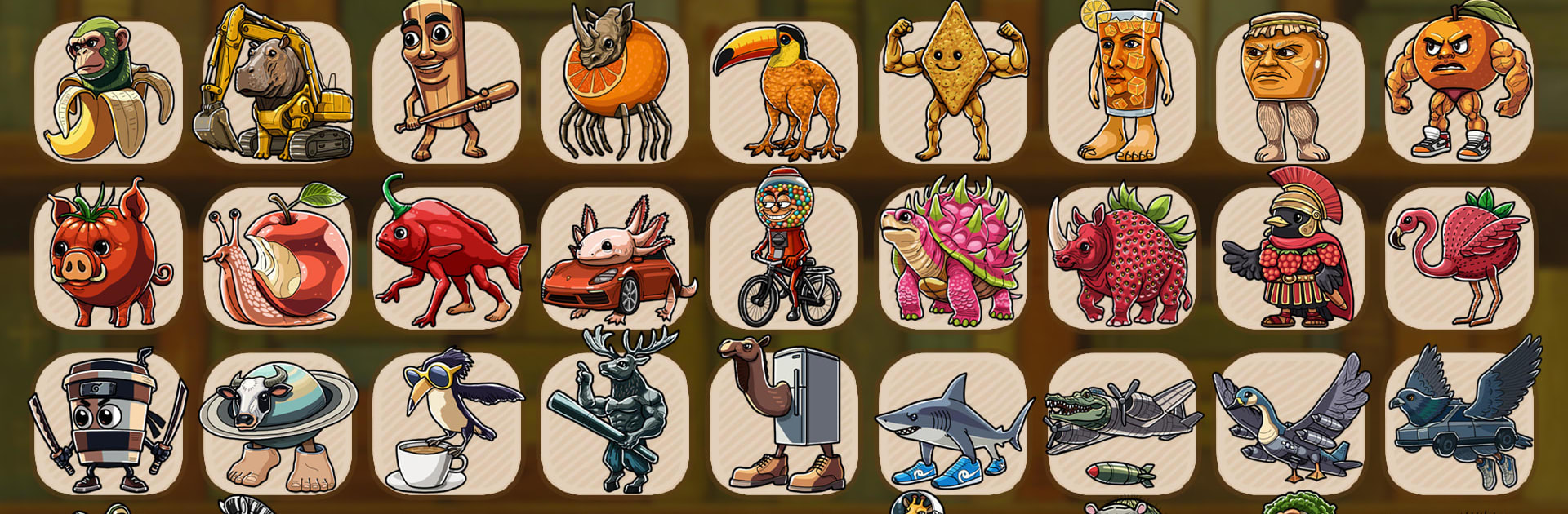
  • Offbeat roster: Collect a gallery of oddballs—think sneaker-wearing sharks, drumstick brutes, and appliance-born crustaceans—each with their own quirky animations and personality.

  • Merge and evolve: Fuse creatures to level up your lineup, unlock new forms, and stack evolution perks that can flip a match before it starts or snowball over time.

  • Five-slot squad building: Field exactly five characters and juggle tanks, damage dealers, and support picks to create a lineup that fits your style of mayhem.

  • Skill Chains that matter: Certain pairings trigger wild synergies—like teams that toughen up when they’re hit, or lineups that bombard the field in the opening moments.

  • Soundboard-powered chaos: Every creature brings signature audio stings (yes, the earworm chants are here), and the built-in soundboard lets you replay your favorites whenever you want.

  • Rule-bending props: Find and equip cyber-themed items—treats, trinkets, and other odd power-ups—that twist the usual logic of battle and turn close fights in your favor.

  • Auto-battles with brains: Battles resolve automatically, but smart pre-fight planning—positioning, merges, and chain setups—decides who walks away.

  • Style with bite: A bold, painted-board look pairs with exaggerated Italian vibes and punchy sound design to make every clash feel like a tiny, noisy spectacle.

  • Challenges and global rivals: Work through increasingly strange enemy squads, study their builds, and test your creations against players from around the world.

Start your journey now. Download the game on BlueStacks, invite your friends, and march on a new adventure.


Game Features

Enhancements

  • Macros
  • Multi Instance
  • Multi Instance Sync
  • Eco Mode
  • Enhancements
Macros

Macros

Skip the boring parts of a game. Play Brainrot Fight with Macros and get the edge. Simply record a sequence of commands and execute them at any moment.
Multi Instance

Multi Instance

Why limit to one game on your phone when you can play many on your PC? Open multiple instances of Brainrot Fight at once with Multi-Instance. Leverage the power of different accounts by doing more.
Multi Instance Sync

Multi Instance Sync

Get the best out of Brainrot Fight with Multi-Instance Sync. Play the game from different accounts and build your own empire. Use Multi-instance sync to repeat the action in the main BlueStacks instance on all other instances.
Eco Mode

Eco Mode

Find the rarest heroes by making multiple summons in Brainrot Fight. And while you are at it, reduce your PC’s resource consumption with the Eco Mode. Farm efficiently. Get the best results.
Read More

How to Download and Play Brainrot Fight on PC or Mac

  • Download and install BlueStacks on your PC or Mac

  • Complete Google sign-in to access the Play Store, or do it later

  • Look for Brainrot Fight in the search bar at the top right corner

  • Click to install Brainrot Fight from the search results

  • Complete Google sign-in (if you skipped step 2) to install Brainrot Fight

  • Click the Brainrot Fight icon on the home screen to start playing

video
Watch Video

Minimum System Requirements

With BlueStacks 5, you can get started on a PC that fulfills the following requirements.

  • Operating System

    Microsoft Windows 7 or above, macOS 11 (Big Sur) or above

  • Processor

    Intel, AMD or Apple Silicon Processor

  • RAM

    at least 4GB

  • HDD

    10GB Free Disk Space

Note:

* You must be an Administrator on your PC. Up to date graphics drivers from Microsoft or the chipset vendor.

Brainrot Fight - FAQs

  • How to play Brainrot Fight on Windows PC & Mac?

    Play Brainrot Fight on your PC or Mac by following these simple steps.

    • Click on 'Play Brainrot Fight on PC’ to download BlueStacks
    • Install it and log-in to Google Play Store
    • Launch and play the game.
  • Why is BlueStacks the fastest and safest platform to play games on PC?

    BlueStacks respects your privacy and is always safe and secure to use. It does not carry any malware, spyware, or any sort of additional software that could harm your PC.

    It is engineered to optimize speed and performance for a seamless gaming experience.

  • What are Brainrot Fight PC requirements?

    Minimum requirement to run Brainrot Fight on your PC

    • OS: Microsoft Windows 7 or above MacOS 11 (Big Sur) or above
    • Processor: Intel, AMD or Apple Silicon Processor
    • RAM: Your PC must have at least 4GB of RAM. (Note that having 4GB or more disk space is not a substitute for RAM)
    • HDD: 10GB Free Disk Space.
    • You must be an Administrator on your PC.