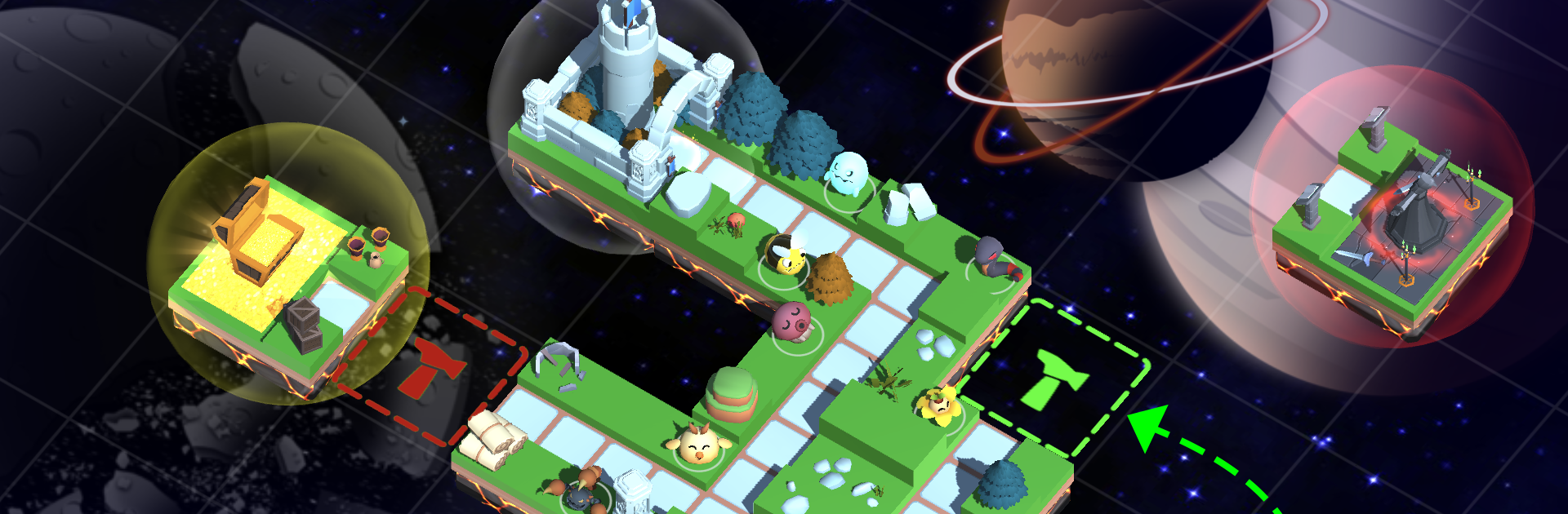
Monster Tiles TD: Tower Wars

Monster Tiles TD: Tower Wars

Strategy

| Swell Games LLC

Play on PC with BlueStacks or from our cloud

  • Overview
  • Game Features
  • How to Play

Page Modified On: November 20, 2025

Play Monster Tiles TD: Tower Wars on PC or Mac

Join millions to experience Monster Tiles TD: Tower Wars, an exciting Strategy game from Swell Games LLC. With BlueStacks App Player, you are always a step ahead of your opponent, ready to outplay them with faster gameplay and better control with the mouse and keyboard on your PC or Mac.

About the Game

Monster Tiles TD: Tower Wars flips tower defense in a clever way. Instead of guarding a preset road, you lay down the map yourself, tile by tile, after every wave. It’s a Strategy game from Swell Games LLC where smart layouts, evolving monster towers, and on-the-fly decisions decide whether your base holds or crumbles.

Game Features

  • Build the Path
  • Place a fresh, randomly generated tile after each wave to shape enemy routes, expand your base, and create the maze you want to defend.

  • Roguelike Variety

  • Every run deals you different tiles and perks, so maps, paths, and strategies keep changing. No two defenses feel the same.

  • 35+ Monster Towers

  • Deploy a big roster of monsters with unique skills and class specialties. Mix and match for combos that melt bosses and blitz swarms.

  • Evolve and Power Up

  • Transform monsters into stronger forms, unlock new abilities, and push their stats higher with layered upgrades and tech.

  • Placement Synergies

  • Position towers to trigger powerful interactions. Nudge enemy pathing to keep them under your strongest damage zones longer.

  • Gear, Artifacts, and Spells

  • Hunt bosses for loot ranging from common to divine. Equip monsters and stack artifacts, spells, and technologies to fine-tune your build.

  • Resources That Matter

  • Invest gold, energy, credits, and Tournament points into hundreds of upgrade combinations that buff your squad and debuff foes.

  • Modes and Difficulty

  • Take on multiple maps and settings from Easy to Impossible, plus Endless, Sudden Death, Score Attack, and Swarm modes.

  • PvP Tournaments and Leaderboards

  • Compete head-to-head, chase high ranks, and personalize your leaderboard look with unlockable icons, titles, and backgrounds.

  • Daily Goals and Events

  • Knock out tasks and achievements for steady rewards, with seasonal extras that keep the grind feeling good.

  • Offline-Friendly

  • Play anywhere, anytime—no connection required.

  • Play Your Way

  • Works great on mobile, and it also runs nicely on PC with BlueStacks if you want a bigger view.

Slay your opponents with your epic moves. Play it your way on BlueStacks and dominate the battlefield.


Game Features

Enhancements

  • Macros
  • Multi Instance
  • Multi Instance Sync
  • Eco Mode
  • Enhancements
Macros

Macros

Skip the boring parts of a game. Play Monster Tiles TD: Tower Wars with Macros and get the edge. Simply record a sequence of commands and execute them at any moment.
Multi Instance

Multi Instance

Why limit to one game on your phone when you can play many on your PC? Open multiple instances of Monster Tiles TD: Tower Wars at once with Multi-Instance. Leverage the power of different accounts by doing more.
Multi Instance Sync

Multi Instance Sync

Get the best out of Monster Tiles TD: Tower Wars with Multi-Instance Sync. Play the game from different accounts and build your own empire. Use Multi-instance sync to repeat the action in the main BlueStacks instance on all other instances.
Eco Mode

Eco Mode

Find the rarest heroes by making multiple summons in Monster Tiles TD: Tower Wars. And while you are at it, reduce your PC’s resource consumption with the Eco Mode. Farm efficiently. Get the best results.
Read More

How to Download and Play Monster Tiles TD: Tower Wars on PC or Mac

  • Download and install BlueStacks on your PC or Mac

  • Complete Google sign-in to access the Play Store, or do it later

  • Look for Monster Tiles TD: Tower Wars in the search bar at the top right corner

  • Click to install Monster Tiles TD: Tower Wars from the search results

  • Complete Google sign-in (if you skipped step 2) to install Monster Tiles TD: Tower Wars

  • Click the Monster Tiles TD: Tower Wars icon on the home screen to start playing

video
Watch Video

Minimum System Requirements

With BlueStacks 5, you can get started on a PC that fulfills the following requirements.

  • Operating System

    Microsoft Windows 7 or above, macOS 11 (Big Sur) or above

  • Processor

    Intel, AMD or Apple Silicon Processor

  • RAM

    at least 4GB

  • HDD

    10GB Free Disk Space

Note:

* You must be an Administrator on your PC. Up to date graphics drivers from Microsoft or the chipset vendor.

Monster Tiles TD: Tower Wars - FAQs

  • How to play Monster Tiles TD: Tower Wars on Windows PC & Mac?

    Play Monster Tiles TD: Tower Wars on your PC or Mac by following these simple steps.

    • Click on 'Play Monster Tiles TD: Tower Wars on PC’ to download BlueStacks
    • Install it and log-in to Google Play Store
    • Launch and play the game.
  • Why is BlueStacks the fastest and safest platform to play games on PC?

    BlueStacks respects your privacy and is always safe and secure to use. It does not carry any malware, spyware, or any sort of additional software that could harm your PC.

    It is engineered to optimize speed and performance for a seamless gaming experience.

  • What are Monster Tiles TD: Tower Wars PC requirements?

    Minimum requirement to run Monster Tiles TD: Tower Wars on your PC

    • OS: Microsoft Windows 7 or above MacOS 11 (Big Sur) or above
    • Processor: Intel, AMD or Apple Silicon Processor
    • RAM: Your PC must have at least 4GB of RAM. (Note that having 4GB or more disk space is not a substitute for RAM)
    • HDD: 10GB Free Disk Space.
    • You must be an Administrator on your PC.