Farm Animals Games For Kids

Farm Animals Games For Kids

Trivia

| Kids Games Under 6 Year Old

Play on PC with BlueStacks or from our cloud

  • Overview
  • Game Features
  • How to Play

Page Modified On: June 13, 2025

Play Farm Animals Games For Kids on PC or Mac

From the innovators and creators at Kids Games Under 6 Year Old, Farm Animals Games For Kids is another fun addition to the World of Trivia games. Go beyond your mobile screen and play it bigger and better on your PC or Mac. An immersive experience awaits you.

About the Game

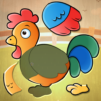
Farm Animals Games For Kids is all about making learning fun for the little ones. Got a kiddo who’s curious about farm life? This game brings the sights and sounds of the countryside right to your device. With friendly animal characters and easy-to-use games, children can explore, match, and discover farm animals while picking up new words and skills along the way.

Game Features

  • Animal Sounds & Names
    Each animal has its own real-life sound, so when kids tap on a picture, they hear a moo, a baa, or a gobble—just like being on a farm! It’s a playful way for them to connect pictures, sounds, and names.

  • Matching Memory Games
    There’s a memory card challenge that gets kids thinking. Remember where the pig or sheep is hiding? Match pairs and improve focus and problem-solving at the same time.

  • Kid-Friendly Puzzles
    Simple animal-themed puzzles keep young minds engaged. The pieces are chunky, colorful, and just the right size for small fingers. It’s both relaxing and a little bit of a brain teaser.

  • Levels for Every Kid
    Whether your child’s a total beginner or ready for a bigger challenge, there are different difficulty settings—easy, hard, even very hard. Everyone can play at their own pace.

  • Variety of Animals
    From cows and goats to chickens, turkeys, and even a goose, a whole menagerie is waiting. Kids can learn to spot—and pronounce—the names of all their farmyard favorites.

  • Fine Motor Skill Boost
    Every tap, slide, and match isn’t just fun—it’s helping with hand-eye coordination and memory, sneaking in a little skill-building without any pressure.

  • Perfect for Trivia Fans
    Curious kids who love asking questions will enjoy the trivia-style format, where recognizing and naming animals is half the game. It’s learning dressed up as play.

If you want to let your child play on a bigger screen, Farm Animals Games For Kids works great on BlueStacks, too.

Slay your opponents with your epic moves. Play it your way on BlueStacks and dominate the battlefield.


Game Features

Enhancements

  • Macros
  • Multi Instance
  • Multi Instance Sync
  • Script
  • Enhancements
Macros

Macros

Automate the predictable in Farm Animals Games For Kids and transform your gameplay with Macros. Get access to inventive Macros in the BlueStacks Macro Community
Multi Instance

Multi Instance

Play Farm Animals Games For Kids on one window. And chat with your friend on the other. Press CTRL + Shift + 8 to open the Multi-Instance Manager. And start creating fresh instances or clone an existing one.
Multi Instance Sync

Multi Instance Sync

Play Farm Animals Games For Kids with the power of Multi-Instance Sync. Replicate what you are doing on the main instance on all other instances. Level up faster, play more.
Script

Script

Script your way to gaming glory in Farm Animals Games For Kids with BlueStacks Script. Write and run a set of commands to automate repeated tasks. Trigger the command by assigning it to any key.
Read More

How to Download and Play Farm Animals Games For Kids on PC or Mac

  • Download and install BlueStacks on your PC or Mac

  • Complete Google sign-in to access the Play Store, or do it later

  • Look for Farm Animals Games For Kids in the search bar at the top right corner

  • Click to install Farm Animals Games For Kids from the search results

  • Complete Google sign-in (if you skipped step 2) to install Farm Animals Games For Kids

  • Click the Farm Animals Games For Kids icon on the home screen to start playing

video
Watch Video

Minimum System Requirements

With BlueStacks 5, you can get started on a PC that fulfills the following requirements.

  • Operating System

    Microsoft Windows 7 or above, macOS 11 (Big Sur) or above

  • Processor

    Intel, AMD or Apple Silicon Processor

  • RAM

    at least 4GB

  • HDD

    10GB Free Disk Space

Note:

* You must be an Administrator on your PC. Up to date graphics drivers from Microsoft or the chipset vendor.

Farm Animals Games For Kids - FAQs

  • How to play Farm Animals Games For Kids on Windows PC & Mac?

    Play Farm Animals Games For Kids on your PC or Mac by following these simple steps.

    • Click on 'Play Farm Animals Games For Kids on PC’ to download BlueStacks
    • Install it and log-in to Google Play Store
    • Launch and play the game.
  • Why is BlueStacks the fastest and safest platform to play games on PC?

    BlueStacks respects your privacy and is always safe and secure to use. It does not carry any malware, spyware, or any sort of additional software that could harm your PC.

    It is engineered to optimize speed and performance for a seamless gaming experience.

  • What are Farm Animals Games For Kids PC requirements?

    Minimum requirement to run Farm Animals Games For Kids on your PC

    • OS: Microsoft Windows 7 or above MacOS 11 (Big Sur) or above
    • Processor: Intel, AMD or Apple Silicon Processor
    • RAM: Your PC must have at least 4GB of RAM. (Note that having 4GB or more disk space is not a substitute for RAM)
    • HDD: 10GB Free Disk Space.
    • You must be an Administrator on your PC.