

Upgrade your experience. Try Home Theater VR, the fantastic Video Players & Editors app from blevok LLC, from the comfort of your laptop, PC, or Mac, only on BlueStacks.
Home Theater VR feels like a virtual cinema toolkit that actually lets the user run the show. It is a video player, a PC streamer, a basic web browser, and even an image viewer, all tucked into one place. The biggest thing that stands out is control. Everything is adjustable inside the app, including IPD and head tracking, and it does not depend on Cardboard or Daydream or any of that. It handles local files, direct web links, and even streams fed from VLC or FFMPEG. It supports up to 4K, flat videos in any aspect ratio, 360, 180, and 3D HSBS or HOU, and it comes with 24 different “theaters” like indoor rooms, outdoor scenes, a clean void, or a full screen wall. There is a neat touch where someone can import a 360 photo to turn it into their own custom theater, then nudge the screen distance or tilt until it feels right. Subtitles use .srt and the text style is tweakable, which is handy.
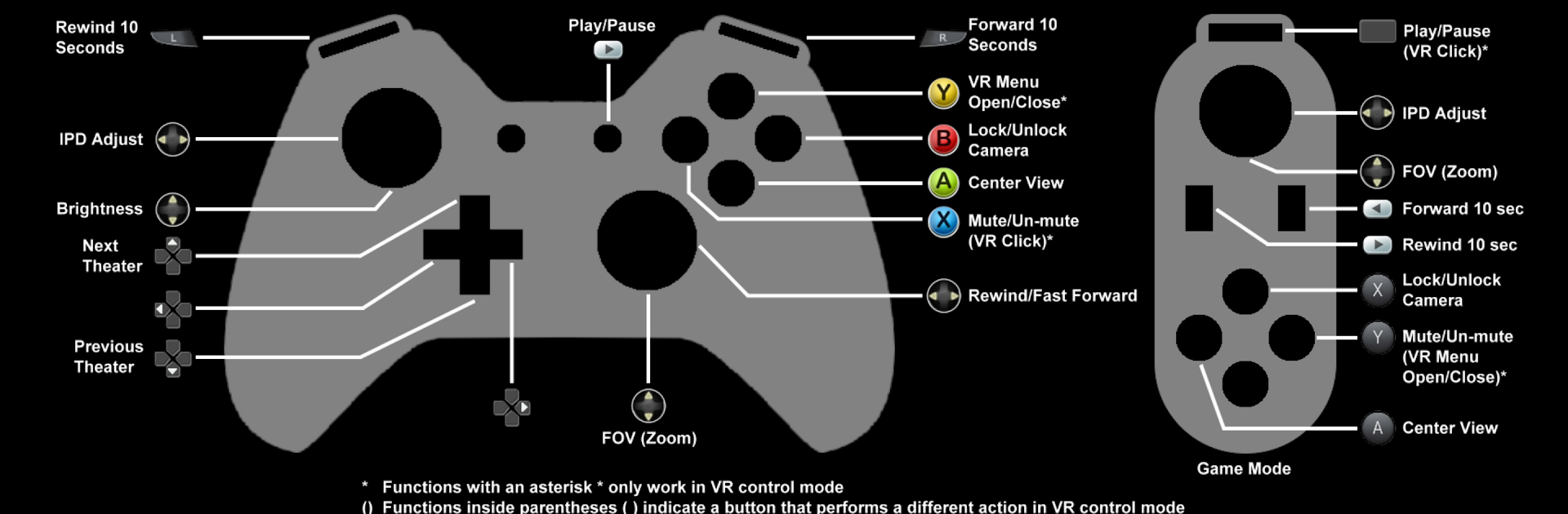
For PC streaming, the included helper apps make it simple. PC Monitor Mode mirrors a Windows desktop, with two stream types: DDA for Intel CPUs that can hit around 60 fps with low delay, and SDG that works on more machines but feels slower. That is enough for browsing or reading, and fine for some games if the hardware lines up. Running it on a computer through BlueStacks is surprisingly convenient for fiddling with settings, browsing folders, or launching streams, and then swapping over to a headset if wanted. Head tracking has several modes, even one that fakes gyro using the camera, and there are options to re-center, lock the view, or auto-center if drift bugs the user. Gamepads are supported, so an Xbox or PlayStation controller will click through menus without taking the headset off, and screenshots can be saved from any source. It is a paid app, but the trial does not rush anyone, and the built-in help screens explain the odd bits with links to extras when needed.
Switch to BlueStacks and make the most of your apps on your PC or Mac.