Why BlueStacks Works Well on Low-End PCs in 2026

Not everyone upgrades their PC every few years, and that’s perfectly fine. Even in 2026, a huge number of players are still gaming on low-end or older systems, whether that means a laptop with 4GB of RAM, an aging desktop CPU, or integrated graphics that weren’t designed with modern games in mind. Unfortunately, many Android emulators assume you’re running high-end hardware, which often leads to lag, stutters, crashes, or games that simply refuse to run properly.
This is where BlueStacks stands apart. Instead of pushing raw power as its only selling point, BlueStacks focuses on adaptability, allowing players to scale performance up or down based on the hardware they actually have. That flexibility is precisely why BlueStacks continues to be widely regarded as the best emulator for low-end PCs, especially for users who want stable performance without upgrading their entire system.
Why Low-End PCs Struggle With Most Android Emulators
Many Android emulators are built with modern, high-performance systems in mind. While that works well for newer PCs, it creates problems for players running older hardware. High baseline CPU usage, aggressive background processes, and rigid virtualization requirements can quickly overwhelm low-end systems, even before a game is launched.
In practice, this often results in poor frame pacing, delayed input response, and inconsistent performance during longer play sessions. Some emulators also lack effective throttling, meaning they continue consuming system resources even when a game doesn’t need them. For players on low-end PCs, this creates the impression that Android emulation itself is the problem—when in reality, it’s the lack of optimization.
Why BlueStacks Runs Great on Low-End Hardware
BlueStacks approaches emulation differently by focusing on efficiency rather than brute force. Its architecture is designed to scale based on available resources, which allows it to run smoothly even on PCs that fall below what many users would consider “gaming-ready.”
One of the biggest advantages BlueStacks has is how it manages CPU usage. Instead of aggressively consuming processing power at all times, BlueStacks dynamically adjusts how resources are allocated during gameplay. This makes a noticeable difference on low-end systems, where even small CPU spikes can cause lag or stuttering.
BlueStacks also gives users granular control over how much of their system is being used. Rather than forcing a fixed performance profile, it allows players to fine-tune the experience so the emulator works with their hardware, not against it. This is a major reason why BlueStacks consistently feels more stable than alternatives like LDPlayer on older PCs, especially during extended sessions.
CPU Usage: Why It Matters Most on Low-End PCs
On low-end systems, CPU usage is often the single biggest performance bottleneck. When an emulator consumes too much processing power, everything else suffers—from frame rate consistency to system responsiveness outside the game.
BlueStacks places a strong emphasis on keeping CPU usage under control. Its internal optimizations prioritize stable gameplay over unnecessary background load, which helps prevent sudden performance drops on weaker processors. This is particularly important for popular idle and strategy games that are meant to run for long periods without constant player input.
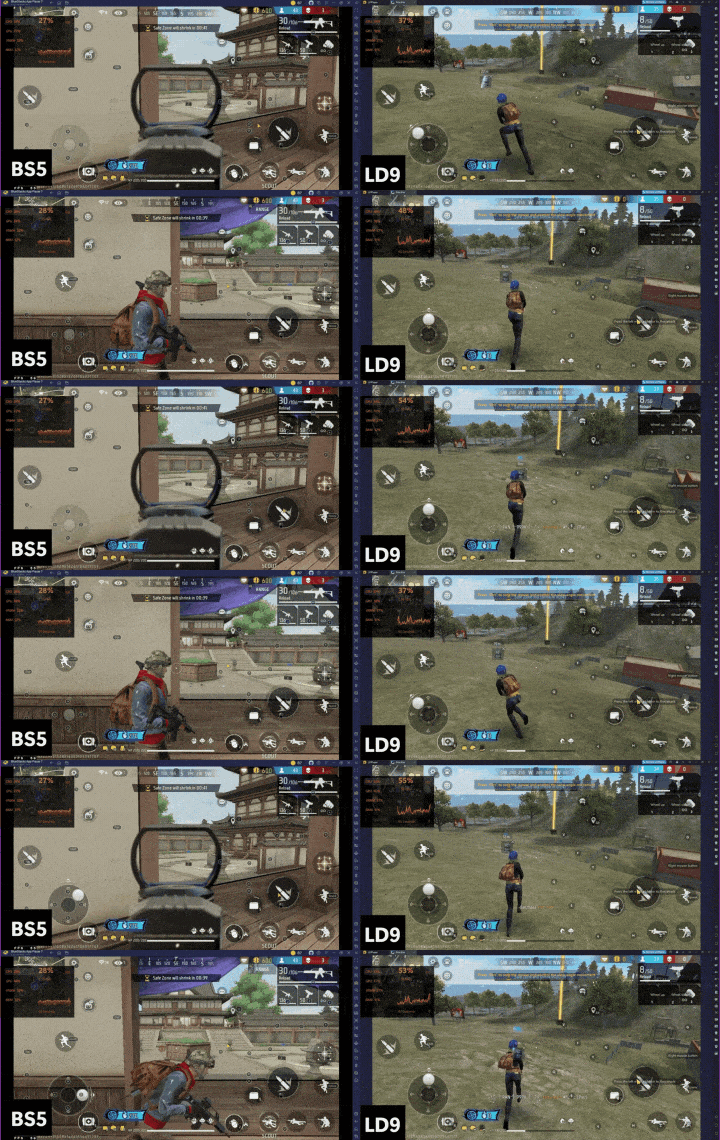
As demonstrated in the CPU usage comparison above, BlueStacks maintains a lower and more stable CPU footprint during gameplay. On low-end PCs, that efficiency translates directly into smoother performance, fewer freezes, and a noticeably more responsive experience overall.
BlueStacks Minimum System Requirements
The definition of a low-end PC has shifted over the years, but many players still fall into this category, often without realizing it. Older processors, limited RAM, and integrated graphics remain common, especially on laptops and budget desktops. Regardless, BlueStacks is very compatible with low-end hardware, boasting these minimum system requirements:
- OS: Microsoft Windows 7 and above, macOS 11 (Big Sur) or above
- Processor: Intel, AMD Processor or Apple Silicon Processor (M1-M4)
- RAM: Your PC or Mac must have at least 4GB of RAM
- Storage: 10GB Free Disk Space
- Permissions: Administrator access on your PC or Mac.
- Graphics drivers: Up-to-date graphics drivers from Microsoft or the chipset vendor.
Low-end hardware is one of the many areas where BlueStacks excels. Instead of excluding users with modest hardware, it’s built to accommodate them. As long as expectations are set realistically and settings are adjusted properly, BlueStacks can deliver a smooth and playable experience even on systems that struggle with other emulators.
Optimizing BlueStacks for the Best Results on Low-End PCs
Even though BlueStacks runs well out of the box, low-end PCs benefit significantly from basic performance tuning. Adjusting a few key settings, such as frame rate limits, resolution, and graphics rendering options, can dramatically improve stability and responsiveness.
Rather than repeating those steps here, BlueStacks already provides a dedicated, step-by-step optimization guide for low-end systems that walks through the best configuration in detail. Following those recommendations ensures you’re getting the best possible performance without unnecessary strain on your system, especially if you’re running on limited hardware.
Conclusion: BlueStacks is the Best Option for Low-End Systems
Low-end hardware shouldn’t lock players out of enjoying mobile games on PC. The problem isn’t that Android emulation is too demanding; it’s that many emulators aren’t built with flexibility in mind. BlueStacks stands out by offering a scalable, efficient solution that adapts to your system rather than overwhelming it.
Thanks to its optimized CPU usage, customizable performance settings, and proven stability on older machines, BlueStacks remains the best emulator for low-end PCs in 2026. Whether you’re playing casually or leaving games running for long sessions, it delivers a smoother, more reliable experience than most alternatives.
If you’re gaming on an older PC and want an emulator that actually respects your hardware, download BlueStacks today and see how far smart optimization can take you, no upgrades required.