
末日街99號
末日街99號

末日街99號

Action

| Mighty Technology Limited

Play on PC with BlueStacks or from our cloud

  • Overview
  • Game Features
  • How to Play

Page Modified On: November 20, 2025

Play 末日街99號 on PC or Mac

末日街99號 brings the Action genre to life, and throws up exciting challenges for gamers. Developed by Mighty Technology Limited, this Android game is best experienced on BlueStacks, the World’s #1 app player for PC and Mac users.

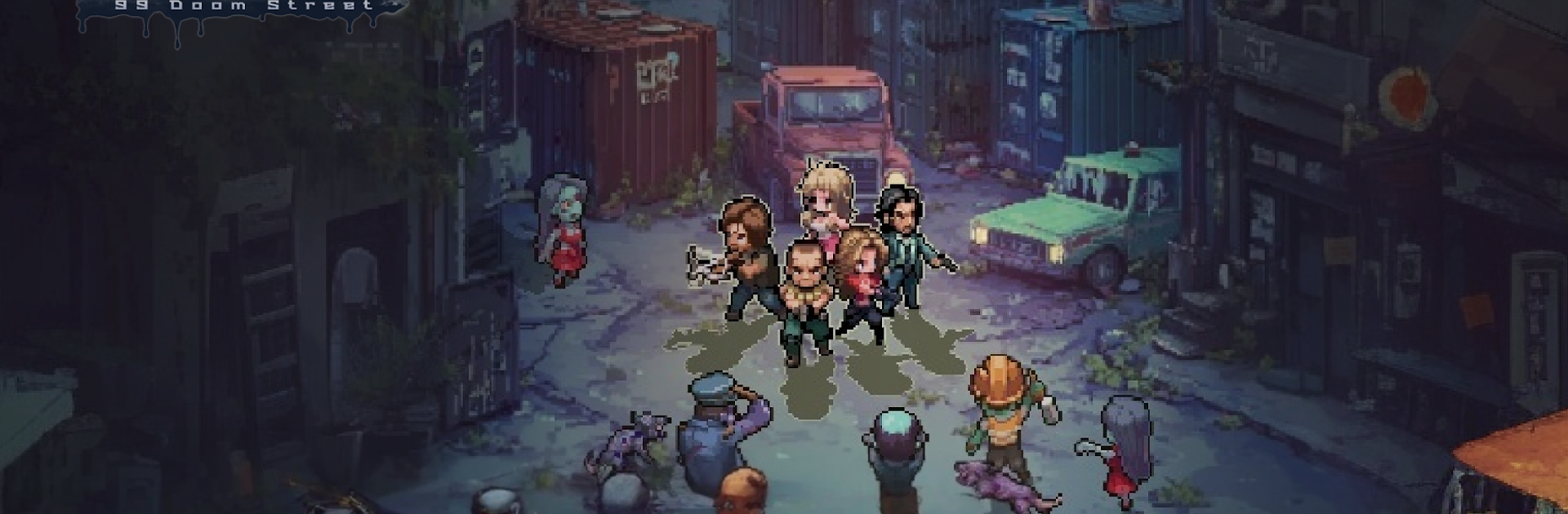
99 Doomsday Street is a pixel-art survival strategy game that drops the player into a ruined city where zombies shuffle around and every bolt or can of food matters. The loop is simple to grasp but tense: scout the blocks, haul back scrap, then turn it into walls, turrets, workshops, and a proper refuge. The base slowly turns from a leaky shack into a real fortress, while the map keeps tempting risky raids for better loot. Combat leans on squad planning, training soldiers, and timing skills, so a sloppy command can get a team wiped. On PC with BlueStacks, dragging buildings into place and assigning squads with a mouse feels snappy, and hotkeys help when things get loud.

What stands out is how often the player has to choose what kind of leader to be. Survivors show up tired, maybe useful, maybe not, and trust is never free. Take them in and share rations, or rule with a steel grip, the game reacts either way. Research trees push new tech that makes looting runs faster, trading or outright plunder fills storage when farming runs dry, and clearing strongholds slowly pulls territory back from the dead. Companions are not just flavor, they come with personalities and unique perks, and yes, there are romance paths if that is the mood. Day and night, waves keep testing the walls, resources flow out faster than they come in, and the city keeps reminding the player that survival belongs to whoever plans better and hits harder.

Make your gaming sessions memorable with precise controls that give you an edge in close combats and visuals that pop up, bringing every character to life.


Game Features

Enhancements

  • Macros
  • Multi Instance
  • Multi Instance Sync
  • Eco Mode
  • Enhancements
Macros

Macros

Skip the boring parts of a game. Play 末日街99號 with Macros and get the edge. Simply record a sequence of commands and execute them at any moment.
Multi Instance

Multi Instance

Why limit to one game on your phone when you can play many on your PC? Open multiple instances of 末日街99號 at once with Multi-Instance. Leverage the power of different accounts by doing more.
Multi Instance Sync

Multi Instance Sync

Get the best out of 末日街99號 with Multi-Instance Sync. Play the game from different accounts and build your own empire. Use Multi-instance sync to repeat the action in the main BlueStacks instance on all other instances.
Eco Mode

Eco Mode

Find the rarest heroes by making multiple summons in 末日街99號. And while you are at it, reduce your PC’s resource consumption with the Eco Mode. Farm efficiently. Get the best results.
Read More

How to Download and Play 末日街99號 on PC or Mac

  • Download and install BlueStacks on your PC or Mac

  • Complete Google sign-in to access the Play Store, or do it later

  • Look for 末日街99號 in the search bar at the top right corner

  • Click to install 末日街99號 from the search results

  • Complete Google sign-in (if you skipped step 2) to install 末日街99號

  • Click the 末日街99號 icon on the home screen to start playing

video
Watch Video

Minimum System Requirements

With BlueStacks 5, you can get started on a PC that fulfills the following requirements.

  • Operating System

    Microsoft Windows 7 or above, macOS 11 (Big Sur) or above

  • Processor

    Intel, AMD or Apple Silicon Processor

  • RAM

    at least 4GB

  • HDD

    10GB Free Disk Space

Note:

* You must be an Administrator on your PC. Up to date graphics drivers from Microsoft or the chipset vendor.

末日街99號 - FAQs

  • How to play 末日街99號 on Windows PC & Mac?

    Play 末日街99號 on your PC or Mac by following these simple steps.

    • Click on 'Play 末日街99號 on PC’ to download BlueStacks
    • Install it and log-in to Google Play Store
    • Launch and play the game.
  • Why is BlueStacks the fastest and safest platform to play games on PC?

    BlueStacks respects your privacy and is always safe and secure to use. It does not carry any malware, spyware, or any sort of additional software that could harm your PC.

    It is engineered to optimize speed and performance for a seamless gaming experience.

  • What are 末日街99號 PC requirements?

    Minimum requirement to run 末日街99號 on your PC

    • OS: Microsoft Windows 7 or above MacOS 11 (Big Sur) or above
    • Processor: Intel, AMD or Apple Silicon Processor
    • RAM: Your PC must have at least 4GB of RAM. (Note that having 4GB or more disk space is not a substitute for RAM)
    • HDD: 10GB Free Disk Space.
    • You must be an Administrator on your PC.







