Bomber Battle : Bomb Man Arena

Bomber Battle : Bomb Man Arena

Action

| Rainbow 5s

Play on PC with BlueStacks or from our cloud

  • Overview
  • Game Features
  • How to Play

Page Modified On: August 20, 2026

Play Bomber Battle : Bomb Man Arena on PC or Mac

Bomber Battle : Bomb Man Arena brings the Action genre to life, and throws up exciting challenges for gamers. Developed by Rainbow 5s, this Android game is best experienced on BlueStacks, the World’s #1 app player for PC and Mac users.

About the Game

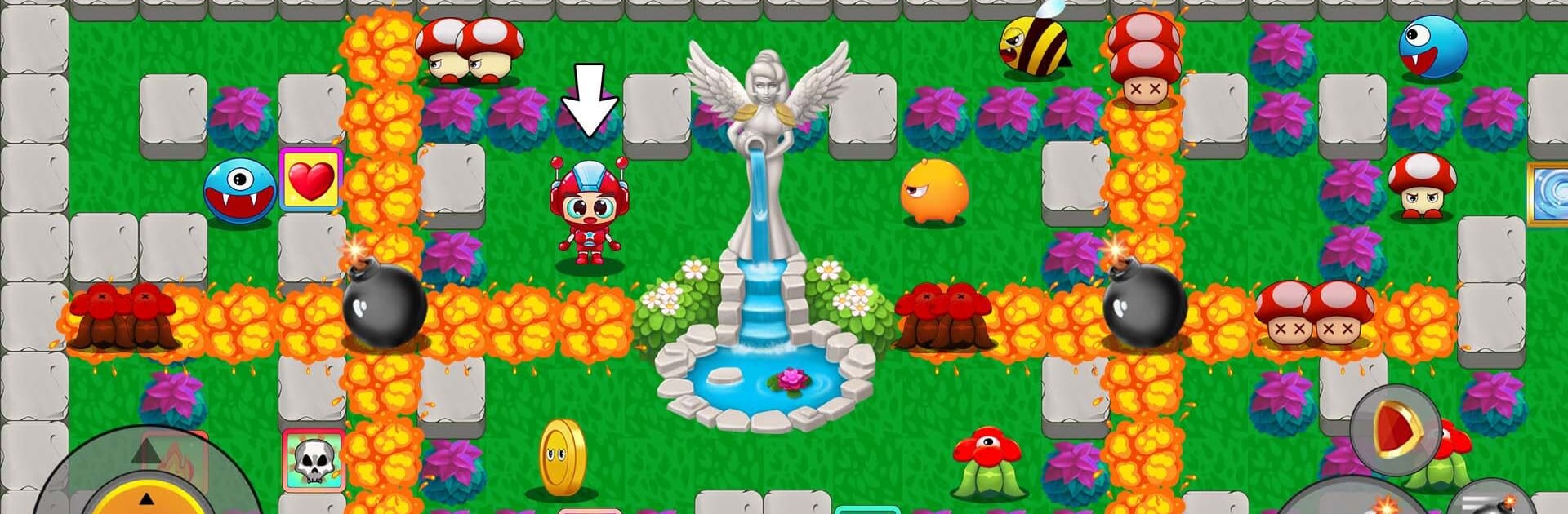
Bomber Battle : Bomb Man Arena is a fast, explosive take on classic bomb-dropping fun. It blends quick reactions with clever traps, letting you outsmart monsters, crack open blocked paths, and chase that perfect chain reaction. It’s an Action game you can enjoy solo offline or while connected—and it plays great on BlueStacks if you like using a keyboard and mouse.

Game Features

  • Strategic Bombing, Fast Reactions: Drop bombs, set traps, and time your blasts to catch enemies and clear cluttered paths without blowing yourself up.
  • Boss Fights With Real Patterns: Face big, tricky bosses that push you to read their moves, position smartly, and find safe openings to strike.
  • Tons of Stages and Maps: Work through over a hundred hand-crafted stages across fantasy-style arenas, with layouts that keep you guessing.
  • Satisfying Power-Ups: Grab items that boost blast range, speed up your steps, add a protective layer, offer an extra heart, or even let you slip through breakable tiles.
  • Play Your Way—Online or Offline: Jump in for quick runs offline, or connect when you want more challenge and a bit of friendly chaos with others.
  • Hero and Bomb Customization: Swap outfits for your character and tweak bomb effects to match your mood—loud, flashy, or just plain cool.
  • Clean 2.5D Look and Punchy Effects: Bright visuals, smooth explosions, and snappy animations make every blast feel crisp and readable.
  • Simple to Learn, Tough to Master: The basics are easy—plant, run, boom—but later stages demand tight timing, smart positioning, and calm nerves under pressure.

BlueStacks gives you more room to focus on the game and less time adjusting around mobile limitations.


Game Features

Enhancements

  • Macros
  • Multi Instance
  • Multi Instance Sync
  • Eco Mode
  • Enhancements
Macros

Macros

Skip the boring parts of a game. Play Bomber Battle : Bomb Man Arena with Macros and get the edge. Simply record a sequence of commands and execute them at any moment.
Multi Instance

Multi Instance

Why limit to one game on your phone when you can play many on your PC? Open multiple instances of Bomber Battle : Bomb Man Arena at once with Multi-Instance. Leverage the power of different accounts by doing more.
Multi Instance Sync

Multi Instance Sync

Get the best out of Bomber Battle : Bomb Man Arena with Multi-Instance Sync. Play the game from different accounts and build your own empire. Use Multi-instance sync to repeat the action in the main BlueStacks instance on all other instances.
Eco Mode

Eco Mode

Find the rarest heroes by making multiple summons in Bomber Battle : Bomb Man Arena. And while you are at it, reduce your PC’s resource consumption with the Eco Mode. Farm efficiently. Get the best results.
Read More

How to Download and Play Bomber Battle : Bomb Man Arena on PC or Mac

  • Download and install BlueStacks on your PC or Mac

  • Complete Google sign-in to access the Play Store, or do it later

  • Look for Bomber Battle : Bomb Man Arena in the search bar at the top right corner

  • Click to install Bomber Battle : Bomb Man Arena from the search results

  • Complete Google sign-in (if you skipped step 2) to install Bomber Battle : Bomb Man Arena

  • Click the Bomber Battle : Bomb Man Arena icon on the home screen to start playing

video
Watch Video

Minimum System Requirements

With BlueStacks 5, you can get started on a PC that fulfills the following requirements.

  • Operating System

    Microsoft Windows 7 or above, macOS 11 (Big Sur) or above

  • Processor

    Intel, AMD or Apple Silicon Processor

  • RAM

    at least 4GB

  • HDD

    10GB Free Disk Space

Note:

* You must be an Administrator on your PC. Up to date graphics drivers from Microsoft or the chipset vendor.

Bomber Battle : Bomb Man Arena - FAQs

  • How to play Bomber Battle : Bomb Man Arena on Windows PC & Mac?

    Play Bomber Battle : Bomb Man Arena on your PC or Mac by following these simple steps.

    • Click on 'Play Bomber Battle : Bomb Man Arena on PC’ to download BlueStacks
    • Install it and log-in to Google Play Store
    • Launch and play the game.
  • Why is BlueStacks the fastest and safest platform to play games on PC?

    BlueStacks respects your privacy and is always safe and secure to use. It does not carry any malware, spyware, or any sort of additional software that could harm your PC.

    It is engineered to optimize speed and performance for a seamless gaming experience.

  • What are Bomber Battle : Bomb Man Arena PC requirements?

    Minimum requirement to run Bomber Battle : Bomb Man Arena on your PC

    • OS: Microsoft Windows 7 or above MacOS 11 (Big Sur) or above
    • Processor: Intel, AMD or Apple Silicon Processor
    • RAM: Your PC must have at least 4GB of RAM. (Note that having 4GB or more disk space is not a substitute for RAM)
    • HDD: 10GB Free Disk Space.
    • You must be an Administrator on your PC.