Chess Fantasy : Survival

Chess Fantasy : Survival

Action

| WhiteDragons Studio

Play on PC with BlueStacks or from our cloud

  • Overview
  • Game Features
  • How to Play

Page Modified On: October 21, 2026

Play Chess Fantasy : Survival on PC or Mac

Play Chess Fantasy : Survival by WhiteDragons Studio on PC or Mac with BlueStacks. Use a bigger screen, mouse and keyboard controls, and smoother performance while you play.

About the Game

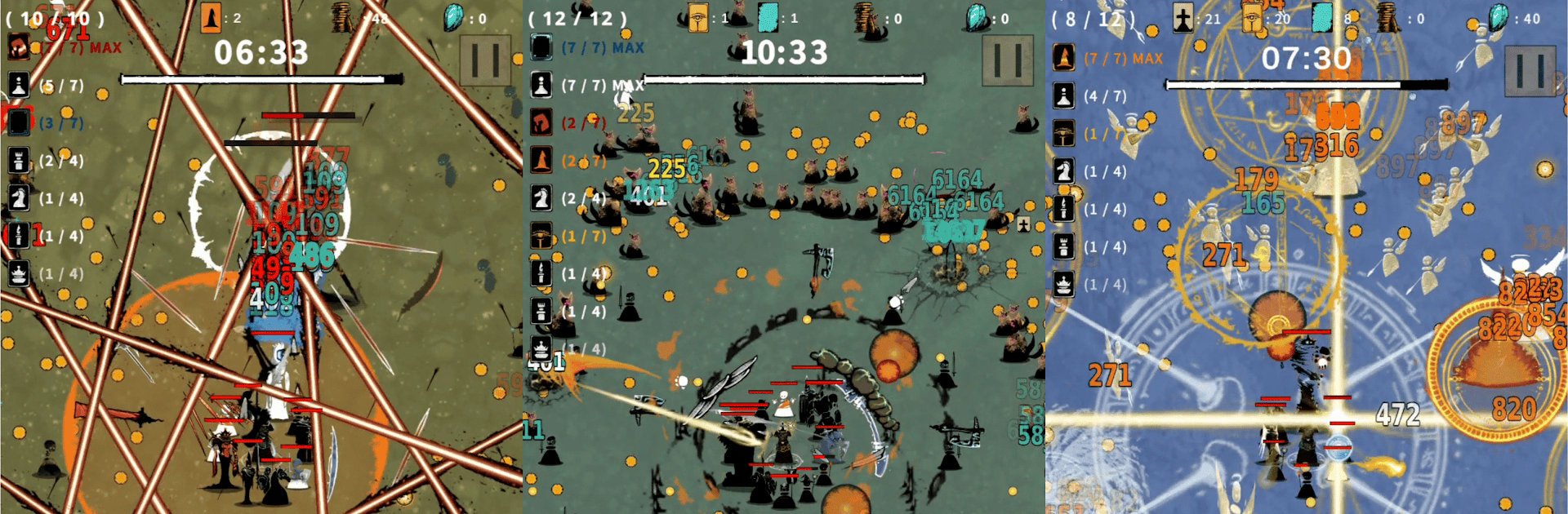
Chess Fantasy : Survival is a fast, tactical Action game where you protect your King by summoning and evolving chess‑inspired units. Each run throws different choices your way, so you’re constantly tweaking builds, chasing synergies, and figuring out how to outlast brutal waves. It’s great for quick sessions or long streaks—and it feels smooth on BlueStacks.

Game Features

  • Summon-and-merge combat: Call units to the field and fuse matching ones to rank them up, unlocking fresh skills and a sharper look as they climb to 3-star power.
  • Lasting progress between runs: Upgrade your King, units, and passives so every attempt leaves you stronger and better prepared for the next onslaught.
  • Ever-changing drafts: Unit offers shift moment to moment, pushing you to adapt—one set of choices can lead to wildly different strategies.
  • Synergies that reshape your squad: Complete class combos to trigger big bonuses, from boosted attacks to unique effects that flip tough fights in your favor.
  • Quick to learn, tough to master: No dense rulebook—position, summon, combine, then watch your lineup tear through enemies while you make clutch decisions.
  • Gritty medieval fantasy vibe: Battle frost giants, elite soldiers, and eerie moonlit beings across a rugged kingdom with bold, striking visuals.
  • Flexible build paths: Fill out new synergies with fresh recruits or triple up on favorites to concentrate raw firepower—it’s your call.
  • Waves, elites, and pressure: Survive escalating assaults and tricky encounters that reward smart timing, clean merges, and confident risk-taking.

Start your journey now. Download the game on BlueStacks, invite your friends, and march on a new adventure.


Game Features

Enhancements

  • Macros
  • Multi Instance
  • Multi Instance Sync
  • Eco Mode
  • Enhancements
Macros

Macros

Skip the boring parts of a game. Play Chess Fantasy : Survival with Macros and get the edge. Simply record a sequence of commands and execute them at any moment.
Multi Instance

Multi Instance

Why limit to one game on your phone when you can play many on your PC? Open multiple instances of Chess Fantasy : Survival at once with Multi-Instance. Leverage the power of different accounts by doing more.
Multi Instance Sync

Multi Instance Sync

Get the best out of Chess Fantasy : Survival with Multi-Instance Sync. Play the game from different accounts and build your own empire. Use Multi-instance sync to repeat the action in the main BlueStacks instance on all other instances.
Eco Mode

Eco Mode

Find the rarest heroes by making multiple summons in Chess Fantasy : Survival. And while you are at it, reduce your PC’s resource consumption with the Eco Mode. Farm efficiently. Get the best results.
Read More

How to Download and Play Chess Fantasy : Survival on PC or Mac

  • Download and install BlueStacks on your PC or Mac

  • Complete Google sign-in to access the Play Store, or do it later

  • Look for Chess Fantasy : Survival in the search bar at the top right corner

  • Click to install Chess Fantasy : Survival from the search results

  • Complete Google sign-in (if you skipped step 2) to install Chess Fantasy : Survival

  • Click the Chess Fantasy : Survival icon on the home screen to start playing

video
Watch Video

Minimum System Requirements

With BlueStacks 5, you can get started on a PC that fulfills the following requirements.

  • Operating System

    Microsoft Windows 7 or above, macOS 11 (Big Sur) or above

  • Processor

    Intel, AMD or Apple Silicon Processor

  • RAM

    at least 4GB

  • HDD

    10GB Free Disk Space

Note:

* You must be an Administrator on your PC. Up to date graphics drivers from Microsoft or the chipset vendor.

Chess Fantasy : Survival - FAQs

  • How to play Chess Fantasy : Survival on Windows PC & Mac?

    Play Chess Fantasy : Survival on your PC or Mac by following these simple steps.

    • Click on 'Play Chess Fantasy : Survival on PC’ to download BlueStacks
    • Install it and log-in to Google Play Store
    • Launch and play the game.
  • Why is BlueStacks the fastest and safest platform to play games on PC?

    BlueStacks respects your privacy and is always safe and secure to use. It does not carry any malware, spyware, or any sort of additional software that could harm your PC.

    It is engineered to optimize speed and performance for a seamless gaming experience.

  • What are Chess Fantasy : Survival PC requirements?

    Minimum requirement to run Chess Fantasy : Survival on your PC

    • OS: Microsoft Windows 7 or above MacOS 11 (Big Sur) or above
    • Processor: Intel, AMD or Apple Silicon Processor
    • RAM: Your PC must have at least 4GB of RAM. (Note that having 4GB or more disk space is not a substitute for RAM)
    • HDD: 10GB Free Disk Space.
    • You must be an Administrator on your PC.