DB Ultra Legend Battle

DB Ultra Legend Battle

Action

| Super Z dragon games

Play on PC with BlueStacks or from our cloud

  • Overview
  • Game Features
  • How to Play

Page Modified On: October 30, 2026

Play DB Ultra Legend Battle on PC or Mac

DB Ultra Legend Battle by Super Z dragon games has plenty to keep you busy. BlueStacks lets you play it on PC or Mac with more screen space, better control, and fewer mobile limits.

About the Game

DB Ultra Legend Battle is a fast, flashy Action fighter built around explosive ki battles and wild transformations. Pick a warrior, charge up, and trade beams and combos in quick 1v1 clashes or push-your-luck survival runs. Prefer playing on PC? DB Ultra Legend Battle also works smoothly with BlueStacks.

Game Features

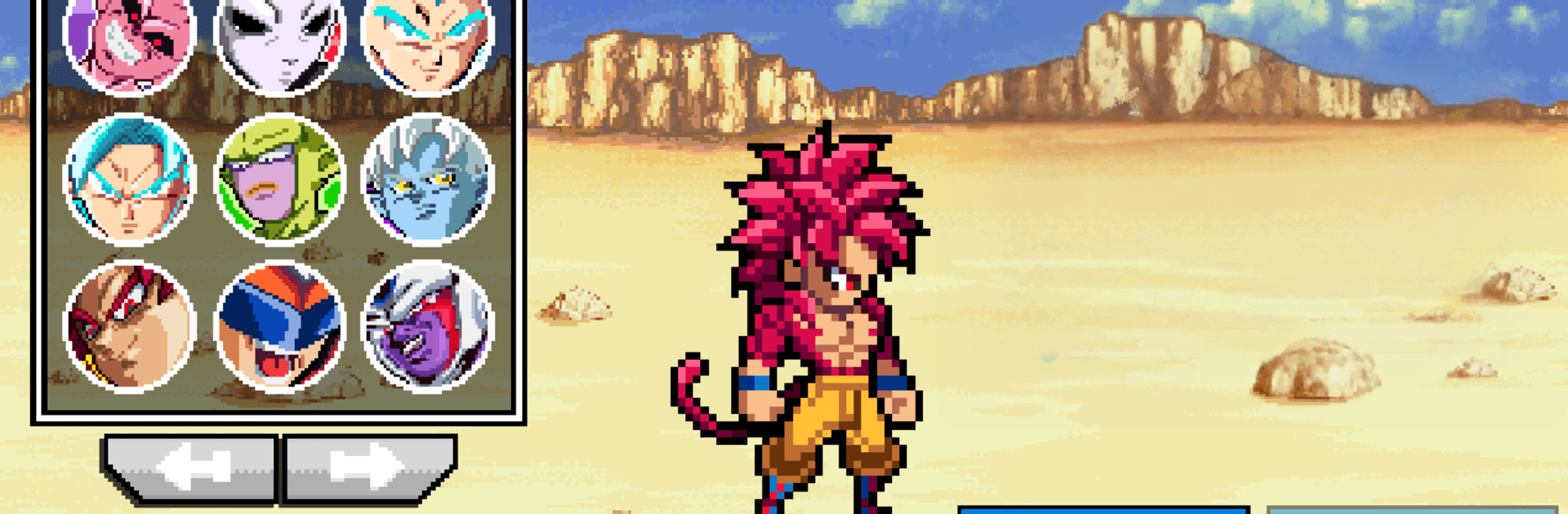
  • Stacked Roster: Battle with heroes and villains across eras like Z, Kai, and GT—Goku, Vegeta, Broly, Frieza, Cell, and more are ready to rumble.
  • Legendary Transformations: Power up through SSJ, SSJ2/3/4, tap into Saiyan God and Blue, or try to hit Ultra Instinct; some foes even unleash golden evolutions.
  • Modes That Keep You Fighting: Jump into quick 1v1 matches, test your limits in Survival, or enter tournament brackets to prove you’re the last one standing.
  • Signature Energy Attacks: Charge ki and unleash Kamehameha-style waves, Death Balls, and explosive energy blasts—expect dramatic beam clashes and huge finishes.
  • Pick Your Lineage: Choose fighters from Saiyan, Namekian, Frost demon, angel, or god of destruction lines, each with distinct abilities and feel.
  • Combat With Crunch: Chain simple inputs into clean combos, juggle when you find an opening, and time your specials to turn a close round in your favor.
  • Retro Look, Big Sparks: A punchy pixel-art vibe meets glowing auras, screen-shake, and bold impact effects for fights that feel loud and satisfying.
  • Power Management Matters: Keep an eye on your ki, manage transformations smartly, and save that ultimate for the moment it’ll end the match.

Start your journey now. Download the game on BlueStacks, invite your friends, and march on a new adventure.


Game Features

Enhancements

  • Macros
  • Multi Instance
  • Multi Instance Sync
  • Eco Mode
  • Enhancements
Macros

Macros

Skip the boring parts of a game. Play DB Ultra Legend Battle with Macros and get the edge. Simply record a sequence of commands and execute them at any moment.
Multi Instance

Multi Instance

Why limit to one game on your phone when you can play many on your PC? Open multiple instances of DB Ultra Legend Battle at once with Multi-Instance. Leverage the power of different accounts by doing more.
Multi Instance Sync

Multi Instance Sync

Get the best out of DB Ultra Legend Battle with Multi-Instance Sync. Play the game from different accounts and build your own empire. Use Multi-instance sync to repeat the action in the main BlueStacks instance on all other instances.
Eco Mode

Eco Mode

Find the rarest heroes by making multiple summons in DB Ultra Legend Battle. And while you are at it, reduce your PC’s resource consumption with the Eco Mode. Farm efficiently. Get the best results.
Read More

How to Download and Play DB Ultra Legend Battle on PC or Mac

  • Download and install BlueStacks on your PC or Mac

  • Complete Google sign-in to access the Play Store, or do it later

  • Look for DB Ultra Legend Battle in the search bar at the top right corner

  • Click to install DB Ultra Legend Battle from the search results

  • Complete Google sign-in (if you skipped step 2) to install DB Ultra Legend Battle

  • Click the DB Ultra Legend Battle icon on the home screen to start playing

video
Watch Video

Minimum System Requirements

With BlueStacks 5, you can get started on a PC that fulfills the following requirements.

  • Operating System

    Microsoft Windows 7 or above, macOS 11 (Big Sur) or above

  • Processor

    Intel, AMD or Apple Silicon Processor

  • RAM

    at least 4GB

  • HDD

    10GB Free Disk Space

Note:

* You must be an Administrator on your PC. Up to date graphics drivers from Microsoft or the chipset vendor.

DB Ultra Legend Battle - FAQs

  • How to play DB Ultra Legend Battle on Windows PC & Mac?

    Play DB Ultra Legend Battle on your PC or Mac by following these simple steps.

    • Click on 'Play DB Ultra Legend Battle on PC’ to download BlueStacks
    • Install it and log-in to Google Play Store
    • Launch and play the game.
  • Why is BlueStacks the fastest and safest platform to play games on PC?

    BlueStacks respects your privacy and is always safe and secure to use. It does not carry any malware, spyware, or any sort of additional software that could harm your PC.

    It is engineered to optimize speed and performance for a seamless gaming experience.

  • What are DB Ultra Legend Battle PC requirements?

    Minimum requirement to run DB Ultra Legend Battle on your PC

    • OS: Microsoft Windows 7 or above MacOS 11 (Big Sur) or above
    • Processor: Intel, AMD or Apple Silicon Processor
    • RAM: Your PC must have at least 4GB of RAM. (Note that having 4GB or more disk space is not a substitute for RAM)
    • HDD: 10GB Free Disk Space.
    • You must be an Administrator on your PC.