Drone Strike: Gunship War

Drone Strike: Gunship War

Action

| VNGGames Studios

Play on PC with BlueStacks or from our cloud

  • Overview
  • Game Features
  • How to Play

Page Modified On: August 03, 2026

Play Drone Strike: Gunship War on PC or Mac

Drone Strike: Gunship War brings the Action genre to life, and throws up exciting challenges for gamers. Developed by VNGGames Studios, this Android game is best experienced on BlueStacks, the World’s #1 app player for PC and Mac users.

About the Game

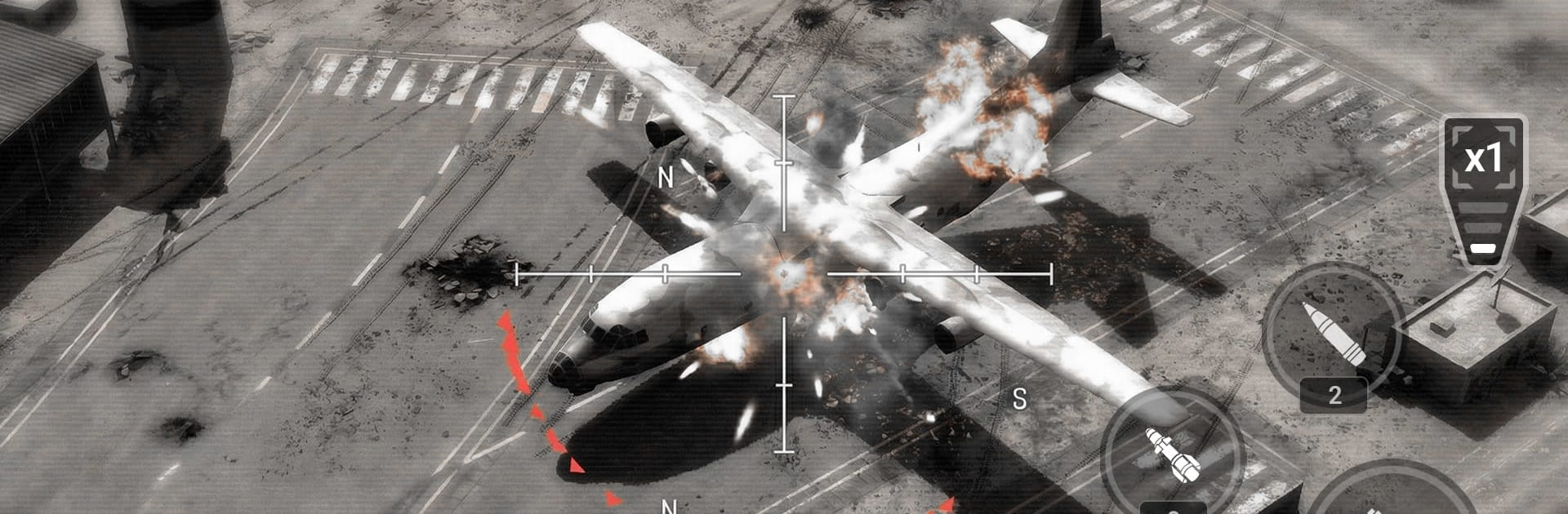
Drone Strike: Gunship War puts you in the hot seat of cutting‑edge UAVs and the thunderous AC‑130, mixing authentic systems with straight-up explosive Action. You’ll chart attack runs, protect ground squads, and pull off precise strikes that feel equal parts tactical and thrilling. Want a bigger screen and tighter aim? It plays nicely on BlueStacks with keyboard and mouse.

Game Features

  • Modern Aerial Warfare: Command next‑gen drones and the AC‑130 to clear the skies, cover allies, and break enemy defenses with well‑timed fire missions.
  • Hands-On Systems: Manage heat and ammo, stabilize the camera, and compensate for targeting drift—small details that reward smart flying and steady hands.
  • Heavy-Hitting Arsenal: Swap between a 25mm Gatling, Hydra 70 rockets, and Hellfire missiles to match the target and the moment.
  • Tactical Roles & Objectives: Run recon, mark high‑value targets, provide air support, and make fast calls from a true UAV command perspective.
  • Deep Upgrades & Loadouts: Tune your bird with guns, missiles, rockets, and countermeasures. Unlock signal jammers, auto‑tracking turrets, and improved navigation, then climb tech trees to shape your ideal war machine.
  • AI Support on Call: Coordinate with tanks and infantry, stack airstrikes, and trigger SuperWeapons like EMP drones, cluster missile barrages, and roving drone swarms.
  • Enemies That Push Back: Face infantry squads, RPG teams, fortified nests, armored convoys, hostile helicopters, jets, and rival drones—backed by adaptive AI that keeps you on your toes.
  • Mission Variety & Rewards: Take on wave survival, tight escort runs, and surgical bombing missions to earn currency and rare components for your next build.

BlueStacks gives you more room to focus on the game and less time adjusting around mobile limitations.


Game Features

Enhancements

  • Macros
  • Multi Instance
  • Multi Instance Sync
  • Eco Mode
  • Enhancements
Macros

Macros

Skip the boring parts of a game. Play Drone Strike: Gunship War with Macros and get the edge. Simply record a sequence of commands and execute them at any moment.
Multi Instance

Multi Instance

Why limit to one game on your phone when you can play many on your PC? Open multiple instances of Drone Strike: Gunship War at once with Multi-Instance. Leverage the power of different accounts by doing more.
Multi Instance Sync

Multi Instance Sync

Get the best out of Drone Strike: Gunship War with Multi-Instance Sync. Play the game from different accounts and build your own empire. Use Multi-instance sync to repeat the action in the main BlueStacks instance on all other instances.
Eco Mode

Eco Mode

Find the rarest heroes by making multiple summons in Drone Strike: Gunship War. And while you are at it, reduce your PC’s resource consumption with the Eco Mode. Farm efficiently. Get the best results.
Read More

How to Download and Play Drone Strike: Gunship War on PC or Mac

  • Download and install BlueStacks on your PC or Mac

  • Complete Google sign-in to access the Play Store, or do it later

  • Look for Drone Strike: Gunship War in the search bar at the top right corner

  • Click to install Drone Strike: Gunship War from the search results

  • Complete Google sign-in (if you skipped step 2) to install Drone Strike: Gunship War

  • Click the Drone Strike: Gunship War icon on the home screen to start playing

video
Watch Video

Minimum System Requirements

With BlueStacks 5, you can get started on a PC that fulfills the following requirements.

  • Operating System

    Microsoft Windows 7 or above, macOS 11 (Big Sur) or above

  • Processor

    Intel, AMD or Apple Silicon Processor

  • RAM

    at least 4GB

  • HDD

    10GB Free Disk Space

Note:

* You must be an Administrator on your PC. Up to date graphics drivers from Microsoft or the chipset vendor.

Drone Strike: Gunship War - FAQs

  • How to play Drone Strike: Gunship War on Windows PC & Mac?

    Play Drone Strike: Gunship War on your PC or Mac by following these simple steps.

    • Click on 'Play Drone Strike: Gunship War on PC’ to download BlueStacks
    • Install it and log-in to Google Play Store
    • Launch and play the game.
  • Why is BlueStacks the fastest and safest platform to play games on PC?

    BlueStacks respects your privacy and is always safe and secure to use. It does not carry any malware, spyware, or any sort of additional software that could harm your PC.

    It is engineered to optimize speed and performance for a seamless gaming experience.

  • What are Drone Strike: Gunship War PC requirements?

    Minimum requirement to run Drone Strike: Gunship War on your PC

    • OS: Microsoft Windows 7 or above MacOS 11 (Big Sur) or above
    • Processor: Intel, AMD or Apple Silicon Processor
    • RAM: Your PC must have at least 4GB of RAM. (Note that having 4GB or more disk space is not a substitute for RAM)
    • HDD: 10GB Free Disk Space.
    • You must be an Administrator on your PC.