End of Andy? Silent Estate

End of Andy? Silent Estate

Action

| PoUgaruGames

Play on PC with BlueStacks or from our cloud

  • Overview
  • Game Features
  • How to Play

Page Modified On: September 25, 2026

Play End of Andy? Silent Estate on PC or Mac

Explore a whole new adventure with End of Andy? Silent Estate, a Action game created by PoUgaruGames. Experience great gameplay with BlueStacks, the most popular gaming platform to play Android games on your PC or Mac.

About the Game

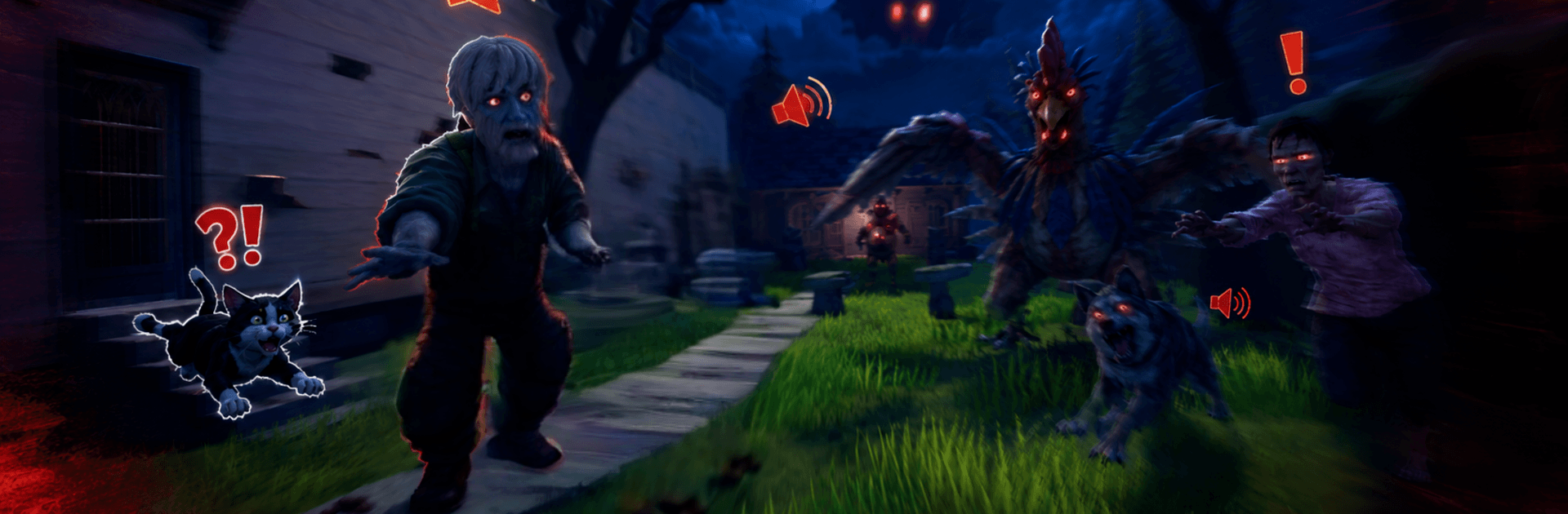
End of Andy? Silent Estate is an Action horror about waking up after a very unflattering death and finding yourself stuck in a warped Purgatory that refuses to let you go. A controlling Neighbor rules the grounds, a sarcastic demon cat named Loku won’t stop talking, and every mistake echoes through a world that listens. Expect tense stealth, weird rules, and a looping push to outsmart the estate — it runs nicely on BlueStacks if you prefer a bigger view and precise controls.

Game Features

  • Living Purgatory: Familiar places are twisted wrong — a too-quiet forest, a moody mansion, a labyrinth that remembers you — and none of them play fair.
  • You’re Andy, Nothing Special: No prophecy or superpowers, just grit, a respawn crypt, and a stubborn world that keeps pulling you back.
  • The Neighbor Runs the Show: He hears your slips, seeds traps across the estate, directs monsters, and watches when you think you’re alone.
  • Sound Changes Everything: Noise attracts trouble; time your steps, stay low, and keep calm or the forest and its hunters will close in.
  • Nonlinear Paths: Unlock shortcuts and secret routes, explore areas out of order, and pry open locked spaces in the mansion.
  • Loku, The Demon Cat: Snarky and unpredictable, he jokes at the worst times, drops real hints, and might nudge you straight into danger.
  • Doorways Tied to Souls: Gather artifacts, piece together a soul’s story, and use the right door to open a possible way out.
  • Death That Moves the Plot: Each fall reshapes the map, reveals new options, and expands what you know about the Estate’s rules.
  • Hostile Residents: Sound-reactive horrors, corrupted souls, and shifting entities crowd a world stitched from broken stories.
  • Stealth and Survival: Hide, distract, and improvise under pressure while the Neighbor keeps tightening the noose.
  • Multiple Endings and Goals: Escape if you can, free trapped spirits if you dare, or challenge the Neighbor’s hold on the Purgatory.
  • Secrets Everywhere: Optional puzzles, hidden rooms, and quiet clues reward players who press on the edges and trust their curiosity.

Start playing End of Andy? Silent Estate on BlueStacks and get a smoother, more comfortable PC or Mac setup.


Game Features

Enhancements

  • Macros
  • Multi Instance
  • Multi Instance Sync
  • Eco Mode
  • Enhancements
Macros

Macros

Skip the boring parts of a game. Play End of Andy? Silent Estate with Macros and get the edge. Simply record a sequence of commands and execute them at any moment.
Multi Instance

Multi Instance

Why limit to one game on your phone when you can play many on your PC? Open multiple instances of End of Andy? Silent Estate at once with Multi-Instance. Leverage the power of different accounts by doing more.
Multi Instance Sync

Multi Instance Sync

Get the best out of End of Andy? Silent Estate with Multi-Instance Sync. Play the game from different accounts and build your own empire. Use Multi-instance sync to repeat the action in the main BlueStacks instance on all other instances.
Eco Mode

Eco Mode

Find the rarest heroes by making multiple summons in End of Andy? Silent Estate. And while you are at it, reduce your PC’s resource consumption with the Eco Mode. Farm efficiently. Get the best results.
Read More

How to Download and Play End of Andy? Silent Estate on PC or Mac

  • Download and install BlueStacks on your PC or Mac

  • Complete Google sign-in to access the Play Store, or do it later

  • Look for End of Andy? Silent Estate in the search bar at the top right corner

  • Click to install End of Andy? Silent Estate from the search results

  • Complete Google sign-in (if you skipped step 2) to install End of Andy? Silent Estate

  • Click the End of Andy? Silent Estate icon on the home screen to start playing

video
Watch Video

Minimum System Requirements

With BlueStacks 5, you can get started on a PC that fulfills the following requirements.

  • Operating System

    Microsoft Windows 7 or above, macOS 11 (Big Sur) or above

  • Processor

    Intel, AMD or Apple Silicon Processor

  • RAM

    at least 4GB

  • HDD

    10GB Free Disk Space

Note:

* You must be an Administrator on your PC. Up to date graphics drivers from Microsoft or the chipset vendor.

End of Andy? Silent Estate - FAQs

  • How to play End of Andy? Silent Estate on Windows PC & Mac?

    Play End of Andy? Silent Estate on your PC or Mac by following these simple steps.

    • Click on 'Play End of Andy? Silent Estate on PC’ to download BlueStacks
    • Install it and log-in to Google Play Store
    • Launch and play the game.
  • Why is BlueStacks the fastest and safest platform to play games on PC?

    BlueStacks respects your privacy and is always safe and secure to use. It does not carry any malware, spyware, or any sort of additional software that could harm your PC.

    It is engineered to optimize speed and performance for a seamless gaming experience.

  • What are End of Andy? Silent Estate PC requirements?

    Minimum requirement to run End of Andy? Silent Estate on your PC

    • OS: Microsoft Windows 7 or above MacOS 11 (Big Sur) or above
    • Processor: Intel, AMD or Apple Silicon Processor
    • RAM: Your PC must have at least 4GB of RAM. (Note that having 4GB or more disk space is not a substitute for RAM)
    • HDD: 10GB Free Disk Space.
    • You must be an Administrator on your PC.