Escape Obby: Lab Challenge

Escape Obby: Lab Challenge

Action

| W & E Studio

Play on PC with BlueStacks or from our cloud

  • Overview
  • Game Features
  • How to Play

Page Modified On: August 20, 2026

Play Escape Obby: Lab Challenge on PC or Mac

Play Escape Obby: Lab Challenge by W & E Studio on PC or Mac with BlueStacks. Use a bigger screen, mouse and keyboard controls, and smoother performance while you play.

About the Game

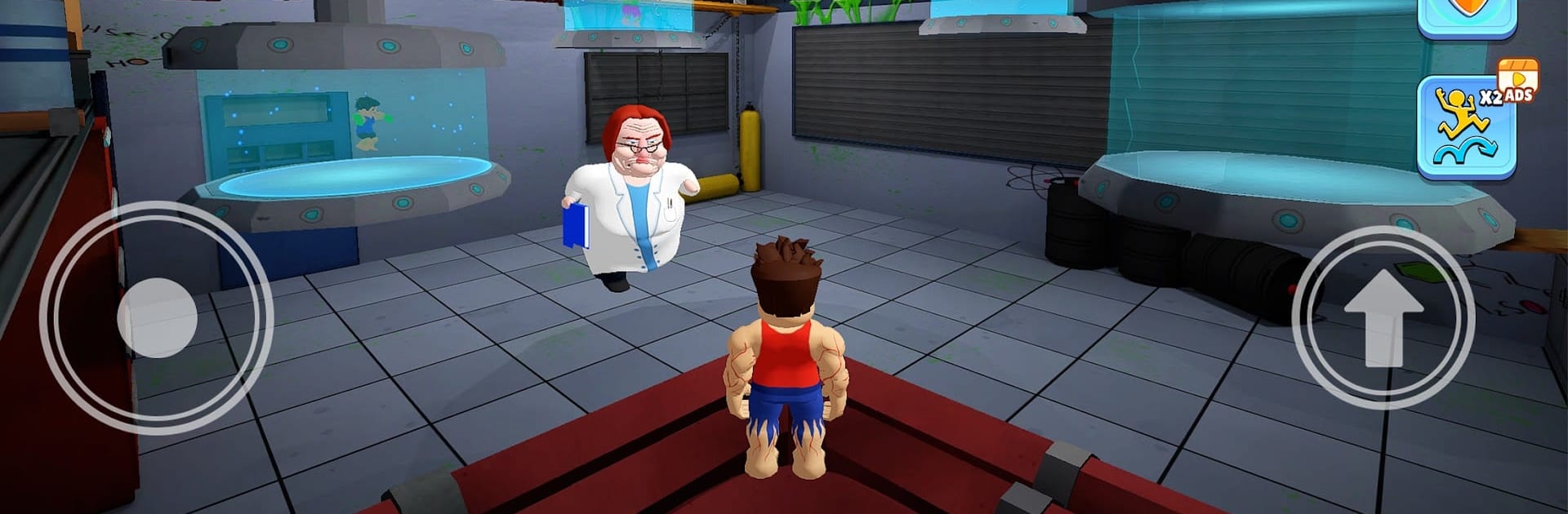
Escape Obby: Lab Challenge drops you into a locked-down research facility where every hallway hides a new “oh no” moment. This fast, timing-heavy Action game mixes escape-room tension with parkour-style movement, so you’re solving problems while sprinting for your life. Prefer a bigger view and easy keyboard input? It plays smoothly on BlueStacks too.

Game Features

  • Parkour You Can Feel: Jump, vault, climb, and slide through laser grids and trap-filled corridors, with movement tuned for tight timing and satisfying momentum.
  • Clever Traps and Puzzles: Work out switches, pressure plates, and moving platforms while picking the quickest path through maze-like layouts.
  • Story-Driven Escape: Uncover what went wrong in the lab as each stage adds new clues, moments of danger, and close encounters with not-so-friendly “projects.”
  • Monster Chases That Raise Your Pulse: Face sections where lab-grown terrors force snap decisions—choose the right line or get caught.
  • Eye-Catching Lab Visuals: Clean, high-contrast rooms, moody lighting, and punchy effects make hazards easy to read and close calls look epic.
  • New Challenges Rolling In: Fresh levels and obstacle variations arrive regularly, keeping routes, tricks, and strategies from going stale.

BlueStacks gives you more room to focus on the game and less time adjusting around mobile limitations.


Game Features

Enhancements

  • Macros
  • Multi Instance
  • Multi Instance Sync
  • Eco Mode
  • Enhancements
Macros

Macros

Skip the boring parts of a game. Play Escape Obby: Lab Challenge with Macros and get the edge. Simply record a sequence of commands and execute them at any moment.
Multi Instance

Multi Instance

Why limit to one game on your phone when you can play many on your PC? Open multiple instances of Escape Obby: Lab Challenge at once with Multi-Instance. Leverage the power of different accounts by doing more.
Multi Instance Sync

Multi Instance Sync

Get the best out of Escape Obby: Lab Challenge with Multi-Instance Sync. Play the game from different accounts and build your own empire. Use Multi-instance sync to repeat the action in the main BlueStacks instance on all other instances.
Eco Mode

Eco Mode

Find the rarest heroes by making multiple summons in Escape Obby: Lab Challenge. And while you are at it, reduce your PC’s resource consumption with the Eco Mode. Farm efficiently. Get the best results.
Read More

How to Download and Play Escape Obby: Lab Challenge on PC or Mac

  • Download and install BlueStacks on your PC or Mac

  • Complete Google sign-in to access the Play Store, or do it later

  • Look for Escape Obby: Lab Challenge in the search bar at the top right corner

  • Click to install Escape Obby: Lab Challenge from the search results

  • Complete Google sign-in (if you skipped step 2) to install Escape Obby: Lab Challenge

  • Click the Escape Obby: Lab Challenge icon on the home screen to start playing

video
Watch Video

Minimum System Requirements

With BlueStacks 5, you can get started on a PC that fulfills the following requirements.

  • Operating System

    Microsoft Windows 7 or above, macOS 11 (Big Sur) or above

  • Processor

    Intel, AMD or Apple Silicon Processor

  • RAM

    at least 4GB

  • HDD

    10GB Free Disk Space

Note:

* You must be an Administrator on your PC. Up to date graphics drivers from Microsoft or the chipset vendor.

Escape Obby: Lab Challenge - FAQs

  • How to play Escape Obby: Lab Challenge on Windows PC & Mac?

    Play Escape Obby: Lab Challenge on your PC or Mac by following these simple steps.

    • Click on 'Play Escape Obby: Lab Challenge on PC’ to download BlueStacks
    • Install it and log-in to Google Play Store
    • Launch and play the game.
  • Why is BlueStacks the fastest and safest platform to play games on PC?

    BlueStacks respects your privacy and is always safe and secure to use. It does not carry any malware, spyware, or any sort of additional software that could harm your PC.

    It is engineered to optimize speed and performance for a seamless gaming experience.

  • What are Escape Obby: Lab Challenge PC requirements?

    Minimum requirement to run Escape Obby: Lab Challenge on your PC

    • OS: Microsoft Windows 7 or above MacOS 11 (Big Sur) or above
    • Processor: Intel, AMD or Apple Silicon Processor
    • RAM: Your PC must have at least 4GB of RAM. (Note that having 4GB or more disk space is not a substitute for RAM)
    • HDD: 10GB Free Disk Space.
    • You must be an Administrator on your PC.