FPV and UAV Simulator

FPV and UAV Simulator

Action

| ToxicFamilyGames

Play on PC with BlueStacks or from our cloud

  • Overview
  • Game Features
  • How to Play

Page Modified On: April 13, 2026

Play FPV and UAV Simulator on PC or Mac

Step into the World of FPV and UAV Simulator, a thrilling Action game from the house of ToxicFamilyGames. Play this Android game on BlueStacks App Player and experience immersive gaming on PC or Mac.

About the Game

FPV and UAV Simulator puts you both in the pilot seat and the commander’s chair. Made by ToxicFamilyGames, this Action title blends hands-on FPV flying with high-level strategy, so you’re weaving through tight spaces one moment and orchestrating a multi-drone strike the next. Prefer a bigger view? It also runs smoothly on PC with BlueStacks.

Game Features

  • Diverse Drone Roster: Field nimble FPV rigs, quiet recon craft, stand-off strike platforms, and expendable loitering drones—switch tools as the mission shifts.
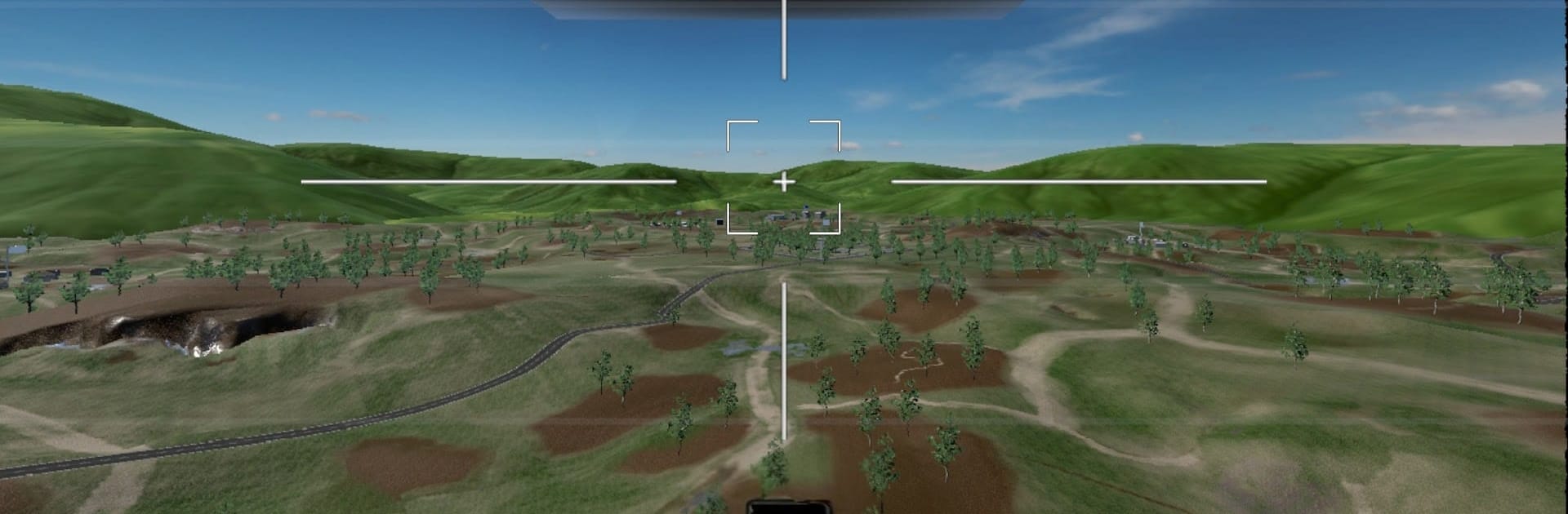
  • True FPV Feel: Thread alleys, hug terrain, and line up precise hits in first person with responsive controls that reward steady hands.
  • Swarm Control: Group UAVs, assign roles, and time synchronized pushes to overwhelm defenses or cover retreats.
  • Adaptive AI Foes: Enemies watch how you play, change tactics, and hit back where you’re weakest, keeping pressure high.
  • Strategy Meets Sim: Plan sorties, manage resources, and fine-tune loadouts while realistic flight physics and onboard systems shape performance.
  • Deep Tech Progression: Research upgrades, unlock advanced airframes, and mix sensors, munitions, and support gear to craft your ideal fleet.
  • Dynamic Campaign Map: From covert infiltrations to open assaults, your choices move the front line and open new objectives—or new threats.
  • Rich Sights and Sound: Detailed models, grounded environments, and punchy effects sell the speed, weight, and chaos of modern unmanned combat.

Ready to top the leaderboard? We bet you do. Let precise controls and sharp visuals optimized on BlueStacks lead you to victory.


Game Features

Enhancements

  • Macros
  • Multi Instance
  • Multi Instance Sync
  • Eco Mode
  • Enhancements
Macros

Macros

Skip the boring parts of a game. Play FPV and UAV Simulator with Macros and get the edge. Simply record a sequence of commands and execute them at any moment.
Multi Instance

Multi Instance

Why limit to one game on your phone when you can play many on your PC? Open multiple instances of FPV and UAV Simulator at once with Multi-Instance. Leverage the power of different accounts by doing more.
Multi Instance Sync

Multi Instance Sync

Get the best out of FPV and UAV Simulator with Multi-Instance Sync. Play the game from different accounts and build your own empire. Use Multi-instance sync to repeat the action in the main BlueStacks instance on all other instances.
Eco Mode

Eco Mode

Find the rarest heroes by making multiple summons in FPV and UAV Simulator. And while you are at it, reduce your PC’s resource consumption with the Eco Mode. Farm efficiently. Get the best results.
Read More

How to Download and Play FPV and UAV Simulator on PC or Mac

  • Download and install BlueStacks on your PC or Mac

  • Complete Google sign-in to access the Play Store, or do it later

  • Look for FPV and UAV Simulator in the search bar at the top right corner

  • Click to install FPV and UAV Simulator from the search results

  • Complete Google sign-in (if you skipped step 2) to install FPV and UAV Simulator

  • Click the FPV and UAV Simulator icon on the home screen to start playing

video
Watch Video

Minimum System Requirements

With BlueStacks 5, you can get started on a PC that fulfills the following requirements.

  • Operating System

    Microsoft Windows 7 or above, macOS 11 (Big Sur) or above

  • Processor

    Intel, AMD or Apple Silicon Processor

  • RAM

    at least 4GB

  • HDD

    10GB Free Disk Space

Note:

* You must be an Administrator on your PC. Up to date graphics drivers from Microsoft or the chipset vendor.

FPV and UAV Simulator - FAQs

  • How to play FPV and UAV Simulator on Windows PC & Mac?

    Play FPV and UAV Simulator on your PC or Mac by following these simple steps.

    • Click on 'Play FPV and UAV Simulator on PC’ to download BlueStacks
    • Install it and log-in to Google Play Store
    • Launch and play the game.
  • Why is BlueStacks the fastest and safest platform to play games on PC?

    BlueStacks respects your privacy and is always safe and secure to use. It does not carry any malware, spyware, or any sort of additional software that could harm your PC.

    It is engineered to optimize speed and performance for a seamless gaming experience.

  • What are FPV and UAV Simulator PC requirements?

    Minimum requirement to run FPV and UAV Simulator on your PC

    • OS: Microsoft Windows 7 or above MacOS 11 (Big Sur) or above
    • Processor: Intel, AMD or Apple Silicon Processor
    • RAM: Your PC must have at least 4GB of RAM. (Note that having 4GB or more disk space is not a substitute for RAM)
    • HDD: 10GB Free Disk Space.
    • You must be an Administrator on your PC.