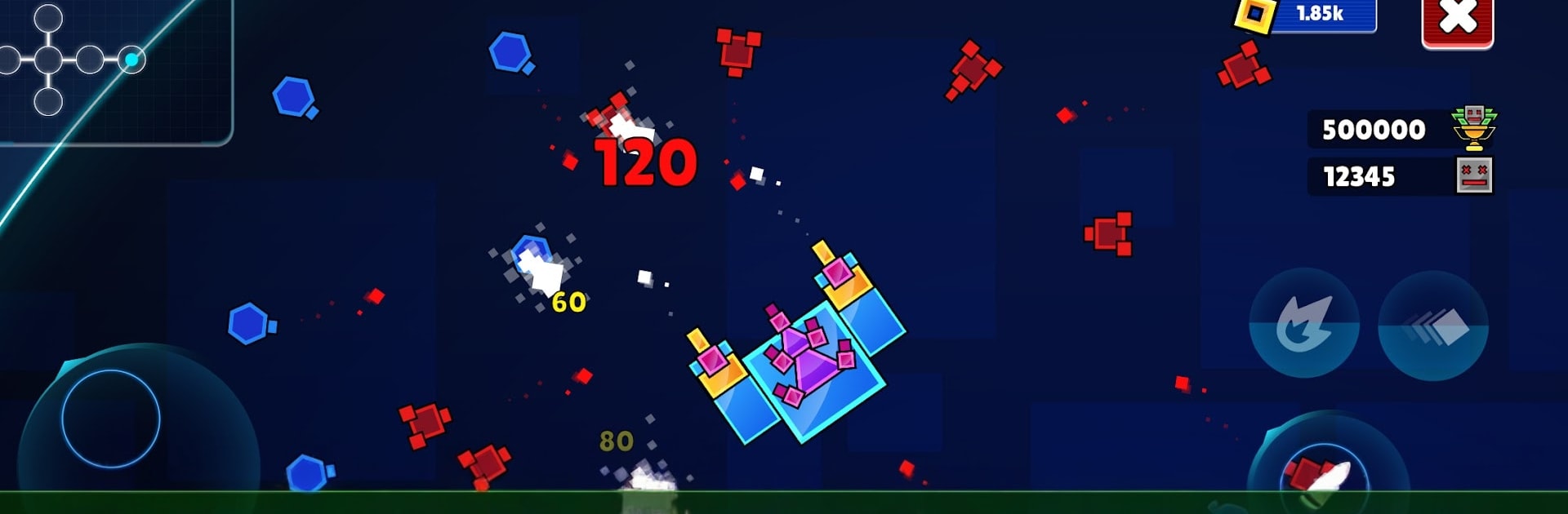
Geometry Tank - Dash Adventure

Geometry Tank - Dash Adventure

Action

| Abersoft Technologies

Play on PC with BlueStacks or from our cloud

  • Overview
  • Game Features
  • How to Play

Page Modified On: September 18, 2026

Play Geometry Tank - Dash Adventure on PC or Mac

Explore a whole new adventure with Geometry Tank – Dash Adventure, a Action game created by Abersoft Technologies. Experience great gameplay with BlueStacks, the most popular gaming platform to play Android games on your PC or Mac.

About the Game

Geometry Tank – Dash Adventure throws you into a relentless arcade run where every move counts and every crystal matters. This is pure Action with a clever twist: you pilot a tank that can evolve through multiple classes, but the same crystals you spend to grow are also your lifeline. Want a comfy setup? It plays nicely on BlueStacks if you prefer a bigger screen and crisp controls.

Game Features

  • Endless arena grid: Roam a boundless network of connected arenas that sprawls in every direction—the farther you push, the nastier the waves and the richer the rewards.
  • Evolving tank classes: Start as a nimble Class 1 and climb through six forms up to a hulking mothership, each step reshaping your speed, firepower, and presence on the field.
  • Smart crystal economy: Shatter foes to earn crystals that power upgrades and also serve as health, forcing tight decisions between getting stronger and staying alive.
  • Class or firepower—your call: Spend crystals to rank up your chassis or keep your tank small and supercharge weapons like damage, rate of fire, and spread for a lean, lethal build.
  • Phase-down on damage: Take hits and you don’t just lose HP—you drop a gear, shedding upgrades in reverse. Run out, and you’re back to the start.
  • Enemies with personality: Battle dozens of geometric threats with distinct patterns—chargers, snipers, orbiters, and swarms—demanding sharp movement and timing rather than mindless spraying.
  • Neon punch and particles: Clean lines, bright glows, and chunky particle bursts make every blast, ricochet, and screen-clear feel crunchy and satisfying.
  • Choose your route outward: Begin in a calmer center hub, then chart your own path into tougher tiles where enemy density spikes—and so do the payoffs.

Get ready for a buttery smooth, high-performance gaming action only on BlueStacks.

Game Features

Enhancements

  • Macros
  • Multi Instance
  • Multi Instance Sync
  • Eco Mode
  • Enhancements
Macros

Macros

Skip the boring parts of a game. Play Geometry Tank - Dash Adventure with Macros and get the edge. Simply record a sequence of commands and execute them at any moment.
Multi Instance

Multi Instance

Why limit to one game on your phone when you can play many on your PC? Open multiple instances of Geometry Tank - Dash Adventure at once with Multi-Instance. Leverage the power of different accounts by doing more.
Multi Instance Sync

Multi Instance Sync

Get the best out of Geometry Tank - Dash Adventure with Multi-Instance Sync. Play the game from different accounts and build your own empire. Use Multi-instance sync to repeat the action in the main BlueStacks instance on all other instances.
Eco Mode

Eco Mode

Find the rarest heroes by making multiple summons in Geometry Tank - Dash Adventure. And while you are at it, reduce your PC’s resource consumption with the Eco Mode. Farm efficiently. Get the best results.
Read More

How to Download and Play Geometry Tank - Dash Adventure on PC or Mac

  • Download and install BlueStacks on your PC or Mac

  • Complete Google sign-in to access the Play Store, or do it later

  • Look for Geometry Tank - Dash Adventure in the search bar at the top right corner

  • Click to install Geometry Tank - Dash Adventure from the search results

  • Complete Google sign-in (if you skipped step 2) to install Geometry Tank - Dash Adventure

  • Click the Geometry Tank - Dash Adventure icon on the home screen to start playing

video
Watch Video

Minimum System Requirements

With BlueStacks 5, you can get started on a PC that fulfills the following requirements.

  • Operating System

    Microsoft Windows 7 or above, macOS 11 (Big Sur) or above

  • Processor

    Intel, AMD or Apple Silicon Processor

  • RAM

    at least 4GB

  • HDD

    10GB Free Disk Space

Note:

* You must be an Administrator on your PC. Up to date graphics drivers from Microsoft or the chipset vendor.

Geometry Tank - Dash Adventure - FAQs

  • How to play Geometry Tank - Dash Adventure on Windows PC & Mac?

    Play Geometry Tank - Dash Adventure on your PC or Mac by following these simple steps.

    • Click on 'Play Geometry Tank - Dash Adventure on PC’ to download BlueStacks
    • Install it and log-in to Google Play Store
    • Launch and play the game.
  • Why is BlueStacks the fastest and safest platform to play games on PC?

    BlueStacks respects your privacy and is always safe and secure to use. It does not carry any malware, spyware, or any sort of additional software that could harm your PC.

    It is engineered to optimize speed and performance for a seamless gaming experience.

  • What are Geometry Tank - Dash Adventure PC requirements?

    Minimum requirement to run Geometry Tank - Dash Adventure on your PC

    • OS: Microsoft Windows 7 or above MacOS 11 (Big Sur) or above
    • Processor: Intel, AMD or Apple Silicon Processor
    • RAM: Your PC must have at least 4GB of RAM. (Note that having 4GB or more disk space is not a substitute for RAM)
    • HDD: 10GB Free Disk Space.
    • You must be an Administrator on your PC.