Goo Goo Gaga: Night Shift

Goo Goo Gaga: Night Shift

Action

| MineGame

Play on PC with BlueStacks or from our cloud

  • Overview
  • Game Features
  • How to Play

Page Modified On: May 11, 2026

Play Goo Goo Gaga: Night Shift on PC or Mac

Explore a whole new adventure with Goo Goo Gaga: Night Shift, a Action game created by MineGame. Experience great gameplay with BlueStacks, the most popular gaming platform to play Android games on your PC or Mac.

About the Game

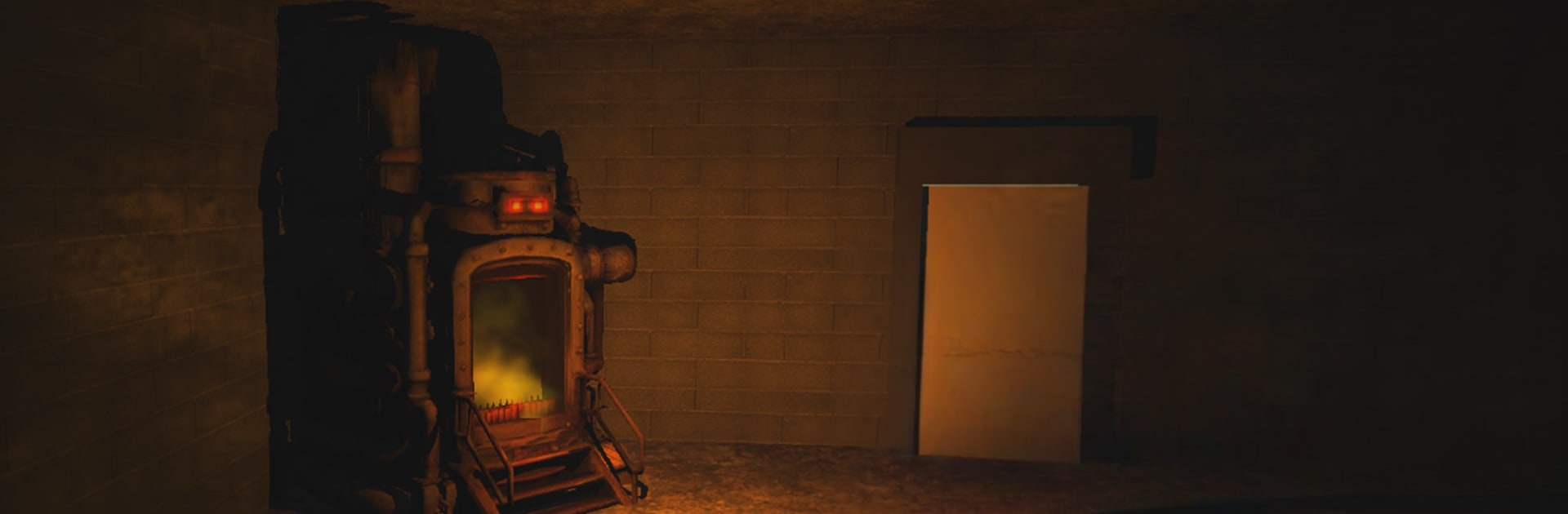
Goo Goo Gaga: Night Shift drops you into the loneliest job in town—watching over an abandoned chocolate factory after hours. It should’ve been simple: clean up the leftover boxes, keep the lights on, and go home. Instead, the candy laughs, the shadows crawl, and you’re suddenly fighting for your life. From MineGame, this Action nightmare makes a routine shift feel like a sprint through a haunted assembly line, where one slip means getting buried under a giggling, gooey swarm.

Game Features

  • Graveyard Shift Vibes: Explore dim corridors, silent conveyor belts, and storage rooms where every flicker might reveal a grinning sugar-creep waiting to pounce.
  • Burn the Boxes: Feed the roaring furnace with leftover stock to cut the monsters off at the source—your lifeline and main objective rolled into one.
  • Snap Shooting: Fast, punchy firefights reward steady aim and quick decisions as sticky weirdos close in from every angle.
  • Growing Panic: The longer you last, the louder the laughs and the thicker the horde. Pressure rises minute by minute, and it doesn’t let up.
  • Eerie Atmosphere: Off-kilter giggles, distant clanks, and moody lighting build tension until everything erupts in chaos.
  • Smart Positioning: Learn the floor plan, pick your lanes, and manage chokepoints to avoid getting boxed in when the swarm breaks loose.
  • Simple To Grasp, Hard To Shake: Three clear goals—burn, shoot, survive—wrapped in a tone that sticks with you long after the shift ends.
  • Play Your Way: Prefer mouse and keyboard? It feels great on PC with BlueStacks for tighter aim and quick reactions.

Ready to top the leaderboard? We bet you do. Let precise controls and sharp visuals optimized on BlueStacks lead you to victory.


Game Features

Enhancements

  • Macros
  • Multi Instance
  • Multi Instance Sync
  • Eco Mode
  • Enhancements
Macros

Macros

Skip the boring parts of a game. Play Goo Goo Gaga: Night Shift with Macros and get the edge. Simply record a sequence of commands and execute them at any moment.
Multi Instance

Multi Instance

Why limit to one game on your phone when you can play many on your PC? Open multiple instances of Goo Goo Gaga: Night Shift at once with Multi-Instance. Leverage the power of different accounts by doing more.
Multi Instance Sync

Multi Instance Sync

Get the best out of Goo Goo Gaga: Night Shift with Multi-Instance Sync. Play the game from different accounts and build your own empire. Use Multi-instance sync to repeat the action in the main BlueStacks instance on all other instances.
Eco Mode

Eco Mode

Find the rarest heroes by making multiple summons in Goo Goo Gaga: Night Shift. And while you are at it, reduce your PC’s resource consumption with the Eco Mode. Farm efficiently. Get the best results.
Read More

How to Download and Play Goo Goo Gaga: Night Shift on PC or Mac

  • Download and install BlueStacks on your PC or Mac

  • Complete Google sign-in to access the Play Store, or do it later

  • Look for Goo Goo Gaga: Night Shift in the search bar at the top right corner

  • Click to install Goo Goo Gaga: Night Shift from the search results

  • Complete Google sign-in (if you skipped step 2) to install Goo Goo Gaga: Night Shift

  • Click the Goo Goo Gaga: Night Shift icon on the home screen to start playing

video
Watch Video

Minimum System Requirements

With BlueStacks 5, you can get started on a PC that fulfills the following requirements.

  • Operating System

    Microsoft Windows 7 or above, macOS 11 (Big Sur) or above

  • Processor

    Intel, AMD or Apple Silicon Processor

  • RAM

    at least 4GB

  • HDD

    10GB Free Disk Space

Note:

* You must be an Administrator on your PC. Up to date graphics drivers from Microsoft or the chipset vendor.

Goo Goo Gaga: Night Shift - FAQs

  • How to play Goo Goo Gaga: Night Shift on Windows PC & Mac?

    Play Goo Goo Gaga: Night Shift on your PC or Mac by following these simple steps.

    • Click on 'Play Goo Goo Gaga: Night Shift on PC’ to download BlueStacks
    • Install it and log-in to Google Play Store
    • Launch and play the game.
  • Why is BlueStacks the fastest and safest platform to play games on PC?

    BlueStacks respects your privacy and is always safe and secure to use. It does not carry any malware, spyware, or any sort of additional software that could harm your PC.

    It is engineered to optimize speed and performance for a seamless gaming experience.

  • What are Goo Goo Gaga: Night Shift PC requirements?

    Minimum requirement to run Goo Goo Gaga: Night Shift on your PC

    • OS: Microsoft Windows 7 or above MacOS 11 (Big Sur) or above
    • Processor: Intel, AMD or Apple Silicon Processor
    • RAM: Your PC must have at least 4GB of RAM. (Note that having 4GB or more disk space is not a substitute for RAM)
    • HDD: 10GB Free Disk Space.
    • You must be an Administrator on your PC.