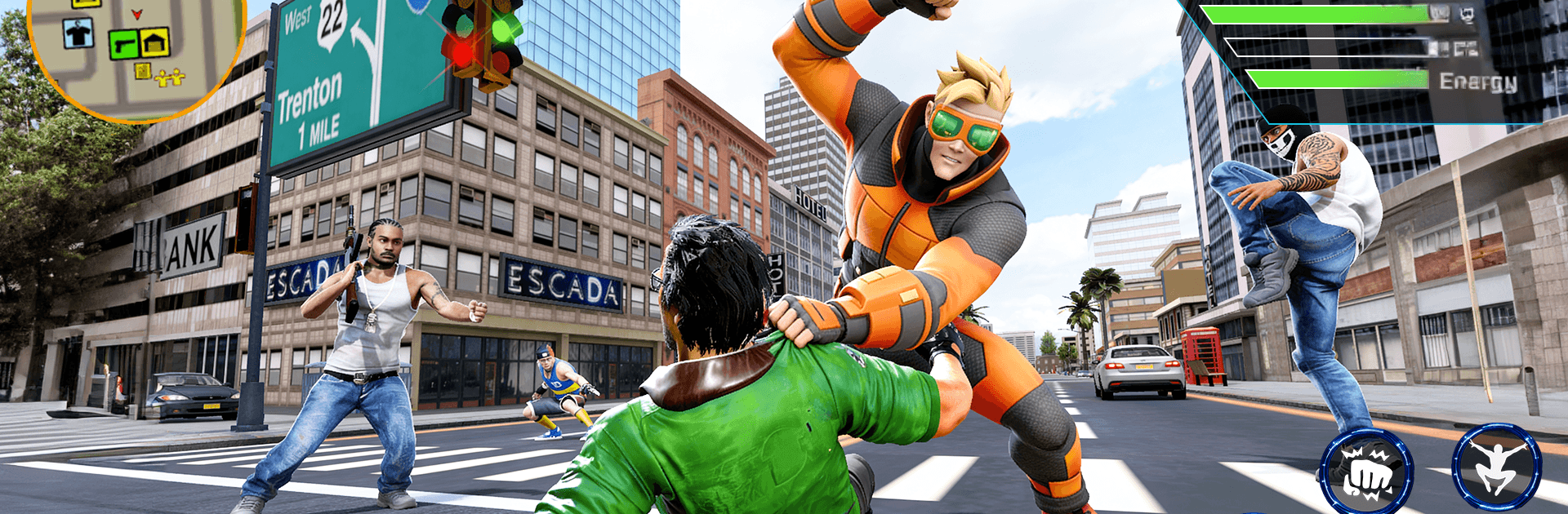
Hero Flying City Simulator

Hero Flying City Simulator

Action

| BROWNE CURTIS HENRY

Play on PC with BlueStacks or from our cloud

  • Overview
  • Game Features
  • How to Play

Page Modified On: June 02, 2026

Play Hero Flying City Simulator on PC or Mac

Step into the World of Hero Flying City Simulator, a thrilling Action game from the house of BROWNE CURTIS HENRY. Play this Android game on BlueStacks App Player and experience immersive gaming on PC or Mac.

About the Game

Hero Flying City Simulator throws you into a crime-ridden metropolis and hands you the tools to clean it up your way. Zip between rooftops, scale glass towers, and crash through enemy strongholds as you push gangs out of each district. It’s a fast, free-roaming city playground with plenty to do, whether you’re chasing missions or just causing a little controlled chaos.

Game Features

  • Supercharged movement: Swing across streets, climb skyscrapers, and leap insane gaps with speed and agility that make rooftop travel feel second nature.
  • Big open city: Roam a sprawling 3D map packed with side gigs, hidden stashes, mini-games, and off-the-path challenges if you like to wander.
  • Crunchy combat: Mix melee beatdowns with gadgets and firepower—swap between guns, blasters, and rocket launchers to shred gangs and push through turf wars.
  • Hero missions: Rescue hostages, track crime lords, and topple district bosses in focused action quests that escalate as you take back territory.
  • Heavy vehicles: When subtlety fails, roll out the big toys—yes, you can commandeer serious hardware, including a tank, to flatten roadblocks.
  • Upgrades that matter: Unlock and improve weapons and gear to match your playstyle, from close-quarters brawling to long-range chaos.
  • Clean look, smooth feel: A detailed city and responsive controls keep the pace snappy; prefer keyboard and mouse? Fire it up on PC with BlueStacks for crisp handling.

Get ready for a buttery smooth, high-performance gaming action only on BlueStacks.

Game Features

Enhancements

  • Macros
  • Multi Instance
  • Multi Instance Sync
  • Eco Mode
  • Enhancements
Macros

Macros

Skip the boring parts of a game. Play Hero Flying City Simulator with Macros and get the edge. Simply record a sequence of commands and execute them at any moment.
Multi Instance

Multi Instance

Why limit to one game on your phone when you can play many on your PC? Open multiple instances of Hero Flying City Simulator at once with Multi-Instance. Leverage the power of different accounts by doing more.
Multi Instance Sync

Multi Instance Sync

Get the best out of Hero Flying City Simulator with Multi-Instance Sync. Play the game from different accounts and build your own empire. Use Multi-instance sync to repeat the action in the main BlueStacks instance on all other instances.
Eco Mode

Eco Mode

Find the rarest heroes by making multiple summons in Hero Flying City Simulator. And while you are at it, reduce your PC’s resource consumption with the Eco Mode. Farm efficiently. Get the best results.
Read More

How to Download and Play Hero Flying City Simulator on PC or Mac

  • Download and install BlueStacks on your PC or Mac

  • Complete Google sign-in to access the Play Store, or do it later

  • Look for Hero Flying City Simulator in the search bar at the top right corner

  • Click to install Hero Flying City Simulator from the search results

  • Complete Google sign-in (if you skipped step 2) to install Hero Flying City Simulator

  • Click the Hero Flying City Simulator icon on the home screen to start playing

video
Watch Video

Minimum System Requirements

With BlueStacks 5, you can get started on a PC that fulfills the following requirements.

  • Operating System

    Microsoft Windows 7 or above, macOS 11 (Big Sur) or above

  • Processor

    Intel, AMD or Apple Silicon Processor

  • RAM

    at least 4GB

  • HDD

    10GB Free Disk Space

Note:

* You must be an Administrator on your PC. Up to date graphics drivers from Microsoft or the chipset vendor.

Hero Flying City Simulator - FAQs

  • How to play Hero Flying City Simulator on Windows PC & Mac?

    Play Hero Flying City Simulator on your PC or Mac by following these simple steps.

    • Click on 'Play Hero Flying City Simulator on PC’ to download BlueStacks
    • Install it and log-in to Google Play Store
    • Launch and play the game.
  • Why is BlueStacks the fastest and safest platform to play games on PC?

    BlueStacks respects your privacy and is always safe and secure to use. It does not carry any malware, spyware, or any sort of additional software that could harm your PC.

    It is engineered to optimize speed and performance for a seamless gaming experience.

  • What are Hero Flying City Simulator PC requirements?

    Minimum requirement to run Hero Flying City Simulator on your PC

    • OS: Microsoft Windows 7 or above MacOS 11 (Big Sur) or above
    • Processor: Intel, AMD or Apple Silicon Processor
    • RAM: Your PC must have at least 4GB of RAM. (Note that having 4GB or more disk space is not a substitute for RAM)
    • HDD: 10GB Free Disk Space.
    • You must be an Administrator on your PC.